

Pantry Pic: Photo to Recipe
Apptractive pty ltd · Food & Drink
Independent analytics for this App Store listing. AppTracker is not affiliated with Apptractive pty ltd.
Chart standing · US
What changed · US
Listing changes AppTracker has observed for this app in this storefront — new versions, price moves, rating shifts, and store copy.
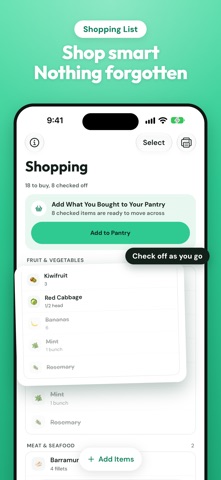
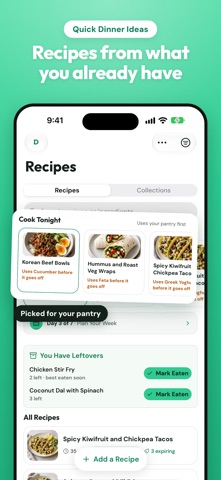
Meet Pantry Pic 3.0, redesigned for iOS 27 and iPad. • A fresh iOS 27 design, with a floating glass tab bar, native controls and big titles that tuck away as you scroll • Your Pantry is now a grid of ingredient tiles by category, with the food to use first at the top • Cook Mode is rebuilt, with large steps, the ingredients each step needs and a look at what comes next • Dinner Tonight, Sorted opens after your first scan, with your best recipe match first • Tell us what you feel like eating and find recipes built around your pantry • Recipe pages show a Nutrition Score, your pantry progress and a cover made from their own ingredients • Shopping is grouped by aisle. Tap an item to tick it off or hold it to edit • Scan a barcode to add packaged food to your Pantry or Shopping list • Cup and spoon equivalents sit beside metric liquid amounts in every recipe • More room on iPad, with recipes, Cook Mode and your week on two pages in landscape • Waste Less Week brings one small mission a day and a streak to keep you going • A refreshed dark mode throughout Thanks for cooking with Pantry Pic.
Price & rating history · US
Reconstructed from the listing changes AppTracker has observed in this storefront. A field is charted once it has changed more than once, and each line starts at the value it moved from.
Average rating · ★ 4.22 now · 3 changes on record
Ratings breakdown · US
The star breakdown behind this app's rating in this storefront.
In-app purchases · US
What this app sells inside itself, grouped by kind and priced for this storefront.
Screenshots





Keywords this app targets
Search terms AppTracker associates with this app — estimates, not search volume. ❝ = in the app's title; a highlighted number is its current position for that term.
Similar apps
Competitors and close alternatives, as estimated by AppTracker.
 Recipe Keeper - ReciPics
Vladimir Skromny
2 shared topics · 1 shared title word
Recipe Keeper - ReciPics
Vladimir Skromny
2 shared topics · 1 shared title word
 Recipin: Save & Find Recipes
Ranjbaran Ghaleh Reza
2 shared topics
Recipin: Save & Find Recipes
Ranjbaran Ghaleh Reza
2 shared topics
 Recipe Notes - My Cookbook
Galaxy Edge Ltd.
1 shared topic · 1 shared title word
Recipe Notes - My Cookbook
Galaxy Edge Ltd.
1 shared topic · 1 shared title word
 Pantrio: Save Recipes
Big Mood Apps LLC
2 shared topics
Pantrio: Save Recipes
Big Mood Apps LLC
2 shared topics
 SeePantry: Meals Recipes Lists
Allpath Enterprises LLC
SeePantry: Meals Recipes Lists
Allpath Enterprises LLC
 Pipiro
Andrius Cepukas
2 shared topics
Pipiro
Andrius Cepukas
2 shared topics
 DinnerSorted
Michael Asaad
1 shared topic
DinnerSorted
Michael Asaad
1 shared topic
 Cove — Recipe Box
Patrick Bottge
1 shared topic · 1 shared title word
Cove — Recipe Box
Patrick Bottge
1 shared topic · 1 shared title word
About
Wondering what to cook tonight? Take a photo of your fridge, pantry or leftovers and get personalised recipe ideas in seconds. No typing, no endless searching. Pantry Pic turns the food you already have into meals you actually want to cook. Snap a photo, review what it finds and start cooking. NEW IN 3.0 - A full redesign for iOS 27, with a glass tab bar, native controls and more room on iPad - Your pantry as a grid of ingredient tiles, with the food to use first at the top - A rebuilt Cook Mode with large steps, the ingredients each step needs and what comes next - Recipe pages with a Nutrition Score, pantry progress and a cover made from their own ingredients - Shopping grouped by aisle, plus barcode scanning for packaged food - Dinner Tonight, Sorted: your best recipe match first, straight after a scan HOW IT WORKS 1. Photograph your fridge, pantry, leftovers or a shopping receipt 2. Review the detected ingredients and add or remove items 3. Get recipes matched to your ingredients and dietary needs 4. Cook along with clear step-by-step instructions MORE WAYS TO FIND DINNER - Snap a Dish: photograph a meal out or at home and get the full recipe to make it yourself - Import from anywhere: paste a link or recipe text and Pantry Pic saves a clean, cookable card - Receipts to pantry: scan or email a grocery receipt and your pantry updates itself - Cravings: tell it what you feel like eating and get recipes built around your pantry KEY FEATURES - Instant ingredient detection from photos, no manual entry - Personalised recipes for keto, vegan, gluten-free and 10+ diets - Smart shopping lists for the ingredients you are missing - Ingredient swaps when you are missing something - Chat about any recipe: ask for swaps, scaling or tips without leaving the page - Nutrition and calorie breakdowns for every recipe - Cooking timers in a Live Activity on your Lock Screen and Dynamic Island - Collections, plus printing for meal plans, shopping lists and whole cookbooks - Works with Siri and Shortcuts PLAN YOUR WEEK Add recipes to your weekly meal plan, build a balanced menu for the whole family and generate a shopping list with one tap. FRESHNESS GUIDE Know when your ingredients are at their best so you use them before they go to waste. WASTE LESS WEEK Cook with what you already have. Waste Less Week gives you one small mission a day, with a streak to keep you going. FREE TO START Download free with 4 scans per month. Upgrade to Pantry Pic Pro for unlimited scans, advanced dietary filters, ingredient swaps and weekly meal scheduling. Perfect for: - Busy parents wondering "what's for dinner?" - Students and anyone cooking on a budget - Home cooks who want fresh ideas from what they have - Meal preppers planning the week ahead - Anyone trying to waste less food Now available in 9 languages: English, Spanish, French, German, Italian, Japanese, Dutch, Polish and Portuguese. Love Pantry Pic? Leave a review and help other food lovers find us. Privacy Policy: https://pantrypic.com/privacy-policy Terms of Service: https://pantrypic.com/terms-conditions
What's new · 3.0.0
Meet Pantry Pic 3.0, redesigned for iOS 27 and iPad. • A fresh iOS 27 design, with a floating glass tab bar, native controls and big titles that tuck away as you scroll • Your Pantry is now a grid of ingredient tiles by category, with the food to use first at the top • Cook Mode is rebuilt, with large steps, the ingredients each step needs and a look at what comes next • Dinner Tonight, Sorted opens after your first scan, with your best recipe match first • Tell us what you feel like eating and find recipes built around your pantry • Recipe pages show a Nutrition Score, your pantry progress and a cover made from their own ingredients • Shopping is grouped by aisle. Tap an item to tick it off or hold it to edit • Scan a barcode to add packaged food to your Pantry or Shopping list • Cup and spoon equivalents sit beside metric liquid amounts in every recipe • More room on iPad, with recipes, Cook Mode and your week on two pages in landscape • Waste Less Week brings one small mission a day and a streak to keep you going • A refreshed dark mode throughout Thanks for cooking with Pantry Pic.
Details