

Smart Mileage Tracker
Justin Czisny · Utilities
Independent analytics for this App Store listing. AppTracker is not affiliated with Justin Czisny.
Chart standing · US
What changed · US
Listing changes AppTracker has observed for this app in this storefront — new versions, price moves, rating shifts, and store copy.
Support email updated Marketing site updated Minor updates to keeping app awake Minor updates to saving missed trips after short stops
Price & rating history · US
Reconstructed from the listing changes AppTracker has observed in this storefront. A field is charted once it has changed more than once, and each line starts at the value it moved from.
Average rating · ★ 4.59 now · 5 changes on record
Ratings breakdown · US
The star breakdown behind this app's rating in this storefront.
In-app purchases · US
No in-app purchases.
Screenshots





About
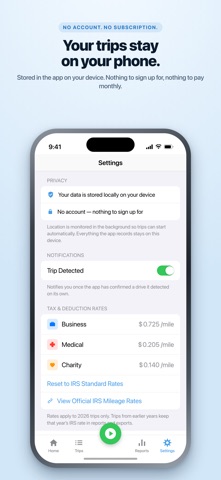
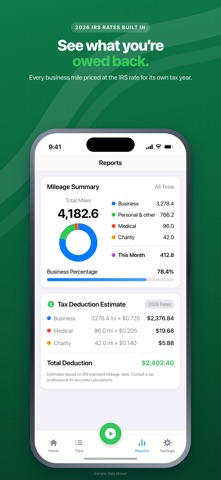
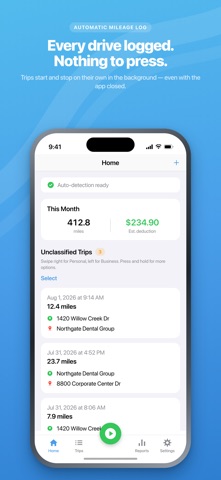
Every feature is free: No subscriptions, premium tiers, trip limits, or time limits. No account. No in-app purchases. Just simple mileage tracking with privacy built in. AUTOMATIC TRIP TRACKING Smart GPS detection begins logging when you start driving and stops when your trip ends - no need to press Start or Stop. AUTOMATIC CATEGORIZATION Classify trips with a simple swipe or based on saved addresses: Swipe left for Business Swipe right for Personal Long-press for Medical, Charity, or Other Add notes to each trip via press You can also categorize a trip directly from the Trip Ended notification without unlocking your phone. Automatically categorize drives based on your work hours, or save frequent destinations as Favorite Locations - such as “Home,” “Office,” or “Client” - with their own assigned categories. Add notes or a business purpose to any trip. MANUAL TRIPS AND ODOMETER RECORDS Add trips manually using start and end addresses. You can also record your vehicle’s odometer readings alongside GPS-measured distance, making your mileage log as detailed as you need. SUMMARIES, SEARCH, AND REPORTS View your total trips, total mileage, and estimated deduction at a glance. Search by address, place name, note, or purpose to find trips without endless scrolling. A Home Screen widget keeps your year-to-date business deduction visible. Export CSV or PDF reports for any date range, or create a complete Year-End Tax Package in one step, including: A per-trip CSV A summary PDF A compliance summary CUSTOM RATES AND TAX SETTINGS Smart Mileage includes the current standard IRS mileage rate, and you can enter your own reimbursement rate at any time. Business, Medical, and Charity trips each use their respective deduction rates. Rates are tied to the year of each trip, so updating this year’s rate will never change calculations from previous years. OPTIONAL - Customize automatic tracking to fit your needs: Choose the trigger speed for auto-start Adjust the stop delay Set a minimum distance to ignore very short trips FOLLOW YOUR TRIP WHILE YOU DRIVE A Live Activity on your Lock Screen and Dynamic Island displays your live distance and a running timer. You can confirm that your drive is being recorded without opening the app. BATTERY-FRIENDLY BACKGROUND TRACKING You stay in control. Limit automatic tracking to times when your phone is plugged in - ideal for rideshare and delivery drivers who keep their devices charging. PRIVACY FIRST - YOUR TRIPS STAY WITH YOU There is no sign-up, and our servers are never involved. Your trips are stored in a local database on your iPhone and are never uploaded to us. Street addresses and place names are retrieved through Apple’s Maps service, while your mileage log remains on your device. Create a backup file you own, then restore it whenever needed. (iCloud Sync coming soon) No ads. No tracking SDKs. Choose the units that work for you: Miles or kilometers: (mph or km/h) BACKGROUND LOCATION Smart Mileage uses your location in the background, including when the app is closed or not in use, to automatically detect and measure drives. This functionality requires the “Always” location setting. Deduction amounts are estimates based on standard IRS mileage rates and are not tax advice. Confirm your figures with a tax professional before filing.
What's new · 2.8.1
Support email updated Marketing site updated Minor updates to keeping app awake Minor updates to saving missed trips after short stops
Details