

Saisun: AI Clothes Sizer
Satoshi Sakuma · Utilities
Independent analytics for this App Store listing. AppTracker is not affiliated with Satoshi Sakuma.
Chart standing · US
What changed · US
Listing changes AppTracker has observed for this app in this storefront — new versions, price moves, rating shifts, and store copy.
Saisun v1.3 introduces the new Width & Height measurement mode! In addition to clothing, you can now check the sizes of flat-laid paper, small items, and even fish you have caught. [New Features & Improvements] ・Added Width & Height mode to measure flat-laid objects from photos. ・When several objects are detected separately, they are labeled A, B, C, etc., so you can view each object’s measurements. ・Improved editing: tap measurement points or labels to select them, then swipe to adjust their positions. ・You can adjust QR reference points manually. If QR detection fails, provisional reference points allow indicative measurements. ・Copy, annotated-image sharing, and history now support multiple detected objects.
Screenshots



About
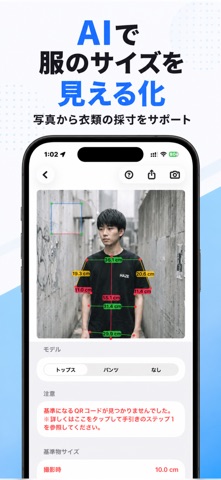
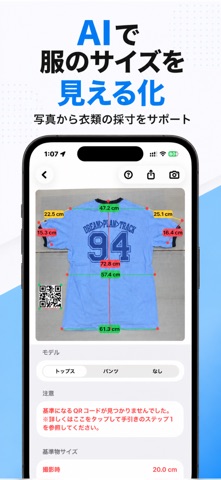
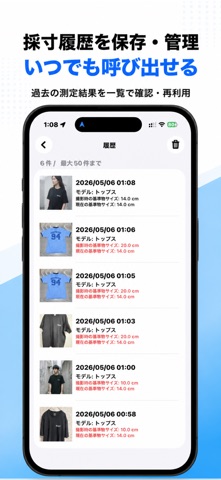
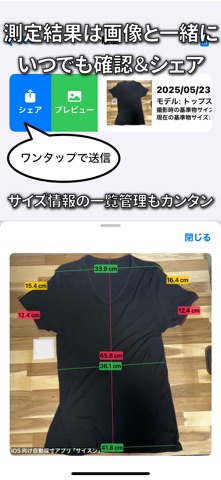
AI-assisted measurements for clothes and everyday objects Lay clothes flat and take a photo. AI identifies garment measurement points to help you check sizes. With the new Width & Height mode, you can also measure flat-laid paper, small items, and even fish you have caught. From resale listings and online shopping to wardrobe organization and everyday size checks, Saisun makes measuring more convenient. [Key Features] ・AI detects garment measurement points to assist with sizing ・Measure the width and height of flat-laid objects with the new mode ・Measure several objects at once when the app detects them separately ・Scale-based measurements using a reference marker ・Support for shoulder width, chest width, garment length, sleeve length, waist, inseam, and more ・Manually adjust measurement points and reference points ・Copy results, share annotated images, and save measurement history [Four Measurement Modes] ・Tops: Measure shoulders, chest, length, sleeves, and more ・Pants: Measure the waist, inseam, and other trouser dimensions ・Width & Height: Measure flat-laid paper, small items, fish, and more; supports multiple detected objects ・Manual: Set measurement points yourself Pants mode requires a paid plan. [Ways to Use Saisun] ・Add measurements to resale and auction listings ・Check sizes before shopping online ・Keep a record of clothing dimensions ・Check paper, envelopes, and card sizes ・Measure small household items and accessories ・Check the approximate size of a fish you have caught from a photo ・Measure multiple items in one photo when detected Measuring clothes and everyday objects, made easier. Make size checks simpler with Saisun. ※For more reliable measurements, use the QR reference marker provided in the app (scale comparison method). ※If the QR marker is not detected, the app can still show indicative measurements based on provisional reference points. These are not verified physical dimensions. ※Results may vary with lighting, camera angle, object placement, marker position, and image distortion. Use a measuring tape when precise dimensions are needed. [Terms of Use] https://shopkoyomi.com/app/saisun/terms-en.html [Privacy Policy] https://shopkoyomi.com/app/saisun/privacy-policy-en.html
What's new · 1.3
Saisun v1.3 introduces the new Width & Height measurement mode! In addition to clothing, you can now check the sizes of flat-laid paper, small items, and even fish you have caught. [New Features & Improvements] ・Added Width & Height mode to measure flat-laid objects from photos. ・When several objects are detected separately, they are labeled A, B, C, etc., so you can view each object’s measurements. ・Improved editing: tap measurement points or labels to select them, then swipe to adjust their positions. ・You can adjust QR reference points manually. If QR detection fails, provisional reference points allow indicative measurements. ・Copy, annotated-image sharing, and history now support multiple detected objects.
Details