

AI Meeting Notes & Recorder
Yen Nguyen Thi Hai · Productivity
Independent analytics for this App Store listing. AppTracker is not affiliated with Yen Nguyen Thi Hai.
Chart standing · US
What changed · US
Listing changes AppTracker has observed for this app in this storefront — new versions, price moves, rating shifts, and store copy.
What's New in 5.0 RECORDING, REBUILT • A cleaner recording screen: one big button to record, pause and resume, plus a clear "Create note" button • See a live transcript while you record, with a level meter and which mic is in use (iPhone or AirPods) • Never lose a recording: if the app closes unexpectedly, you can turn the unsaved audio into a note or delete it • Warnings before your storage runs low or a recording hits its time limit MORE RELIABLE UPLOADS • Audio, PDFs, images and whiteboards keep uploading after you leave the app • Notes still uploading show on Home right away, and a failed upload can be retried without making a duplicate A NEW iPAD EXPERIENCE • A multi-column layout with your notes and the open note side by side • A side panel with Chat, Tasks and Info tabs, so you can keep reading while you use them • Long summaries get an outline you can tap to jump to any section • Keyboard shortcuts: ⌘N new note, ⌘F search, ⌘⌫ delete, and more • Select several notes at once to move or delete them • The layout adapts to any window size, including Split View and Stage Manager SMARTER CHAT WITH YOUR NOTES • More accurate citations: tapping a source opens the exact note it came from • Suggested questions ("This week", "Meetings", "Folder") now answer from exactly the notes they name SIRI, SHORTCUTS & SPOTLIGHT • Open and search your notes with Siri and the Shortcuts app • Your notes show up in Spotlight and open straight to the note
Ratings breakdown · US
The star breakdown behind this app's rating in this storefront.
Screenshots


About
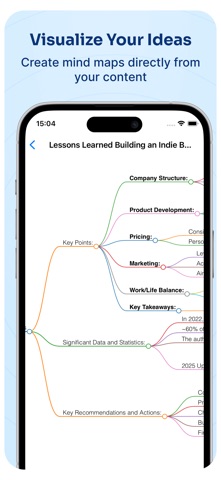
Stay fully present while AI Meeting Notes & Recorder captures the conversation. Record meetings, lectures, interviews, or ideas and turn them into searchable transcripts, clear summaries, key decisions, and action items. FROM CONVERSATION TO ACTION • Record meetings, lectures, interviews, and voice memos in one tap • Follow clear speech-to-text while you record • Turn long recordings into concise AI summaries • Extract key points, decisions, highlights, and to-dos automatically • Share organized notes with colleagues, classmates, or clients CAPTURE CONTENT YOUR WAY • Import existing audio files for transcription • Summarize public YouTube links • Create notes from document scans, photos, text, and web links • Keep everything searchable with folders and tags SMARTER STUDY TOOLS • Transform lectures and notes into quizzes and flashcards • Generate mind maps to understand complex topics • Translate notes into multiple languages • Review the important ideas without replaying the entire recording BUILT FOR • Professionals documenting meetings, client calls, interviews, and brainstorms • Students capturing lectures, preparing for exams, and organizing study notes • Journalists and creators turning conversations into usable content • Anyone who wants to listen now and review the details later PRIVATE & SECURE Your recordings and notes belong to you. We never sell your data. AI Meeting Notes & Recorder is free to download. Some features require an auto-renewing weekly or yearly subscription. Payment is charged to your Apple ID account. Subscriptions renew automatically unless canceled at least 24 hours before the end of the current period. Manage or cancel your subscription in your App Store account settings. Terms of Use: https://black-knight-studio.web.app/tos Privacy Policy: https://black-knight-studio.web.app/privacy Questions or feedback: ndchi27@gmail.com
What's new · 5.0
What's New in 5.0 RECORDING, REBUILT • A cleaner recording screen: one big button to record, pause and resume, plus a clear "Create note" button • See a live transcript while you record, with a level meter and which mic is in use (iPhone or AirPods) • Never lose a recording: if the app closes unexpectedly, you can turn the unsaved audio into a note or delete it • Warnings before your storage runs low or a recording hits its time limit MORE RELIABLE UPLOADS • Audio, PDFs, images and whiteboards keep uploading after you leave the app • Notes still uploading show on Home right away, and a failed upload can be retried without making a duplicate A NEW iPAD EXPERIENCE • A multi-column layout with your notes and the open note side by side • A side panel with Chat, Tasks and Info tabs, so you can keep reading while you use them • Long summaries get an outline you can tap to jump to any section • Keyboard shortcuts: ⌘N new note, ⌘F search, ⌘⌫ delete, and more • Select several notes at once to move or delete them • The layout adapts to any window size, including Split View and Stage Manager SMARTER CHAT WITH YOUR NOTES • More accurate citations: tapping a source opens the exact note it came from • Suggested questions ("This week", "Meetings", "Folder") now answer from exactly the notes they name SIRI, SHORTCUTS & SPOTLIGHT • Open and search your notes with Siri and the Shortcuts app • Your notes show up in Spotlight and open straight to the note
Details