

Invoice Creator & Generator
Anmol Kulshreshtha · Business
Independent analytics for this App Store listing. AppTracker is not affiliated with Anmol Kulshreshtha.
Chart standing · US
What changed · US
Listing changes AppTracker has observed for this app in this storefront — new versions, price moves, rating shifts, and store copy.
• After setup, your first invoice opens ready to fill in and send • Clearer plans: one recommended plan, with the yearly price shown first • The setup preview now shows exactly how your exported invoice looks • Trial reminders show the exact days left, plus stability fixes
Ratings breakdown · US
The star breakdown behind this app's rating in this storefront.
Screenshots




About
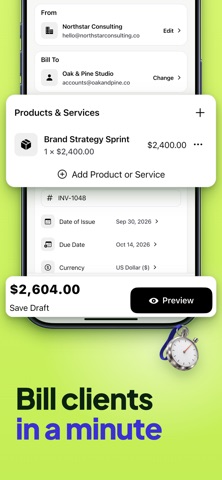
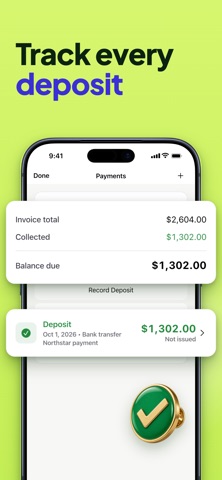
Invoice maker for contractors, freelancers and small business owners who want to bill clients from their phone. Create an invoice, send an estimate before the job starts and keep every payment organized in one place, without spreadsheets or paperwork. Fill in your business details once, add the client and line items, and the invoice generator builds a clean PDF you can preview, share or print in a minute. Key Features • Invoices, estimates and quotes Create invoices, estimates and quotations with your business details, client information, dates, terms and line items. Each document type keeps its own automatic numbering, so your records stay in order. • Turn an estimate into an invoice When a client accepts an estimate or quote, convert it into an invoice in a tap. The original stays saved, so you can always check what was agreed. • PDF you can share or print Preview every document before it goes out, then share the PDF by email, message or any app on your phone, or print it. Choose an A4 page or an 80 mm receipt roll for counter and on-site billing. • Invoice templates with your logo and signature Pick an invoice template that suits your work and add your logo and signature. Clients get a consistent, professional-looking document every time you create an invoice. • Taxes and discounts Add your own tax name and rate, and apply discounts as a percentage or a fixed amount. Subtotals, totals and balances are calculated for you on every line. • Multiple currencies Choose the currency that fits each client and show amounts clearly. Useful when you work with clients in other countries or bill in more than one currency. • Saved clients and items Save clients, products and services once and reuse them on the next invoice. Your client list and billing history stay on your device, ready whenever you open the invoice maker. • Payments, deposits and status Record full or partial payments and ask for a deposit as a fixed amount or a percentage. See at a glance which invoices are paid, unpaid, partially paid or overdue. • Payment receipts When a payment is recorded, create a receipt for it as a PDF. Your client gets proof of payment, and this invoice maker keeps the receipt linked to the original invoice.
What's new · 1.8.0
• After setup, your first invoice opens ready to fill in and send • Clearer plans: one recommended plan, with the yearly price shown first • The setup preview now shows exactly how your exported invoice looks • Trial reminders show the exact days left, plus stability fixes
Details