

DataWidget
Qinghua Wang · Utilities
Independent analytics for this App Store listing. AppTracker is not affiliated with Qinghua Wang.
Chart standing · US
What changed · US
Listing changes AppTracker has observed for this app in this storefront — new versions, price moves, rating shifts, and store copy.
• Improved Invite & Earn reliability and credit updates. • Fixed referral-code validation and limited retries during temporary connection issues. • Improved stability and diagnostics.
Price & rating history · US
Reconstructed from the listing changes AppTracker has observed in this storefront. A field is charted once it has changed more than once, and each line starts at the value it moved from.
Average rating · ★ 4.25 now · 5 changes on record
Ratings breakdown · US
The star breakdown behind this app's rating in this storefront.
In-app purchases · US
What this app sells inside itself, grouped by kind and priced for this storefront.
Screenshots



About
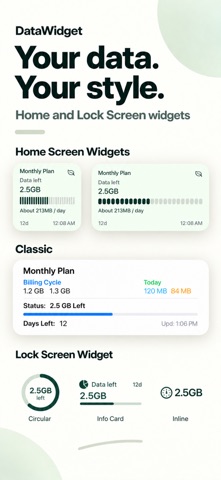
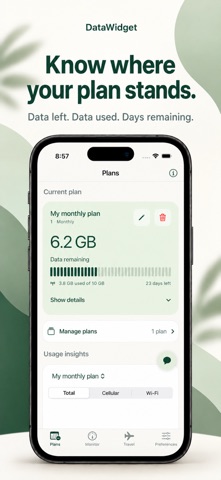
Your data, at a glance. DataWidget brings Wi-Fi and cellular usage to your Home Screen and Lock Screen, so you can keep an eye on your allowance without opening the app. FREE WIDGETS Choose from multiple styles to see remaining data, usage, billing countdowns, and the latest update time. PLANS THAT FIT YOUR LIFE Set monthly, yearly, or custom billing cycles. Track used and remaining data, calibrate totals against your carrier, and explore usage by hour, day, week, or month. READY FOR TRAVEL Track temporary data and eSIM allowances with Travel Hub. Set dates, choose your current plan, and show it in your widgets. Handy unit conversions work offline. MONITOR & STAY INFORMED View live Wi-Fi and cellular upload/download speeds, daily and session totals, and customizable usage alerts. MORE FOR YOUR DOWNTIME Enjoy 12 lightweight offline games, including Garden Match and Garden Pour with saved progress. An optional assistant helps with app features and troubleshooting. Usage history and settings stay on your device. Online assistant questions are processed by Google; do not enter sensitive information. Compatible devices can use Apple's on-device model when online help is unavailable. Free to use, with ads and optional in-app purchases.
What's new · 2.0.3
• Improved Invite & Earn reliability and credit updates. • Fixed referral-code validation and limited retries during temporary connection issues. • Improved stability and diagnostics.
Details