

SellerBook 2: Reseller Tracker
Daisuke Yamashita · Shopping
Independent analytics for this App Store listing. AppTracker is not affiliated with Daisuke Yamashita.
Chart standing · US
What changed · US
Listing changes AppTracker has observed for this app in this storefront — new versions, price moves, rating shifts, and store copy.
Thank you for using Sellerbook! How-to videos now play right inside the app. Open them from "First steps" on Home or "How-to guide" in Settings without leaving Sellerbook. Fixed: when the sales list totals could not be loaded because of a connection problem, they could show as 0 items and 0 yen. Values that could not be loaded now show as "—", and you can retry on the spot. Your reviews help us improve!
Ratings breakdown · US
The star breakdown behind this app's rating in this storefront.
In-app purchases · US
What this app sells inside itself, grouped by kind and priced for this storefront.
Screenshots




Keywords this app targets
Search terms AppTracker associates with this app — estimates, not search volume. ❝ = in the app's title; a highlighted number is its current position for that term.
Similar apps
Competitors and close alternatives, as estimated by AppTracker.
 Profit Tracker - Made Simple
Joshua Hou
1 shared topic · 1 shared title word
Profit Tracker - Made Simple
Joshua Hou
1 shared topic · 1 shared title word
 MR LISTER
Nicholas Kelley
1 shared topic
MR LISTER
Nicholas Kelley
1 shared topic
 Inventory & POS - SellStock
Franyer Verjel Arevalo
2 shared topics
Inventory & POS - SellStock
Franyer Verjel Arevalo
2 shared topics
 Logflip: Buy & Sell Manager
YUSUF SAHAN TARHAN
1 shared topic
Logflip: Buy & Sell Manager
YUSUF SAHAN TARHAN
1 shared topic
 ResellStats - Resell Tracker
Aurelien Vandaele
1 shared title word
ResellStats - Resell Tracker
Aurelien Vandaele
1 shared title word
 ReSellers Sourcing STR Tool
Robert Ryder
ReSellers Sourcing STR Tool
Robert Ryder
 Profit Identifier - Scout AI
Nikolay Petkov
Profit Identifier - Scout AI
Nikolay Petkov
 Profit Prophet: Scan & Resell
Adam Jack Smith
Profit Prophet: Scan & Resell
Adam Jack Smith
About
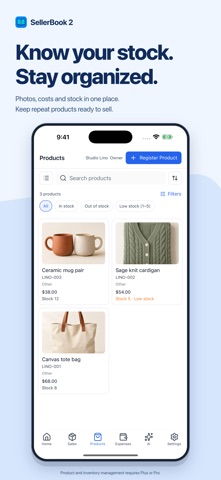
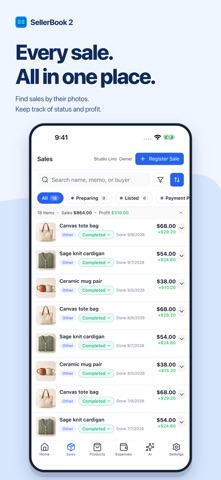
Track profit on every flip — sales, fees, shipping and inventory in one place. SellerBook 2 brings your sales, costs, expenses and inventory together. Whether you sell on eBay, Poshmark, Mercari, Depop or Facebook Marketplace, see the profit behind every sale and keep your business organized. ■ Less typing, easier records • Sales from screenshots: Let AI read up to 10 transaction screenshots at once. Review and edit the item names, amounts and other details before saving. • Expenses from receipts: Scan a receipt with AI to help fill in an expense. Check the details, then save. • Chat-to-log: Describe a sale or expense in your own words, review the summary and confirm it to create the record. AI can make mistakes. Always check extracted details and answers. ■ See where your money goes • Record the sale price, item cost, shipping, platform fees and packing costs together. • Track business expenses by category, even on the Free plan, and see profit after expenses. • Review monthly and annual charts of sales, costs and profits. • Keep sales and expenses organized for your bookkeeping. ■ Your products, in view • Attach multiple product photos to sales and check transaction status and profit in one list. • Reuse product details when recording sales. • Check stock quantities and low-stock indicators for each product. • Organize customers, selling platforms, categories, shipping methods and packing supplies. Product templates and product inventory management require Plus or Pro. ■ Ask AI about your business Ask "What's my profit this month?", "Compare it with last month" or "Which products are low in stock?" Get help exploring sales by platform, product and customer, and checking inventory. ■ Work solo or with a team Use the same account across multiple devices. Plus and Pro let you invite members with Owner, Leader and Staff roles. Pro supports up to 5 stores. ■ Plans • Free: 1 store, solo use, up to 300 sales, expense tracking and 10 AI uses/month. • Plus: $5.99/month or $59.99/year. 1 store, up to 5 members, unlimited sales, product inventory and 200 AI uses/month. • Pro: $11.99/month or $119.99/year. Up to 5 stores and 30 members, unlimited sales, product inventory and 500 AI uses/month. Member limits include the owner. Chat, screenshot analysis and receipt scanning share one monthly AI allowance. Each chat message, screenshot analyzed or receipt scan uses one unit from the allowance, which is shared by the owner's team. Prices are for the U.S. App Store and vary by country or region. Annual plans save approximately 17% compared with 12 monthly payments. ■ Subscription Subscriptions renew monthly or annually. Change or cancel them in your device's subscription settings. ■ Support / Policy • Contact: sellerbook.app.customer@gmail.com • Support: https://sellerbook.app/support • Terms of Use: https://sellerbook.app/terms • Privacy Policy: https://sellerbook.app/privacy • EULA: This app is licensed under the Apple Standard End User License Agreement (EULA). See https://www.apple.com/legal/internet-services/itunes/dev/stdeula/
What's new · 2.19.0
Thank you for using Sellerbook! How-to videos now play right inside the app. Open them from "First steps" on Home or "How-to guide" in Settings without leaving Sellerbook. Fixed: when the sales list totals could not be loaded because of a connection problem, they could show as 0 items and 0 yen. Values that could not be loaded now show as "—", and you can retry on the spot. Your reviews help us improve!
Details