

Video Trimmer: Videos Editor
Ali Umer · Photo & Video
Independent analytics for this App Store listing. AppTracker is not affiliated with Ali Umer.
Chart standing · US
What changed · US
Listing changes AppTracker has observed for this app in this storefront — new versions, price moves, rating shifts, and store copy.
• Set exact trim start and end times with millisecond controls. • Capture a photo at a chosen moment in your video. • Enjoy a refreshed design with dark mode and a guided first-edit experience. • Merge with Premium, or finish a rewarded ad to unlock one successful merge. • Improved batch editing, export progress, saving and sharing. • Updated support for iOS and iPadOS 27, with bug fixes and stability improvements.
Screenshots



About
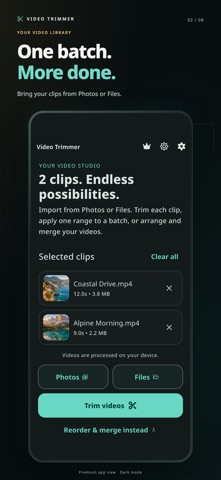
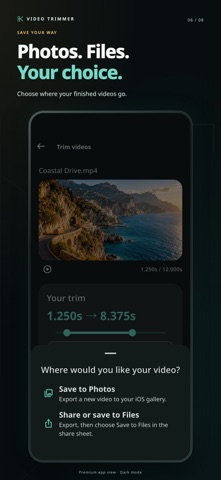
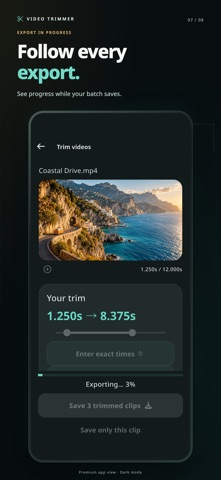
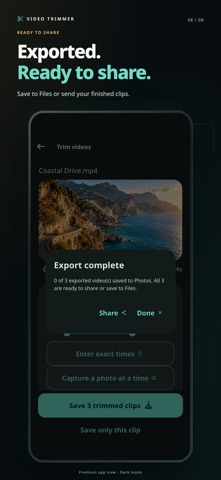
Trim one video or a whole batch, merge clips into one video, and capture photos from your favorite moments. Video Trimmer makes editing straightforward on iPhone and iPad, from import and preview to export and sharing. TRIM ONE VIDEO OR A BATCH • Import videos from Photos or Files, including iCloud Drive. • Choose a different trim for each clip, or apply one range to your batch. • Enter exact start and end times with millisecond controls. • Preview your selection before exporting. • Keep your original videos untouched. TURN VIDEO MOMENTS INTO PHOTOS Choose a time in your video, capture a frame, then save the photo to Photos or share it. Ideal for keeping a favorite moment without taking a screenshot of the player. ARRANGE AND MERGE Reorder your clips and combine them into one video. Premium includes unlimited merging. You can also finish a rewarded video ad to unlock one successful merge during your current app session. SAVE AND SHARE YOUR WAY Follow the export progress, save to Photos, or use the share sheet to send your video or save it to Files. Exports have no added watermark. EDIT ON YOUR DEVICE Video processing takes place on your device. Enjoy a clear dark or light interface and a guided first edit that shows you the workflow using your own videos. PREMIUM OPTIONS Go premium for unlimited merging and an ad-free experience. Subscription and lifetime options are shown in the app where available. Rewarded ads and purchases require an internet connection. Trim controls accept milliseconds; exported video and captured photos follow the frames available in the source video. Privacy Policy: https://owlspeak.web.app/privacy Terms of Use: https://owlspeak.web.app/terms
What's new · 3.0
• Set exact trim start and end times with millisecond controls. • Capture a photo at a chosen moment in your video. • Enjoy a refreshed design with dark mode and a guided first-edit experience. • Merge with Premium, or finish a rewarded ad to unlock one successful merge. • Improved batch editing, export progress, saving and sharing. • Updated support for iOS and iPadOS 27, with bug fixes and stability improvements.
Details