

Sugrlog - Sugar Tracker
Jacob D Kamile · Health & Fitness
Independent analytics for this App Store listing. AppTracker is not affiliated with Jacob D Kamile.
Chart standing · US
What changed · US
Listing changes AppTracker has observed for this app in this storefront — new versions, price moves, rating shifts, and store copy.
Statistics got a major upgrade in 1.8. You can now filter the Statistics page by All Time, Past Year, or the last 30 Days. Each view adapts all charts and numbers to your selected range. New sections include: • Period Comparison — see how your daily average compares to the previous equivalent period, with a clear % change indicator • Top Items by Sugar — a ranked list of the foods and drinks contributing the most sugar in your selected range • Days Under & Over Limit — a simple split showing how many days you stayed within your daily goal versus exceeded it • Average First Entry Time — find out what time of day you typically start logging
Ratings breakdown · US
The star breakdown behind this app's rating in this storefront.
In-app purchases · US
What this app sells inside itself, grouped by kind and priced for this storefront.
Screenshots

About
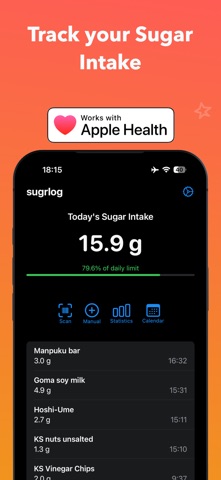
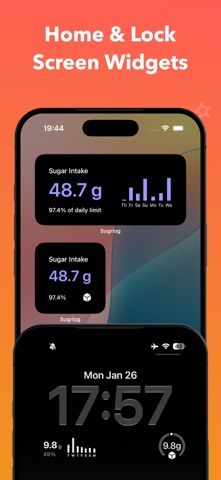
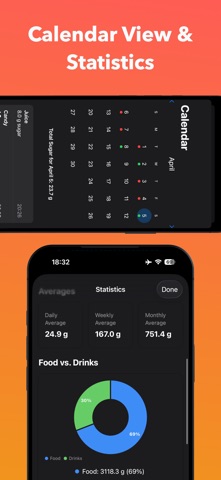
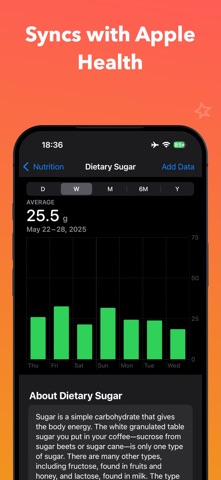
Sugrlog: Your Personal Sugar Intake Monitor Take control of your health with Sugrlog, the smart and intuitive app that helps you monitor and manage your sugar consumption. Whether you're trying to maintain a healthy lifestyle, manage your weight, or follow medical recommendations, Sugrlog makes it easy to stay on top of your sugar intake. Key Features: • Quick Barcode Scanner: Look up nutritional information from an open user contributed catalogue of over 2 million items by scanning product barcodes • Manual Entry: Easily input custom items with both metric and imperial measurements • Daily Log: View your sugar consumption for the day in an easy to understand list format • Calendar View: Go back to previous days and see detailed logs as well as which days you stayed below or went above your sugar limit. • Home Screen shortcuts to go straight from the Home Screen to the scanner or manual entry screen. • Your data is yours. No user registration required and your entries stay on your device. Premium Features (Sugar Tracker+): • One-time purchase for lifetime premium upgrade. No subscription • Apple Health Integration: Sync your sugar intake data with Apple Health • Export data in CSV format to use with external tools • Advanced Statistics: Gain insights with detailed consumption patterns and trends • Smart Notifications: Set customizable reminders to help you stay on track of your logging • Home Screen Widgets: Widgets for daily and weekly sugar intake. Customize your widget from a range of colors and monitor your progress right from your home screen Perfect for: • Health-conscious individuals • People managing their weight • Anyone looking to reduce their sugar intake Download Sugrlog today and take the first step toward a healthier relationship with sugar!
What's new · 1.8
Statistics got a major upgrade in 1.8. You can now filter the Statistics page by All Time, Past Year, or the last 30 Days. Each view adapts all charts and numbers to your selected range. New sections include: • Period Comparison — see how your daily average compares to the previous equivalent period, with a clear % change indicator • Top Items by Sugar — a ranked list of the foods and drinks contributing the most sugar in your selected range • Days Under & Over Limit — a simple split showing how many days you stayed within your daily goal versus exceeded it • Average First Entry Time — find out what time of day you typically start logging
Details