

Metadata Remover
Ertugrul Sari · Productivity
Independent analytics for this App Store listing. AppTracker is not affiliated with Ertugrul Sari.
Chart standing · US
In-app purchases · US
What this app sells inside itself, grouped by kind and priced for this storefront.
Screenshots




About
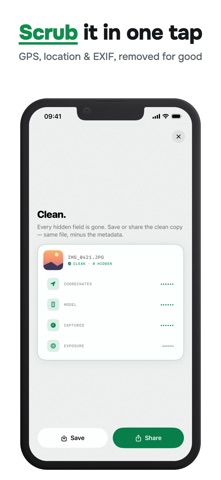
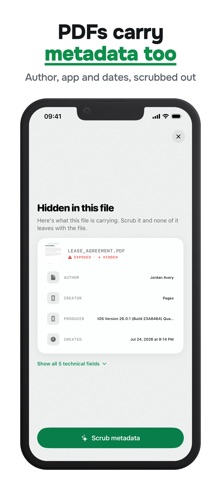
This photo knows exactly where you live. Every picture, video, and PDF you share carries hidden data: your GPS location, your device, the exact moment it was captured, and more. It travels with the file, straight to whoever you send it to. Whether you are selling something online, posting a picture, sending a document, or sharing from any app, Metadata Remover shows you what is hidden and strips it out in one tap. SEE WHAT IS HIDDEN Open any file and see the details it is carrying before you share it. - Location, the GPS coordinates saved inside the file - Device, the exact make and model that captured it - Date and time the file was created - Camera settings like aperture, shutter, and ISO - Caption and keyword tags left by other apps CLEAN IN ONE TAP Tap once and every hidden field is removed. Your photo stays exactly as sharp as it was, because the pixels are never touched. Only the hidden data is stripped. Save the clean copy to your library or share it right away. CHOOSE WHAT TO KEEP For photos you can open the full list of fields and decide what to keep and what to remove, one by one. Prefer the fast route? A single tap clears everything. PHOTOS, VIDEOS, AND PDFS - Photos from your library, including HEIC and JPEG - Videos in MOV and MP4, with location and device details removed - PDFs, cleared of author, dates, and hidden document info CLEAN FROM ANY APP Scrub metadata straight from the share sheet. Send a file from any app, tap Metadata Remover, and save the clean version without switching apps. CLEAN IN BATCHES Load a whole set at once, see the total hidden data across every file, and clean them all in one go. Save them together or share them as a group. PRIVATE BY DESIGN Everything runs on your device. No account, no signup, no email. Your files never leave your phone, nothing is uploaded, and there is no cloud in the middle. The app reads the file, removes the hidden data, and hands you a clean copy. HOW TO USE 1. Open a photo, video, or PDF in the app 2. See the hidden data the file is carrying 3. Tap to strip location and every trace 4. Save the clean copy or share it 5. Or clean straight from any app's share sheet Clean a file before you share it. See exactly what it is hiding, then remove it in one tap. Free to download. Some features require a premium purchase. Privacy Policy: https://ios.estifie.com/metadataeditor/privacy-policy Terms of Use: https://ios.estifie.com/metadataeditor/terms-of-use
Details