

Mapvia: Auto Timestamp GPS Cam
nguyen hiep · Photo & Video
Independent analytics for this App Store listing. AppTracker is not affiliated with nguyen hiep.
Chart standing · US
What changed · US
Listing changes AppTracker has observed for this app in this storefront — new versions, price moves, rating shifts, and store copy.
In this version, I have made the following changes: • Added optional rewarded ads for selected popular locations in Street View and 3D View. Users may choose to watch a rewarded ad to access the corresponding content. • Optimized the Draw Route feature in Journey Map to improve performance and provide a smoother route-drawing experience.
Price & rating history · US
Reconstructed from the listing changes AppTracker has observed in this storefront. A field is charted once it has changed more than once, and each line starts at the value it moved from.
Average rating · ★ 4.31 now · 14 changes on record
Ratings breakdown · US
The star breakdown behind this app's rating in this storefront.
In-app purchases · US
What this app sells inside itself, grouped by kind and priced for this storefront.
Screenshots




Keywords this app targets
Search terms AppTracker associates with this app — estimates, not search volume. ❝ = in the app's title; a highlighted number is its current position for that term.
Similar apps
Competitors and close alternatives, as estimated by AppTracker.
 Geotag Photos: GPS Map Camera
SOFTAXES TECHNOLOGY ( PRIVATE ) LIMITED
1 shared topic · 4 shared title words
Geotag Photos: GPS Map Camera
SOFTAXES TECHNOLOGY ( PRIVATE ) LIMITED
1 shared topic · 4 shared title words
 GPS Camera 55. Field Survey
Kalimex-Consulting s.r.o.
1 shared topic · 2 shared title words
GPS Camera 55. Field Survey
Kalimex-Consulting s.r.o.
1 shared topic · 2 shared title words
 Atlas Photo Map of Travels
Camille HAIDAR
1 shared title word
Atlas Photo Map of Travels
Camille HAIDAR
1 shared title word
 GPS Maps Camera
KRUTAGNA INFOTECH
2 shared title words
GPS Maps Camera
KRUTAGNA INFOTECH
2 shared title words
 TerraCam: GPS Satellite
Oanh Hoang
1 shared topic · 1 shared title word
TerraCam: GPS Satellite
Oanh Hoang
1 shared topic · 1 shared title word
 Photo Map - Travel Tracker
Applorium Ltd
1 shared topic · 2 shared title words
Photo Map - Travel Tracker
Applorium Ltd
1 shared topic · 2 shared title words
 MyMap – Track Visited Places
KAZUNORI WAKAMATSU
MyMap – Track Visited Places
KAZUNORI WAKAMATSU
 Map Diary - Location Journal
Can Bi
1 shared title word
Map Diary - Location Journal
Can Bi
1 shared title word
About
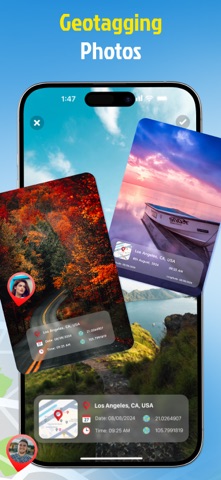
Mapvia helps users capture photos and videos with location details and turn them into visual memories. The app combines GPS camera tools, map based tagging, earth view discovery, and a personal library so every moment can be saved with context and style. ▶ Features That Bring Memories to Life • Shoot With GPS Details Take photos and videos with real time location information shown on the screen. Add place name, date, time, and coordinates to make each memory more meaningful. • See Your Memories on the Map View your memories on a map and revisit places you have been. Browse saved locations through a visual map experience and explore your personal footprint over time. • Explore Earth in Multiple Views Discover the world from a global perspective. Explore places in 2D, 3D, satellite, terrain, and night map styles for a richer location experience. • Import Photos and Add Places Import existing photos from your device and add location tags afterward. This makes it easy to organize old memories even if they were not captured in the app. • Customize Your Location Tags Create your own location tag with flexible settings. Choose map view, date and time type, date and time format, background color, and text color to match your style. • Choose Current or Manual Location Use your current location instantly or add a location manually. This gives you more control when you want to attach a place to a photo or video. • Keep Photos and Videos in One Library Manage all saved content in one library. Switch between photo and video collections, review past memories, and quickly create new ones. ▶ Why Use Mapvia: Mapvia is designed for people who want more than a basic camera. It helps preserve where and when a moment happened, making every photo or video easier to remember, organize, and share. ▶ Perfect for Travel, Family, and Daily Life • Travel memories • Daily moments • Location based storytelling • Personal memory collection • Creative photo tagging Mapvia - Memory Map is built for people who want to keep more than just an image. It helps preserve the full story behind every moment by combining visuals, location, time, and map based context in one simple experience. Whether you are documenting daily life, travel memories, or meaningful places, Memory Map turns ordinary captures into memories you can revisit with greater clarity and emotion. Terms of Use: https://www.apple.com/legal/internet-services/itunes/dev/stdeula/
What's new · 1.2.8
In this version, I have made the following changes: • Added optional rewarded ads for selected popular locations in Street View and 3D View. Users may choose to watch a rewarded ad to access the corresponding content. • Optimized the Draw Route feature in Journey Map to improve performance and provide a smoother route-drawing experience.
Details