

Koodo Reader
亮 郭 · Books
Independent analytics for this App Store listing. AppTracker is not affiliated with 亮 郭.
Chart standing · US
What changed · US
Listing changes AppTracker has observed for this app in this storefront — new versions, price moves, rating shifts, and store copy.
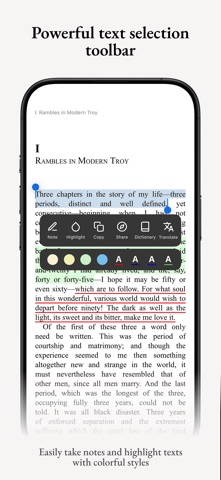
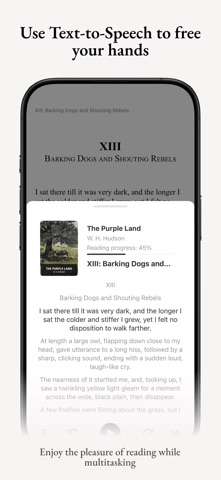
NEW FEATURES · Added a feature to resync all book covers; go to Settings > Sync options · Added an option to download images in CBZ comic mode · The iOS version now supports accessing the system dictionary, system translation, and system OCR; go to Settings > Third-Party Services · Added a dedicated comic mode for CBZ format, supporting streaming rendering · Added support for batch downloading books; tap the three dots at the top of the home screen and select “Batch Operations” · Support for custom translation and TTS APIs; go to Settings > API Settings · Added a “Return” button after navigating to a section via the in-book table of contents · Expanded the font size adjustment range · Support for adjusting the paragraph spacing threshold and title size threshold for text-based PDFs when converting to texts · Support for using AI to extract book titles and author names from filenames; long-press a book and select “Edit” · Support for using AI to extract book titles and author names from filenames when importing books; go to Settings > General Options · Support for caching full-text translation and OCR results; books will be loaded directly from the cache the next time they are opened · Added Paragraph Mode, Reading Ruler, and Speed Reading Mode; enable these in Settings on the book page · Online book metadata matching now includes publication date, ISBN, ratings, and other information · Added 100 curated book background images · Support for searching books using a book key · Experimental support for total page count; go to Settings > Reading Options · Page numbers are now displayed in the book table of contents, please enable total page count first · The official AI dictionary now supports more target languages · Adapted to the iOS 26 Liquid Glass effect · The iOS version now supports importing folders · Supports custom app icons; go to Settings > Appearance · The app now supports 10 additional languages · Added highlight rule feature to text rules, allowing you to highlight specific text in books · Added support for clearing chat history in AI chat · Upgraded to the new React Native architecture to improve overall app performance · Automatically keeps the screen on during synchronization to prevent interruptions caused by the screen locking OPTIMIZATIONS · Optimized the smoothness of page-turning animations · Optimized the smoothness of certain app animations · Optimized import and opening speeds for large CBZ files · Optimized the chart UI for reading statistics · Optimized rendering speed for books with extensive notes and highlights; stuttering issues have been resolved · Optimized performance and frame rate for smooth and simulated page-turning animations · Optimized the TTS feature for PDFs, supporting more natural sentence breaks · Optimized error messages for the sync feature · Optimized the list performance of AI chat; now only the last three rounds of conversations are displayed by default FIXES · Fixed known issues and improved stability. Welcome to report any problems you encounter during use.
Price & rating history · US
Reconstructed from the listing changes AppTracker has observed in this storefront. A field is charted once it has changed more than once, and each line starts at the value it moved from.
Average rating · ★ 3.80 now · 4 changes on record
Ratings breakdown · US
The star breakdown behind this app's rating in this storefront.
In-app purchases · US
What this app sells inside itself, grouped by kind and priced for this storefront.
Screenshots


About
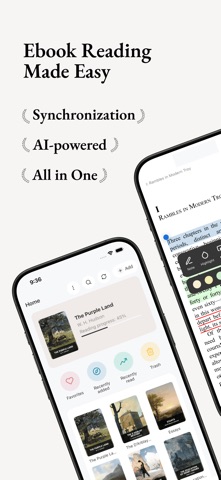
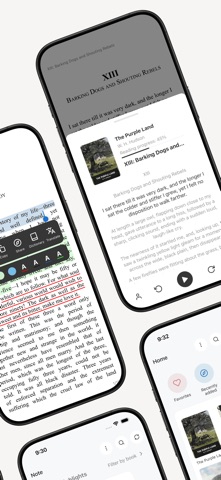
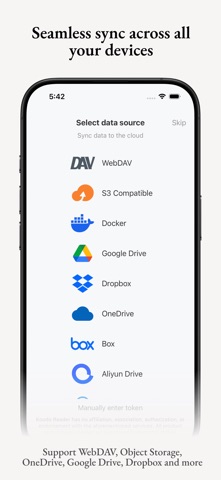
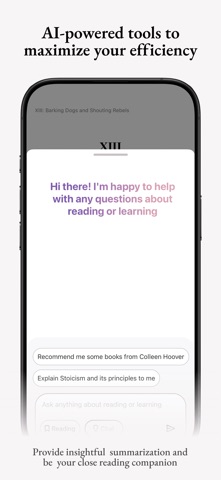
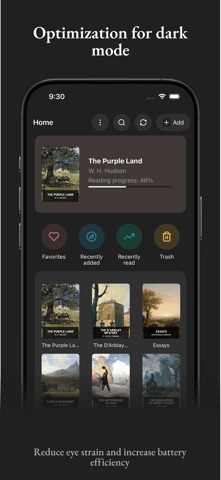
Koodo Reader is a powerful e-book reader designed for managing and reading local e-books. It supports a wide range of popular formats, including EPUB, PDF, MOBI, AZW3, TXT, Comics and more. It integrates seamlessly with personal NAS and cloud storage for a smooth cross-platform experience. With a fully customizable interface, you can adjust fonts, switch between multiple themes, enable night mode, and enjoy optimized layouts for any screen size. Key Features: Broad Format Support: EPUB, PDF, MOBI, AZW3, AZW, TXT, FB2, CBR, CBZ, CBT, CB7, MD, DOCX, HTML, XML, XHTML, MHTML, HTM Cloud Integration: Works with OneDrive, Google Drive, Dropbox, pCloud, Baidu Netdisk, 115 Netdisk, Aliyun Drive, Yandex Disk and Box Network Protocol Compatibility: WebDAV, Self-hosted Docker, SMB, FTP, SFTP and S3-Compatible Object Storage Sync Across Devices: Automatically keeps your library, reading progress, bookshelves, notes, and highlights up to date AI-Powered Tools: Built-in dictionary, translation, and smart summarization
What's new · 2.4.6
NEW FEATURES · Added a feature to resync all book covers; go to Settings > Sync options · Added an option to download images in CBZ comic mode · The iOS version now supports accessing the system dictionary, system translation, and system OCR; go to Settings > Third-Party Services · Added a dedicated comic mode for CBZ format, supporting streaming rendering · Added support for batch downloading books; tap the three dots at the top of the home screen and select “Batch Operations” · Support for custom translation and TTS APIs; go to Settings > API Settings · Added a “Return” button after navigating to a section via the in-book table of contents · Expanded the font size adjustment range · Support for adjusting the paragraph spacing threshold and title size threshold for text-based PDFs when converting to texts · Support for using AI to extract book titles and author names from filenames; long-press a book and select “Edit” · Support for using AI to extract book titles and author names from filenames when importing books; go to Settings > General Options · Support for caching full-text translation and OCR results; books will be loaded directly from the cache the next time they are opened · Added Paragraph Mode, Reading Ruler, and Speed Reading Mode; enable these in Settings on the book page · Online book metadata matching now includes publication date, ISBN, ratings, and other information · Added 100 curated book background images · Support for searching books using a book key · Experimental support for total page count; go to Settings > Reading Options · Page numbers are now displayed in the book table of contents, please enable total page count first · The official AI dictionary now supports more target languages · Adapted to the iOS 26 Liquid Glass effect · The iOS version now supports importing folders · Supports custom app icons; go to Settings > Appearance · The app now supports 10 additional languages · Added highlight rule feature to text rules, allowing you to highlight specific text in books · Added support for clearing chat history in AI chat · Upgraded to the new React Native architecture to improve overall app performance · Automatically keeps the screen on during synchronization to prevent interruptions caused by the screen locking OPTIMIZATIONS · Optimized the smoothness of page-turning animations · Optimized the smoothness of certain app animations · Optimized import and opening speeds for large CBZ files · Optimized the chart UI for reading statistics · Optimized rendering speed for books with extensive notes and highlights; stuttering issues have been resolved · Optimized performance and frame rate for smooth and simulated page-turning animations · Optimized the TTS feature for PDFs, supporting more natural sentence breaks · Optimized error messages for the sync feature · Optimized the list performance of AI chat; now only the last three rounds of conversations are displayed by default FIXES · Fixed known issues and improved stability. Welcome to report any problems you encounter during use.
Details