

The Minimalist Calendar
LIVIU-CASIAN SIME · Productivity
Independent analytics for this App Store listing. AppTracker is not affiliated with LIVIU-CASIAN SIME.
Chart standing · US
What changed · US
Listing changes AppTracker has observed for this app in this storefront — new versions, price moves, rating shifts, and store copy.
syko is now fully native. The app has been rebuilt from the ground up in Swift. It opens faster, scrolls at full frame rate and uses less battery. All your tasks carry across untouched. NEW Reminders, rethought. Choose how many reminders a task gets — up to four — then set each one anywhere from five minutes to two weeks ahead. The old fixed options are gone. Repeats on several weekdays. A task can now repeat every Monday and every Thursday, not just one day a week. Press and hold. Hold a day to see everything on it. Hold a task to open it, read the notes and edit it. Imported events that repeat are now recognised, so you can turn them into repeating tasks in one tap instead of importing the same event over and over. A redesigned three-day calendar that glides between days, with the day you are on always in the middle. An Analysis tab that shows your completion trend, your heavy weekdays and the patterns in how you actually work — as charts, not paragraphs. Light and dark, with a one-tap switch in the top corner. A new icon and a new name: the Minimalist Calendar is now syko. Everything still stays on your device. No account, no server, no tracking.
In-app purchases · US
No in-app purchases.
Screenshots


Keywords this app targets
Search terms AppTracker associates with this app — estimates, not search volume. ❝ = in the app's title; a highlighted number is its current position for that term.
Similar apps
Competitors and close alternatives, as estimated by AppTracker.
 Today: Life Planner
Jeffrey Igot
Today: Life Planner
Jeffrey Igot
 To do cards by Frido
Madsen Vale
To do cards by Frido
Madsen Vale
 Cal2Todo
Yasuko Shikiuchi
Cal2Todo
Yasuko Shikiuchi
 AnySchedule - Calendar & Todo
ReleCompany
AnySchedule - Calendar & Todo
ReleCompany
 Simple Calendar: ToDo Planner
Komorebi Inc.
Simple Calendar: ToDo Planner
Komorebi Inc.
 Tydé
Garrett Franks
Tydé
Garrett Franks
 minical - Planner & Calendar
minical Inc.
minical - Planner & Calendar
minical Inc.
 ADHD Task Helper
Chengdu Songzi Information Technology Co., Ltd.
ADHD Task Helper
Chengdu Songzi Information Technology Co., Ltd.
About
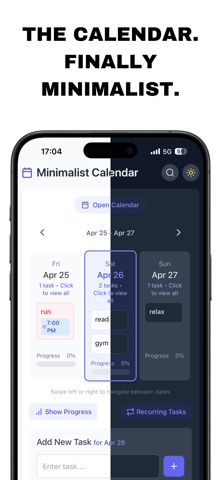
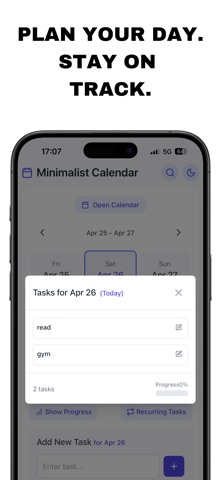
Three days. That is the whole idea. Most calendars show you a month you cannot act on. syko shows you yesterday, today and tomorrow — the only days you can actually do anything about. Swipe, and the days move one at a time. WHAT IT DOES Three-day view. One screen, three days, no pinching or zooming to find today. Tasks that take a minute to add. Type it, tap plus. Add a time, a colour or a note only if you want one. Reminders that actually arrive. Up to four per task, from five minutes to two weeks ahead. Pick how many you want, then how far in advance each one lands. Repeats, properly. Every day, or any combination of weekdays — Mondays and Thursdays, or just Sundays. Your existing calendar, imported. Apple, Google, Outlook and Exchange all come in through the accounts already on your iPhone. No extra sign-in, no passwords handed over. Progress you can see. A quiet completion bar per day, and an Analysis tab that reads your real history: how much you finish, which weekdays run heavy, how steady you have been. BUILT TO BE KIND syko is designed with ADHD in mind. It never turns red at you, never guilts you, and never invents a streak to break. A day you did not finish looks dim, not alarming. Patterns only appear once there is enough evidence to mean something — no verdicts from three data points. PRIVATE BY DESIGN Everything lives on your iPhone. No account to create, no server to trust, no tracking. Delete the app and the data goes with it. Native, and it feels like it. Built in Swift for iOS, so it opens instantly and moves like the rest of your phone.
What's new · 1.3
syko is now fully native. The app has been rebuilt from the ground up in Swift. It opens faster, scrolls at full frame rate and uses less battery. All your tasks carry across untouched. NEW Reminders, rethought. Choose how many reminders a task gets — up to four — then set each one anywhere from five minutes to two weeks ahead. The old fixed options are gone. Repeats on several weekdays. A task can now repeat every Monday and every Thursday, not just one day a week. Press and hold. Hold a day to see everything on it. Hold a task to open it, read the notes and edit it. Imported events that repeat are now recognised, so you can turn them into repeating tasks in one tap instead of importing the same event over and over. A redesigned three-day calendar that glides between days, with the day you are on always in the middle. An Analysis tab that shows your completion trend, your heavy weekdays and the patterns in how you actually work — as charts, not paragraphs. Light and dark, with a one-tap switch in the top corner. A new icon and a new name: the Minimalist Calendar is now syko. Everything still stays on your device. No account, no server, no tracking.
Details