

xTune - Lyrion Remote & Player
斌 胡 · Music
Independent analytics for this App Store listing. AppTracker is not affiliated with 斌 胡.
Chart standing · US
What changed · US
Listing changes AppTracker has observed for this app in this storefront — new versions, price moves, rating shifts, and store copy.
NEW FEATURES Cached Playback Cached playback is built for unstable mobile networks. It pre-caches local library files from your playlist onto your iOS device, giving the built-in player a steady stream to work with. • Experimental. Turn on "Local Media Service" under Experimental Features first. A new "Cached Playback" section then appears in the built-in player settings. • One-tap mode switch. A toggle in the top-right corner of the Now Playing dialog flips between Remote and Cached mode. • Cache status in the queue. Every track in the current playlist shows its state: green for cached, yellow for caching. • Dedicated status page. A new page shows cached playback details. It opens by itself when the server goes offline during playback. • Works in CarPlay. Cached playback is available in the car as well, so you can keep listening with the built-in player. • MP3 by default. Your Lyrion Music Server needs MP3 transcoding enabled. • Local library only. Cached playback does not cover radio or streaming services, so check that your content is supported before you rely on it. Other • Favorites sorting. Sort your favorites by original order, reverse order, or alphabetically. Radio keeps its own separate sort setting. • Connect by hostname. A new switch in Server settings. It is off by default, which means the IP address is preferred. Adjust it to suit your network. • Faster Boxset view. All songs now load in one pass, cutting the waiting and scrolling stutter caused by paged loading. • AND / OR filtering. The filter box at the top of lists now supports both match modes. Configure it under Advanced settings. • Go to track in release. A new option in the three-dot menu of search results jumps straight to that track's position in the album. • Force the volume slider. For players that don't support volume control, you can now make the volume bar always visible in player settings. • Tap lyrics to dismiss. Tap anywhere in the lyrics detail page to close it, with no need to find the close button. • Pause on disconnect. Playback now pauses when a Bluetooth headset or other audio device disconnects, so audio doesn't suddenly blast from the speaker. IMPROVEMENTS • "Discover Music" performance. Fixed a deadlock that hurt page loading and interaction. • Now Playing info loads more reliably. Album, artist, and work details no longer leave you staring at a blank page. • Lock screen artwork caching. Recommended covers now use an in-memory cache. We removed the synchronous disk read and repeated decoding on every render. • Consistent player and server pages. The player management page and the server switching page now share one color scheme and grouped background, in both light and dark mode. • Consistent purchase pages. Grouped backgrounds and primary buttons now follow a single pattern. • Smoother full-screen entry. The bottom button row now animates in together with the content instead of appearing on its own. • Better iPad portrait transition. The playlist no longer fades in early. It rises with the main view first, then fades in. BUG FIXES • Fixed Live Activity artwork problems. Covers no longer mismatch after a track change, oversized covers are no longer dropped, and duplicate icons no longer linger. • Fixed off-center artwork in the Vinyl theme, so covers stay visually centered. • Fixed artwork that was too wide during iPad portrait full-screen playback. • Favorites no longer fail as a whole batch. A failed artist avatar or playlist cover now degrades gracefully instead of taking the rest down with it. • Fixed misaligned icon and text in the experimental features info card. • Fixed DSTM control commands being sent to the wrong player. • Fixed various other bugs and copy errors, improving overall stability and text accuracy.
In-app purchases · US
What this app sells inside itself, grouped by kind and priced for this storefront.
Screenshots

Keywords this app targets
Search terms AppTracker associates with this app — estimates, not search volume. ❝ = in the app's title; a highlighted number is its current position for that term.
Similar apps
Competitors and close alternatives, as estimated by AppTracker.
 Lyrioo - Lyrion Remote Control
Simon Maurice
Lyrioo - Lyrion Remote Control
Simon Maurice
 Lysoniq
Tim Fagan
Lysoniq
Tim Fagan
 Music X - Music Offline Player
Vibe Music Limited
1 shared topic · 1 shared title word
Music X - Music Offline Player
Vibe Music Limited
1 shared topic · 1 shared title word
 RetroTune
Tsuyoshi Terasaki
1 shared topic
RetroTune
Tsuyoshi Terasaki
1 shared topic
 MonkeyMote Music Remote
Martin Tofall
1 shared topic · 1 shared title word
MonkeyMote Music Remote
Martin Tofall
1 shared topic · 1 shared title word
 Musa Player
Lucas Raggers
1 shared title word
Musa Player
Lucas Raggers
1 shared title word
 Lyra - Music, Radio, eSound
Nadia Ferrari
Lyra - Music, Radio, eSound
Nadia Ferrari
 Music Tune - Offline Player
LUCKY LUKE'S FOODS, INC.
1 shared title word
Music Tune - Offline Player
LUCKY LUKE'S FOODS, INC.
1 shared title word
About
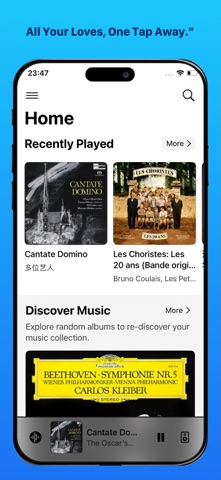
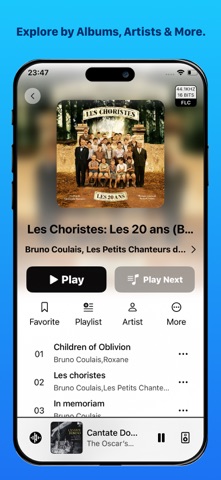
xTune is a remote app for LMS (Lyrion Music Server/Logitech Media Server) with a built-in player. Compatible with all LMS-based systems including Daphile and piCorePlayer. Key Features: - Flexible Browsing: Navigate your music by Album, Artist, Genre, Year, Work, or Folder. - Streaming Services: Supports Spotify, Qobuz, Tidal, Podcasts, and BBC Sounds. - Playback & Discovery: Includes favorites, playlists, LMS internet radio, Local play history, Random Play, online lyrics. - Built-in Player*: Plays music directly on your iPhone/iPad, supporting FLAC, ALAC, MP3, OPUS, DSD, with Gapless Playback & USB DAC output. - VU meter & spectrum display (available on built‑in player only). *The built-in player is unlocked via a one-time in-app purchase.
What's new · 3.8.18
NEW FEATURES Cached Playback Cached playback is built for unstable mobile networks. It pre-caches local library files from your playlist onto your iOS device, giving the built-in player a steady stream to work with. • Experimental. Turn on "Local Media Service" under Experimental Features first. A new "Cached Playback" section then appears in the built-in player settings. • One-tap mode switch. A toggle in the top-right corner of the Now Playing dialog flips between Remote and Cached mode. • Cache status in the queue. Every track in the current playlist shows its state: green for cached, yellow for caching. • Dedicated status page. A new page shows cached playback details. It opens by itself when the server goes offline during playback. • Works in CarPlay. Cached playback is available in the car as well, so you can keep listening with the built-in player. • MP3 by default. Your Lyrion Music Server needs MP3 transcoding enabled. • Local library only. Cached playback does not cover radio or streaming services, so check that your content is supported before you rely on it. Other • Favorites sorting. Sort your favorites by original order, reverse order, or alphabetically. Radio keeps its own separate sort setting. • Connect by hostname. A new switch in Server settings. It is off by default, which means the IP address is preferred. Adjust it to suit your network. • Faster Boxset view. All songs now load in one pass, cutting the waiting and scrolling stutter caused by paged loading. • AND / OR filtering. The filter box at the top of lists now supports both match modes. Configure it under Advanced settings. • Go to track in release. A new option in the three-dot menu of search results jumps straight to that track's position in the album. • Force the volume slider. For players that don't support volume control, you can now make the volume bar always visible in player settings. • Tap lyrics to dismiss. Tap anywhere in the lyrics detail page to close it, with no need to find the close button. • Pause on disconnect. Playback now pauses when a Bluetooth headset or other audio device disconnects, so audio doesn't suddenly blast from the speaker. IMPROVEMENTS • "Discover Music" performance. Fixed a deadlock that hurt page loading and interaction. • Now Playing info loads more reliably. Album, artist, and work details no longer leave you staring at a blank page. • Lock screen artwork caching. Recommended covers now use an in-memory cache. We removed the synchronous disk read and repeated decoding on every render. • Consistent player and server pages. The player management page and the server switching page now share one color scheme and grouped background, in both light and dark mode. • Consistent purchase pages. Grouped backgrounds and primary buttons now follow a single pattern. • Smoother full-screen entry. The bottom button row now animates in together with the content instead of appearing on its own. • Better iPad portrait transition. The playlist no longer fades in early. It rises with the main view first, then fades in. BUG FIXES • Fixed Live Activity artwork problems. Covers no longer mismatch after a track change, oversized covers are no longer dropped, and duplicate icons no longer linger. • Fixed off-center artwork in the Vinyl theme, so covers stay visually centered. • Fixed artwork that was too wide during iPad portrait full-screen playback. • Favorites no longer fail as a whole batch. A failed artist avatar or playlist cover now degrades gracefully instead of taking the rest down with it. • Fixed misaligned icon and text in the experimental features info card. • Fixed DSTM control commands being sent to the wrong player. • Fixed various other bugs and copy errors, improving overall stability and text accuracy.
Details