

CursiveAI: Text to Handwriting
Sherzod Saidmaksumov · Productivity
Independent analytics for this App Store listing. AppTracker is not affiliated with Sherzod Saidmaksumov.
Chart standing · US
What changed · US
Listing changes AppTracker has observed for this app in this storefront — new versions, price moves, rating shifts, and store copy.
- Redesigned Write, Style, Results, and Settings screens - Add images directly inside a document, then resize and align them - Insert and edit inline or block math equations with alignment and color controls - Choose Print or Photo layouts with regional paper options and notebook-style scenes - Use new realism presets with controls for word placement, line starts, spacing, ink flow, and letterform variation - Apply colors to selected text, equations, underlines, and strikethroughs - Navigate multi-page results with a page grid and jump controls, then save or share an individual page - Use the app interface in English, German, or Russian - Enjoy a new app icon, refreshed splash experience, and export reliability improvements
Ratings breakdown · US
The star breakdown behind this app's rating in this storefront.
In-app purchases · US
What this app sells inside itself, grouped by kind and priced for this storefront.
Screenshots



About
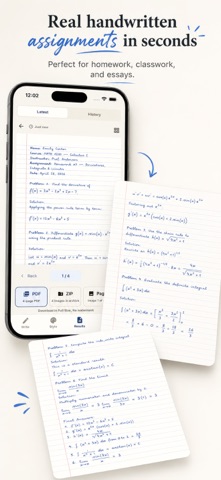
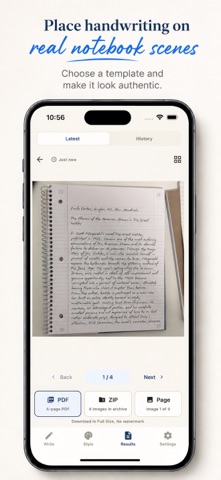
Convert text to handwriting and create realistic handwritten notes, assignments, letters, worksheets, and PDF pages. Convert Text to Handwriting AI is a handwriting generator and editor for iPhone and iPad. Type or paste text, import a PDF, DOCX file, or image, then edit your content and turn it into naturally handwritten pages. CREATE AND EDIT - Format text with headings, bold, underline, strikethrough, lists, alignment, and custom colors - Build editable tables for schedules, worksheets, and organized notes - Insert and edit inline or block math equations - Add images inside your document, then resize and align them - Create multi-page documents with undo and redo MAKE HANDWRITING LOOK NATURAL - Choose from 95 handwriting styles - Generate handwriting for text in 40+ languages - Select a realism preset or fine-tune the result - Adjust font size, ink color, line height, letter spacing, word spacing, and paragraph spacing - Control word placement, line starts, line spacing, ink flow, and letterform variation - Add paper texture, shading, blur, shadows, and page rotation DESIGN THE PAGE - Choose a clean Print layout or a Photo-style notebook scene - Use regional paper formats in portrait or landscape - Pick lined, grid, notebook, and exercise-book looks - Adjust margins, paper backgrounds, and page settings IMPORT, PREVIEW, AND EXPORT - Turn PDF, DOCX, and image imports into editable handwritten pages - Review multi-page results in a page grid and jump to any page - Save or share an individual page - Export polished PDFs, image files, or ZIP bundles Use Convert Text to Handwriting AI as a text to handwriting converter, PDF to handwriting tool, handwritten assignment maker, or realistic handwriting generator. It is built for study notes, homework, worksheets, letters, printable pages, and everyday writing. Some final exports and premium styles or effects may require Premium. Terms of Use (EULA): https://www.apple.com/legal/internet-services/itunes/dev/stdeula/
What's new · 3
- Redesigned Write, Style, Results, and Settings screens - Add images directly inside a document, then resize and align them - Insert and edit inline or block math equations with alignment and color controls - Choose Print or Photo layouts with regional paper options and notebook-style scenes - Use new realism presets with controls for word placement, line starts, spacing, ink flow, and letterform variation - Apply colors to selected text, equations, underlines, and strikethroughs - Navigate multi-page results with a page grid and jump controls, then save or share an individual page - Use the app interface in English, German, or Russian - Enjoy a new app icon, refreshed splash experience, and export reliability improvements
Details