

Noota: AI Note Taker & Memos
Anh Nguyen · Productivity
Independent analytics for this App Store listing. AppTracker is not affiliated with Anh Nguyen.
Chart standing · US
What changed · US
Listing changes AppTracker has observed for this app in this storefront — new versions, price moves, rating shifts, and store copy.
Share to Noota from any app, and keep recording through calls. • Share to Noota — send a recording from Voice Memos, a video from Photos, a PDF, or a YouTube link from any app. It waits at the top of your notes until you tap it. • Recording carries on — an incoming call no longer stops it unless you answer, recording resumes after the call, and Noota tells you when the microphone hears nothing. • Live Activity and a Record control — follow the timer on the Lock Screen and in the Dynamic Island, pause or mark a moment from there, and start recording from Control Center or the Action button. • Mark this moment — tap the bookmark while recording to find that part of the transcript later. • Vietnamese, Thai, and Russian recordings are now transcribed in their own language. • More files open, including editable Voice Memos recordings, YouTube Shorts, and live streams. • Bug fixes and improvements.
Ratings breakdown · US
The star breakdown behind this app's rating in this storefront.
In-app purchases · US
What this app sells inside itself, grouped by kind and priced for this storefront.
Screenshots



About
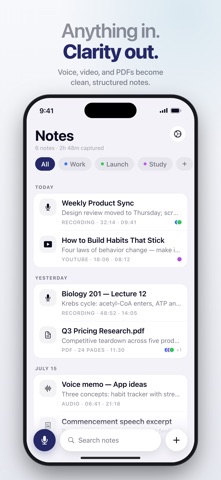
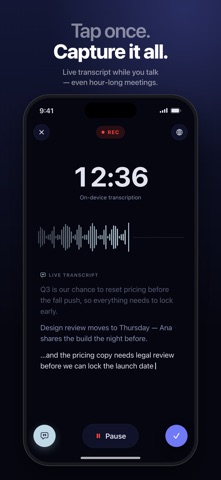
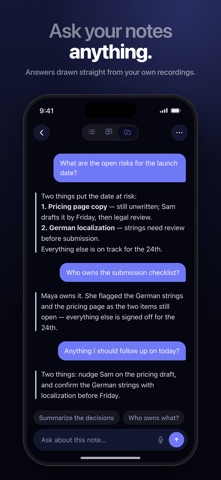
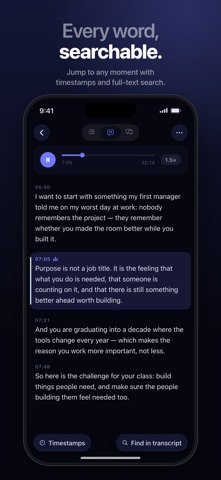
Noota turns meetings, lectures, interviews, YouTube videos, and PDFs into clear, organized notes. Get transcripts, summaries, notes, flashcards, and quizzes from almost any content — all in one app. Whether you're studying, working, researching, or capturing ideas, Noota helps you understand information faster and never miss what matters. RECORD ANYTHING • Record meetings, lectures, interviews, and voice notes • Watch the transcript appear as you speak (iOS 26 or later) • Import audio and video files • Turn YouTube videos into notes and highlights • Upload PDFs and documents, or scan paper with your camera • Search across all your transcripts instantly ASK SIRI, HANDS FREE • "Hey Siri, start recording in Noota" — start, pause, resume, or stop • Open or search your notes by voice • Create a note by voice — name it, dictate it, and tag it • On iOS 27, ask in ordinary words — there's no phrase to memorize • Ask a question about a note and hear the answer read back • Summarize a note, or build a quiz or flashcards, just by asking • Start recording from the Home Screen or Lock Screen widget • Find notes in Spotlight and open straight to them • Add Noota to your own automations in the Shortcuts app PRIVATE BY DESIGN Many transcription apps send recordings to the cloud. Noota processes transcription on your device. • On-device transcription — your audio is never sent to AI providers • No account required to get started • Optional sync, only if you choose it • Spotlight shows note titles and summaries, never your transcripts • Export or delete your notes anytime CLEAR NOTES INSTANTLY • Accurate transcripts in seconds • AI summaries, key takeaways, action items, and decisions • Ask questions about your notes and get instant answers • Translate a summary into another language, on your device • Math formulas render properly, from summaries and transcripts to quizzes and exports • Find information without rewatching or rereading content STUDY SMARTER • Create flashcards from any note • Generate quizzes from lectures and study materials • Turn long recordings into bite-sized learning content • Review faster and retain more information EXPORT AND SHARE • Export to PDF, Markdown, or plain text • Share a summary, a quiz, or a flashcard set in a tap • Share summaries with classmates, colleagues, and clients • Organize notes by class, project, or topic IPHONE, IPAD, MAC, AND APPLE WATCH • Record from your wrist — Noota on Apple Watch sends each recording to your iPhone • A native Mac app, with recording in a panel beside your notes • Full size on iPad, and side by side with another app • One subscription for iPhone, iPad, and Mac • Available in 14 languages PERFECT FOR • Meetings and team calls • Lectures and study sessions • Interviews and research • Voice notes and personal ideas • YouTube videos, PDFs, and documents Download Noota and turn everything you hear, watch, and read into clear notes. Privacy Policy: https://www.noota.app/privacy-policy Terms of Use: https://www.noota.app/terms-of-use
What's new · 2.1.2
Share to Noota from any app, and keep recording through calls. • Share to Noota — send a recording from Voice Memos, a video from Photos, a PDF, or a YouTube link from any app. It waits at the top of your notes until you tap it. • Recording carries on — an incoming call no longer stops it unless you answer, recording resumes after the call, and Noota tells you when the microphone hears nothing. • Live Activity and a Record control — follow the timer on the Lock Screen and in the Dynamic Island, pause or mark a moment from there, and start recording from Control Center or the Action button. • Mark this moment — tap the bookmark while recording to find that part of the transcript later. • Vietnamese, Thai, and Russian recordings are now transcribed in their own language. • More files open, including editable Voice Memos recordings, YouTube Shorts, and live streams. • Bug fixes and improvements.
Details