

SuperMote: Smart TV Remote
Fan Wai Ho · Utilities
Independent analytics for this App Store listing. AppTracker is not affiliated with Fan Wai Ho.
Chart standing · US
What changed · US
Listing changes AppTracker has observed for this app in this storefront — new versions, price moves, rating shifts, and store copy.
Fixed bugs and improved performance.
Price & rating history · US
Reconstructed from the listing changes AppTracker has observed in this storefront. A field is charted once it has changed more than once, and each line starts at the value it moved from.
Average rating · ★ 4.92 now · 2 changes on record
Ratings breakdown · US
The star breakdown behind this app's rating in this storefront.
Screenshots


About
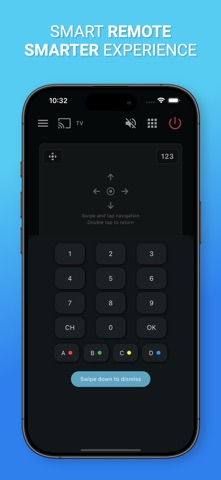
Lost your TV remote again? SuperMote turns your phone into a simple, fast, and reliable smart TV remote. Connect your phone and TV to the same Wi-Fi network, scan for nearby devices, pair in seconds, and control your TV from one clean remote interface. Supported TVs and Devices SuperMote is designed to work with many Wi-Fi enabled smart TVs and streaming devices, including: • Samsung Smart TVs • LG Smart TVs • Sony BRAVIA TVs • Google TV devices • TCL smart TVs • Hisense smart TVs • Philips smart TVs • Xiaomi TVs • NVIDIA SHIELD TV • Chromecast with Google TV Compatibility may vary by TV brand, model, region, software version, and network remote control settings. Key Features • Smart TV Remote Control Control your TV with familiar buttons for power, volume, mute, channels, navigation, playback, and more. • Quick Device Discovery SuperMote scans your local Wi-Fi network and helps you find supported smart TVs nearby. • Easy Pairing Connect using your TV’s standard on-screen pairing or approval flow. No complicated setup required. • Touchpad Navigation Use swipe and tap gestures to move through menus and apps on supported TVs. • Multi-TV Support Save and switch between multiple TVs in your home, perfect for bedrooms, living rooms, and shared spaces. • Clean Remote Interface A modern, responsive layout designed for everyday TV control. • Local Network Control SuperMote works over your Wi-Fi network. Your phone and TV must be connected to the same network. How to Get Started 1. Connect your phone and TV to the same Wi-Fi network. 2. Open SuperMote and scan for available devices. 3. Select your TV and complete pairing on the TV screen. 4. Start controlling your TV from your phone. Troubleshooting If your TV is not found, please make sure: • Your phone and TV are on the same Wi-Fi network • Network remote control is enabled on your TV • Your TV allows pairing or device approval • Your TV is powered on and connected to the network Disclaimer SuperMote is an independent application and is not affiliated with, endorsed by, or sponsored by any TV manufacturer. All trademarks are the property of their respective owners. Download SuperMote and enjoy a smarter way to control your TV.
What's new · 1.4.5
Fixed bugs and improved performance.
Details