

DriveMind: Dash Cam & Mileage
Jesvin Jerry · Navigation
Independent analytics for this App Store listing. AppTracker is not affiliated with Jesvin Jerry.
Chart standing · US
What changed · US
Listing changes AppTracker has observed for this app in this storefront — new versions, price moves, rating shifts, and store copy.
What’s new in Version 4.0: FRIENDS & STANDINGS Add the people you drive with and see how your weeks compare. You choose what each friend can see, distance, drives, your heat map, your badges, one permission at a time, and you can change or stop any of it whenever you like. Discover the roads you both drive without either of you sharing a map. SORT BUSINESS FROM PERSONAL Swipe through your drives to sort them, attach a client, and let DriveMind learn the routes you always classify the same way. Edit a whole month in one go, and get a reminder when drives are waiting. A REBUILT TAX REPORT Your mileage deduction, split by rate class and filterable by vehicle or client, with an odometer check and CSV or PDF export. WHAT YOUR CAR ACTUALLY COSTS Log running costs and keep receipts. DriveMind compares the standard mileage rate against your actual expenses. PRIVATE PLACES Draw a circle around home. Anything inside it is removed from what you share, before it leaves the phone. ALSO NEW Odometer readings, so your report can account for miles the app didn't record. A quicker first-run setup that only asks what's relevant to you.
Ratings breakdown · US
The star breakdown behind this app's rating in this storefront.
In-app purchases · US
What this app sells inside itself, grouped by kind and priced for this storefront.
Screenshots




Keywords this app targets
Search terms AppTracker associates with this app — estimates, not search volume. ❝ = in the app's title; a highlighted number is its current position for that term.
Similar apps
Competitors and close alternatives, as estimated by AppTracker.
 Driver: Driving & Dash Cam App
Driver Technologies Inc.
1 shared topic · 3 shared title words
Driver: Driving & Dash Cam App
Driver Technologies Inc.
1 shared topic · 3 shared title words
 DriveDNA: Trip Tracker
Muhammad Hanif Sugiyanto
DriveDNA: Trip Tracker
Muhammad Hanif Sugiyanto
 Gas Mileage Tracker - CarDrive
Oleksandr Moroz
1 shared title word
Gas Mileage Tracker - CarDrive
Oleksandr Moroz
1 shared title word
 Mileage Tracker by DriveStats
WAN LUTFI WAN MD HATTA
1 shared title word
Mileage Tracker by DriveStats
WAN LUTFI WAN MD HATTA
1 shared title word
 DriveTracker - Driving Log
Ryunosuke Shibuya
DriveTracker - Driving Log
Ryunosuke Shibuya
 DrivingReport: Auto Log
Makoto Miura
DrivingReport: Auto Log
Makoto Miura
 MileIQ: Mileage Tracker & Log
MileIQ Inc.
1 shared topic · 1 shared title word
MileIQ: Mileage Tracker & Log
MileIQ Inc.
1 shared topic · 1 shared title word
 Milesheet
Remiam LTD
Milesheet
Remiam LTD
About
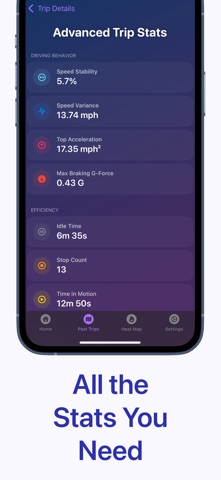
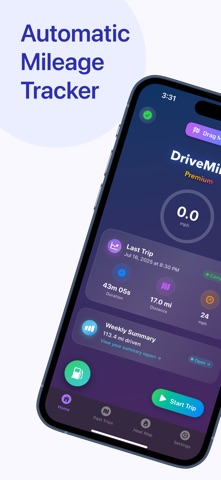
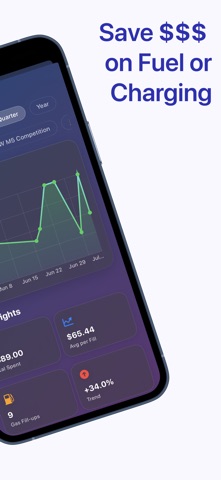
DriveMind logs your drives for you. Automatic mileage tracking, tax-ready reports, a built-in dash cam, and real analytics on how you actually drive — all in one app. Start driving and DriveMind records the trip on its own. You never open the app. When you park, the trip ends and saves itself, with the route, distance, speed and the place you drove to already filled in. AUTOMATIC BY DEFAULT • AutoStart — detects when you start driving and records without a single tap. Arrive, and the trip closes itself. • Named destinations — DriveMind learns the places you visit and labels your drives "Home → Office" instead of a pair of coordinates. Round trips are recognized and grouped together. • DriveMind Intelligence — on-device machine learning tags each drive as Commute, Errand, Leisure and more. • Automatic vehicle detection — connect to your car's CarPlay or Bluetooth and DriveMind knows which vehicle you're in, and stamps the trip with it. • Siri & Shortcuts — "Hey Siri, start a trip." MILEAGE & TAXES • Tax Reports — business, personal and custom purposes, the IRS standard rate for the year in question, exported as PDF or CSV for your accountant. • Purpose rules — classify drives automatically by the day and time they happen, so your weekday commute logs itself as Business. • Per-vehicle mileage — filter and report by car, for households and businesses running more than one. • Custom tags — "Gym", "Class", "Client site". Label trips your way and filter by them. KNOW HOW YOU DRIVE • DriveScore — a personalized score that reflects your driving style, updated as you drive. • Trip Heat Map — every mile you've ever driven, color-coded by speed and filterable by time, with pins marking your top speed, hardest acceleration and hardest braking. • Trip Replay — scrub through a drive like video and watch speed, time and position move with you. • Summary Report — 7-day, 30-day and all-time breakdowns with smart insights and shareable cards. • Advanced stats — speed variance, idle time, stop count, peak G-forces, carbon impact estimate and more. • Hard braking detection — sudden stops flagged on your trip map as tappable pins. YOUR CAR, DOCUMENTED • Dash Cam — turn your iPhone into a dash cam. High-quality video, stored on your device, no extra hardware needed. • Insurance & registration vault — keep your documents in the app, scanned with the camera or imported as PDFs, with reminders before they expire. • Fuel tracking — log fill-ups and see cost per mile, efficiency trends and what you're spending over time. • Flags & favorites — mark a spot mid-drive with one tap, star the drives worth keeping, and add notes you can edit later. FOR ENTHUSIASTS • Drag Mode — time 0–60 mph, 0–100 km/h, the quarter mile, or a distance you define. Auto-stops, replayable, and saved to your performance history. • DriveSense — on-device audio recognition listens for car horns and emergency sirens and marks them on your trip map. • Achievements & XP — optional, off by default, for anyone who likes a streak worth keeping. PRIVATE BY DESIGN Every drive is recorded and analyzed on your device. Trips, places and fuel logs back up to your own iCloud, so nothing is lost when you change phones. Your insurance and registration documents stay on your iPhone and are kept out of backups unless you turn that on yourself. ALSO USEFUL FOR • Documenting a trip for an insurance claim or police report. • Keeping a clear record of your driving history for personal or official use. • Providing evidence in the event of a dispute. DriveMind is free to use. A subscription — monthly, yearly, or a one-time lifetime purchase — removes ads and unlocks DriveScore, the dash cam, advanced analytics, the all-time heat map, automatic trip tagging, DriveSense and more. Download DriveMind and take control of your driving history. Terms of Use: https://www.apple.com/legal/internet-services/itunes/dev/stdeula/
What's new · 4.0
What’s new in Version 4.0: FRIENDS & STANDINGS Add the people you drive with and see how your weeks compare. You choose what each friend can see, distance, drives, your heat map, your badges, one permission at a time, and you can change or stop any of it whenever you like. Discover the roads you both drive without either of you sharing a map. SORT BUSINESS FROM PERSONAL Swipe through your drives to sort them, attach a client, and let DriveMind learn the routes you always classify the same way. Edit a whole month in one go, and get a reminder when drives are waiting. A REBUILT TAX REPORT Your mileage deduction, split by rate class and filterable by vehicle or client, with an odometer check and CSV or PDF export. WHAT YOUR CAR ACTUALLY COSTS Log running costs and keep receipts. DriveMind compares the standard mileage rate against your actual expenses. PRIVATE PLACES Draw a circle around home. Anything inside it is removed from what you share, before it leaves the phone. ALSO NEW Odometer readings, so your report can account for miles the app didn't record. A quicker first-run setup that only asks what's relevant to you.
Details