

Video Grid Collage Maker
Aliaksandr Andrashuk · Photo & Video
Independent analytics for this App Store listing. AppTracker is not affiliated with Aliaksandr Andrashuk.
Chart standing · US
What changed · US
Listing changes AppTracker has observed for this app in this storefront — new versions, price moves, rating shifts, and store copy.
NEW: PUZZLE One video or photo fills the whole grid, and every cell shows its own piece of the frame. The pieces slide in and come together into one picture. Pick a Puzzle template at the top of the start screen — strips, 2×2, 2×3 or 3×3 — and choose a single clip. ALSO NEW IN VERSION 3 – Picture in Picture: a second video in a small window in the corner – Gradient layouts: blend two cells into one seamless shot – Remove Background: cut out people, pets or objects in photos and videos – Reverse any video – Auto Captions in dozens of languages – Multi-track timeline: several clips in each cell, with split, reorder and snapping to clip edges and the playhead – Photo and video overlays – Music and sound with volume and fades – Speed from 0.25× to 5× – 16 filters, color adjustments, Flip, Mirror and Rotate – Borders, rounded corners and photo or video backgrounds – Text in 20 fonts with outlines and HDR glow – Animations with spring and bouncy timing – Up to 9 cells and 100 layouts – Export up to 4K at 60 fps with HDR – Undo and redo, saved projects and landscape editing We ship updates almost every week — send us your ideas!
Price & rating history · US
Reconstructed from the listing changes AppTracker has observed in this storefront. A field is charted once it has changed more than once, and each line starts at the value it moved from.
Average rating · ★ 4.92 now · 3 changes on record
Ratings breakdown · US
The star breakdown behind this app's rating in this storefront.
Screenshots



About
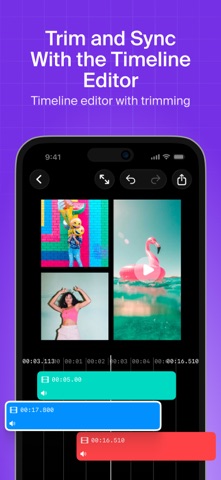
The easiest way to put several videos in one frame. Side by side, in a grid or picture-in-picture: pick a template, drop in your clips, and it's ready to post. No editing skills, no learning curve. Most video apps today feel like an airplane cockpit. Video Grid Collage keeps it simple: the grid does the work, you just choose the clips. HOW IT WORKS 1. Pick a template: vertical for Reels, TikTok and Shorts, square, landscape, animated or gradient 2. Add videos and photos from your library or Files: the grid fills itself 3. Export and share: sharp up to 4K, with your iPhone's HDR intact YOUR FIRST PROJECT IS ALWAYS FREE Every feature, unlimited exports, no watermark. Pro unlocks every project after that. NEW: GRADIENT LAYOUTS Instead of a hard line between two clips, a soft fade blends them into one shot. Start from a Gradient template, or drag one slider in any two-cell layout. PERFECT FOR – Reactions and commentary – Before & after – Comparisons and duets – Multi-angle moments – Travel and year-in-review recaps – Birthdays, weddings and family memories WHY CREATORS PICK IT It's all there, and it stays out of your way until you need it: – 100 layouts with up to 9 cells playing at once – Multi-track timeline: every cell plays its own sequence of clips, up to 100 in the grid — trim, split, reorder and snap them into place – Overlays: layer photos and videos anywhere on top, picture-in-picture style – Auto Captions: turn speech into editable subtitles in dozens of languages – Remove Background: cut out people, pets or objects in photos and videos – Text in 20 fonts with colors, outlines and HDR glow – Animations: fade, slide, zoom and pop, with spring and bouncy timing – Speed from 0.25× to 5×, Reverse, Flip, Mirror and Rotate – 16 filters plus brightness, contrast, saturation, exposure, temperature and hue – Music: add songs from your library or Files, set the volume, fade in and out – Background: a color, transparent, or any photo or video – Spacing, rounded corners and borders – 9 aspect ratios: 9:16 for Reels, TikTok and Shorts, 1:1 and 4:5 for feed, 16:9 for YouTube – Undo and redo, saved projects, portrait and landscape editing Everything renders right on your iPhone. Video Grid Collage is free to download; optional in-app purchases unlock Pro. We ship updates almost every week — send us your ideas and we will build them. Terms of use https://www.apple.com/legal/internet-services/itunes/dev/stdeula/
What's new · 3.27
NEW: PUZZLE One video or photo fills the whole grid, and every cell shows its own piece of the frame. The pieces slide in and come together into one picture. Pick a Puzzle template at the top of the start screen — strips, 2×2, 2×3 or 3×3 — and choose a single clip. ALSO NEW IN VERSION 3 – Picture in Picture: a second video in a small window in the corner – Gradient layouts: blend two cells into one seamless shot – Remove Background: cut out people, pets or objects in photos and videos – Reverse any video – Auto Captions in dozens of languages – Multi-track timeline: several clips in each cell, with split, reorder and snapping to clip edges and the playhead – Photo and video overlays – Music and sound with volume and fades – Speed from 0.25× to 5× – 16 filters, color adjustments, Flip, Mirror and Rotate – Borders, rounded corners and photo or video backgrounds – Text in 20 fonts with outlines and HDR glow – Animations with spring and bouncy timing – Up to 9 cells and 100 layouts – Export up to 4K at 60 fps with HDR – Undo and redo, saved projects and landscape editing We ship updates almost every week — send us your ideas!
Details