

Remove People from Photos
HYPER IGNITION SYSTEMS - FZCO · Graphics & Design
Independent analytics for this App Store listing. AppTracker is not affiliated with HYPER IGNITION SYSTEMS - FZCO.
Chart standing · US
What changed · US
Listing changes AppTracker has observed for this app in this storefront — new versions, price moves, rating shifts, and store copy.
This update makes the finishing steps smoother. - Save and Share now reflect your current access automatically. - Review requests no longer interrupt the removal process; they appear only after a photo is successfully saved.
Price & rating history · US
Reconstructed from the listing changes AppTracker has observed in this storefront. A field is charted once it has changed more than once, and each line starts at the value it moved from.
Average rating · ★ 4.25 now · 2 changes on record
Ratings breakdown · US
The star breakdown behind this app's rating in this storefront.
In-app purchases · US
What this app sells inside itself, grouped by kind and priced for this storefront.
Screenshots



About
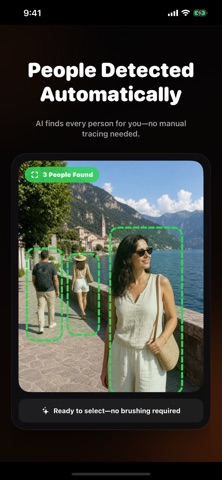
Remove people from photos easily using the ultimate AI person remover and photo eraser designed to make your visual memories flawless. Whether a stranger walked into your shot, a crowd ruined a vacation photo, or photobombers took center stage, our app gives you the power to erase unwanted people and clean up your background in seconds. Achieve studio-quality photo editing results without needing complex desktop software. Our advanced smart magic object removal technology seamlessly detects human figures, background passerby, and unwanted clutter, blending the background naturally so your original image looks completely untouched. Key Features: - AI Powered Person Remover: Instantly remove people from photos with pinpoint precision and natural background fill. - Background Cleanup Tool: Easily wipe away crowds, strangers, tourists, and photobombers from your favorite shots. - Smart Object Touch Up: Swiftly erase unwanted items, wires, debris, or distracting background elements. - Natural Seamless Blending: Advanced AI algorithms intelligently recreate textures, shadows, and lighting behind deleted subjects. - High Resolution Export: Save and share your retouched pictures in high definition without losing quality or detail. - Simple One Tap Interface: Intuitively select and delete any person or object with smooth, effortless controls. Why You'll Love It: - Vacation Pictures Saved: Transform crowded tourist landmarks into private, serene photo moments. - Perfect Portraits: Remove random passersby, background distractions, or photobombers from family photos. - Clean Social Media Content: Create stunning, distraction-free imagery for Instagram, travel blogs, and profile pictures. - Fast Professional Results: Retouch photos in seconds without spending hours learning complicated editing software. Download now to effortlessly remove people from photos and transform your picture library into clean, picture-perfect memories! Subscription Information: – App usage is limited and needs a subscription for unlimited access. – Subscription Length: Weekly and Yearly – Free Trial: If offered, it will automatically convert to a paid subscription unless canceled. – Payment: Charged to your Apple ID account at confirmation of purchase. – Auto-Renewal: Automatically renews unless canceled at least 24 hours before the end of the current period. – Renewal Charge: Your account will be charged within 24 hours before the end of the current period, based on the selected plan. – Managing Subscription: Users can manage subscriptions and turn off auto-renewal in Account Settings on the App Store. – Free Trial Policy: Any unused portion of a free trial will be forfeited upon purchasing a subscription. Terms of Use: https://www.apple.com/legal/internet-services/itunes/dev/stdeula/ Privacy Policy: https://hyperignitionsystems.com/privacy-policy
What's new · 2.6
This update makes the finishing steps smoother. - Save and Share now reflect your current access automatically. - Review requests no longer interrupt the removal process; they appear only after a photo is successfully saved.
Details