

Scroll the Volume
Stefano Bergamini · Utilities
Independent analytics for this App Store listing. AppTracker is not affiliated with Stefano Bergamini.
Chart standing · US
What changed · US
Listing changes AppTracker has observed for this app in this storefront — new versions, price moves, rating shifts, and store copy.
Add Watch Crown sensitivity settings for Apple Watch, in the iPhone app.
Price & rating history · US
Reconstructed from the listing changes AppTracker has observed in this storefront. A field is charted once it has changed more than once, and each line starts at the value it moved from.
Average rating · ★ 0.00 now · 3 changes on record
In-app purchases · US
What this app sells inside itself, grouped by kind and priced for this storefront.
Screenshots





About
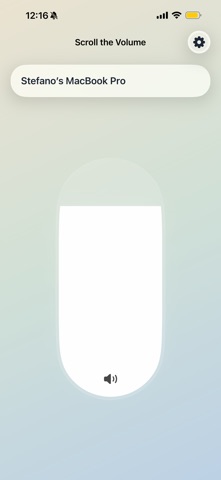
Scroll the Volume Companion lets you control your Mac’s volume from your iPhone and Apple Watch. Pair your iPhone with Scroll the Volume on Mac, then use your phone as a simple remote for volume control. Apple Watch support works through the iPhone companion, so your watch can adjust your Mac’s volume even when your phone app isn’t open on screen. Features: - Control your Mac's volume from iPhone and Apple Watch, even away from Wi‑Fi - Switch between available Mac audio outputs - Activate saved multi-output presets - Control individual devices inside an active multi-output setup - Relay Apple Watch volume control through iPhone - Secure pairing with your Mac - Fast local-network communication between your own devices How it works: - Install Scroll the Volume on your Mac & iPhone - Open the companion app on iPhone - Search for your Mac and pair using the code shown on Mac - Control volume from iPhone or Apple Watch Important: - The Mac app must have Remote Control enabled - iPhone and Mac should be on the same local network - Apple Watch control depends on the iPhone companion Privacy: Scroll the Volume Companion does not use analytics or advertising tracking. Communication is limited to your own paired devices for remote volume control. Support URL: https://docs.google.com/forms/d/e/1FAIpQLScHzne1wMDCQtO27eQotUZYKiSl8rKrNkLmVKrtVCrMBfGoNA/viewform?usp=header Terms of use (EULA): https://www.apple.com/legal/internet-services/itunes/dev/stdeula/ Privacy policy: https://bergs89.github.io/StefanoBergaminiAppsPrivacyStatements/ScrollTheVolumePrivacy.html
What's new · 3.0.3
Add Watch Crown sensitivity settings for Apple Watch, in the iPhone app.
Details