
Chart standing · US
What changed · US
Listing changes AppTracker has observed for this app in this storefront — new versions, price moves, rating shifts, and store copy.
This update lets you pick your own week start day, and makes timeline date labels more accurate near month and year boundaries. # Week Starts On • Premium members can now set the week to start on any day — not just Monday or Sunday. Find it under Settings → Timeline → Timeline Grouping; applies to the Week and Adaptive grouping modes # More accurate timeline labels • Day and Week labels now show the year when a note falls in a different year, and Week ranges show the month when they cross into a new one — so nearby dates from different years or months no longer look identical • Timeline labels now fit themselves to the available space in real time instead of guessing upfront, so week ranges display more reliably across timeline widths and Dynamic Type sizes # Smarter Adaptive grouping • Fixed a few edge cases near month and year boundaries where Adaptive mode could misjudge whether a note belonged to the current week, or split one week's notes across two different groupings As always, thank you for your support. If you're enjoying Memodori, a kind review on the App Store means the world to us.
Ratings breakdown · US
The star breakdown behind this app's rating in this storefront.
Screenshots




About
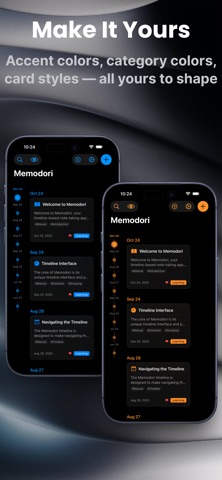
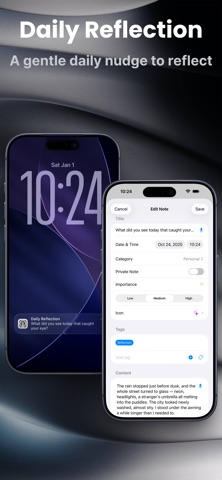
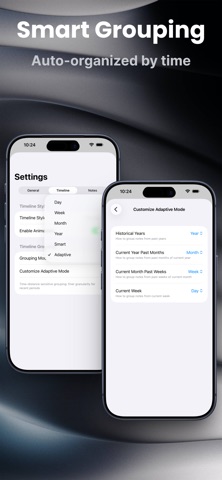
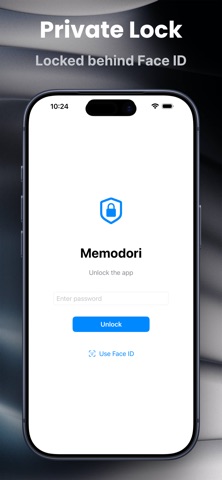
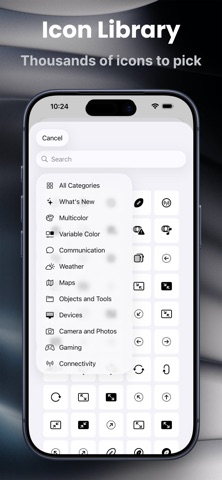
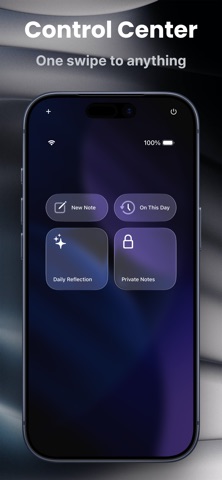
Memodori — A Journal Along Your Timeline Some things are worth keeping in order. Memodori lays your notes, memories, and the thoughts that pass through along a single timeline you can wander — back through the years, or forward to what's still to come. Like a slip of fine paper, written upon time itself. # A TIMELINE YOU CAN WANDER • Browse your notes as dots along time — the bigger the dot, the more a moment mattered • Group by day, week, month, or year, or let Smart and Adaptive modes shape the view around your note density and the distance in time (Premium can fine-tune the rules) • Scroll through your notes and the timeline dot follows along, settling into place with a soft haptic tap • Write freely with titles, dates, categories, importance, custom icons, and tags # MEMORIES THAT FIND YOU • On This Day surfaces what you wrote on this date in years past — a month, six months, a year ago — as a quiet daily card, with an optional reminder at a time you choose • Daily Reflection brings a gentle once-a-day prompt; tap it and a new note opens with the question already at the top • Every reflection is tagged on its own, so you can gather them all whenever you'd like to look back # CAPTURED THE MOMENT IT LANDS • Quick Capture opens a fresh note in a single tap — from a Home or Lock Screen widget, or from Control Center, which also reaches On This Day, Daily Reflection, and Private Mode (iOS 18) • Speak your note instead of typing it — voice input turns your words straight into text (Premium) • Or simply ask Siri, or run a Shortcut, to start a note without opening the app • A Streak widget keeps a quiet count of the days you've shown up, refreshing on its own at midnight # FIND ANYTHING, FAST • Search across everything, and filter by category, tag, importance, or date range • Keep it all tidy with custom tags built for easy retrieval • Personalize each note from a library of thousands of icons — smart categories, bilingual search, and several rendering styles # PRIVATE, BY CHOICE • Keep sensitive notes in a separate private space that asks for authentication to open • Private notes stay fully apart from your timeline until you step into Private Mode • Lock the whole journal behind Face ID / Touch ID and an app lock # YOURS, EVERYWHERE, MADE YOURS • Sync seamlessly across your Apple devices with iCloud — offline-first, catching up the moment you reconnect • Choose your accent color, timeline style, and font size; settle into light or dark • Meet Memodori's Liquid Glass look on iOS 26 — note cards, filters, and the timeline itself feel lighter and more tactile (classic look preserved on earlier versions) • Give each category its own color, and choose exactly what shows on your note cards — icon, tags, badges, and preview length (Premium) • Export any note as a PDF or image, ready to share or keep outside the app (Premium) • Enjoy 10+ languages, switched on the fly, with a layout fully at home on iPad Whether you're keeping personal memories, following a project, or collecting the places you've been, Memodori helps it all settle gently into place — along a timeline that is yours. We hope you enjoy writing with Memodori. Terms of Use: https://www.apple.com/legal/internet-services/itunes/dev/stdeula/
What's new · 1.26
This update lets you pick your own week start day, and makes timeline date labels more accurate near month and year boundaries. # Week Starts On • Premium members can now set the week to start on any day — not just Monday or Sunday. Find it under Settings → Timeline → Timeline Grouping; applies to the Week and Adaptive grouping modes # More accurate timeline labels • Day and Week labels now show the year when a note falls in a different year, and Week ranges show the month when they cross into a new one — so nearby dates from different years or months no longer look identical • Timeline labels now fit themselves to the available space in real time instead of guessing upfront, so week ranges display more reliably across timeline widths and Dynamic Type sizes # Smarter Adaptive grouping • Fixed a few edge cases near month and year boundaries where Adaptive mode could misjudge whether a note belonged to the current week, or split one week's notes across two different groupings As always, thank you for your support. If you're enjoying Memodori, a kind review on the App Store means the world to us.
Details