

MintFlow: VPN & HTTPS Capture
GalaxNet Ltd. · Developer Tools
Independent analytics for this App Store listing. AppTracker is not affiliated with GalaxNet Ltd.
Chart standing · US
What changed · US
Listing changes AppTracker has observed for this app in this storefront — new versions, price moves, rating shifts, and store copy.
MINTFLOW 2.1.0 Built-in DNS ad blocking, more proxy protocols, and easier server import. NEW - DNS ad blocking is included Free. Turn it on and choose AdGuard DNS filter, HaGeZi Multi Normal, or OISD Small. Lists are bundled for initial use, with automatic updates and manual refresh. - Check whether a domain matches your selected filter. Filter DNS Log by matched rule type to see ad-filter blocks, exceptions, routing matches, and more. - Add domain-keyword routing rules alongside existing domain sets and network rules. - Connect with VLESS over TCP using REALITY and Vision, or Trojan over TCP or WebSocket with TLS (Pro). - Import supported VLESS, Trojan, VMess, AnyTLS, and Shadowsocks share links by pasting, scanning a QR code, or choosing a QR image. IMPROVEMENTS AND FIXES - Improved DNS compatibility, including a fix for unusual DNS names that prevented some apps from loading, and better reliability when running the iPad app on macOS. - Improved DNS filter readiness when switching profiles or starting the VPN from system settings, with clearer status when filtering is unavailable. - Fixed DNS Log filters resetting while scrolling. - Fixed packet-buffer leaks that could interrupt traffic during extended use. - Improved AnyTLS-Go compatibility and support for imported certificate-verification options. - Fixed VMess WebSocket TLS connections to servers without HTTP/2 WebSocket support, and added a configurable HTTP/2 stream limit. - Improved Tailscale reauthentication with synced profiles. Save a preferred exit node in the profile and manage live device settings separately. - Improved iCloud profile reconciliation and save-error feedback. Unsupported standalone profile options now produce compilation warnings instead of blocking startup. - Updated onboarding for the new features. MintFlow does not provide VPN or proxy servers. DNS filtering blocks matching domains and cannot remove every ad.
Price & rating history · US
Reconstructed from the listing changes AppTracker has observed in this storefront. A field is charted once it has changed more than once, and each line starts at the value it moved from.
Average rating · ★ 4.75 now · 4 changes on record
Ratings breakdown · US
The star breakdown behind this app's rating in this storefront.
In-app purchases · US
What this app sells inside itself, grouped by kind and priced for this storefront.
Screenshots




Keywords this app targets
Search terms AppTracker associates with this app — estimates, not search volume. ❝ = in the app's title; a highlighted number is its current position for that term.
Similar apps
Competitors and close alternatives, as estimated by AppTracker.
 FlowSpy - AI Packet Capture
Chongqing Spell Technology Co., Ltd.
FlowSpy - AI Packet Capture
Chongqing Spell Technology Co., Ltd.
 HTTPS Capture Traffic Decrypt
Space-Time Transformation Technology Co., Ltd.
HTTPS Capture Traffic Decrypt
Space-Time Transformation Technology Co., Ltd.
 Mistero VPN: Privacy & Proxy
Mistero VPN
Mistero VPN: Privacy & Proxy
Mistero VPN
 Proxyman - Capture HTTPS
Proxyman LLC
Proxyman - Capture HTTPS
Proxyman LLC
 Packet Capture Pro: HTTPS
REALSIGNAL PTE. LTD.
Packet Capture Pro: HTTPS
REALSIGNAL PTE. LTD.
 VPN FREE Fast Unlimited Proxy
VPN Free Unlimited
VPN FREE Fast Unlimited Proxy
VPN Free Unlimited
 Network Sniffer
CHENGDU MIAOZHI TECHNOLOGY CO., LTD.
Network Sniffer
CHENGDU MIAOZHI TECHNOLOGY CO., LTD.
 TunnelSight
Unified-Projects
TunnelSight
Unified-Projects
About
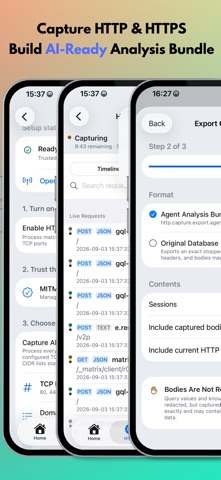
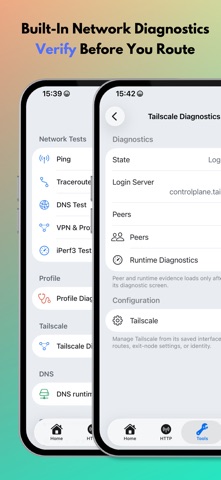
Connect to your own VPN or proxy, block ad and tracker domains, and inspect or rewrite web traffic. MintFlow brings VPN connections, flexible routing, DNS filtering, and HTTP/HTTPS debugging together on iPhone and iPad. Use Simple Mode to send traffic through one Direct, VPN, or proxy output, or build detailed routing rules. See where connections go, investigate DNS queries, and capture the requests and responses you need. VPN AND PROXY - WireGuard VPN with file and QR code import - HTTP and SOCKS5 proxies - Pro support for AmneziaWG, Shadowsocks, Shadowsocks 2022, VMess, AnyTLS, VLESS with REALITY and Vision, Trojan, and experimental Tailscale - Trojan over TCP or WebSocket with TLS - Import supported VLESS, Trojan, VMess, AnyTLS, and Shadowsocks share links by pasting a link, scanning a QR code, or choosing a QR image - Route proxy traffic through VPN connections BUILT-IN DNS AD BLOCKING - Free, opt-in filtering of ad and tracker domains inside MintFlow - Choose AdGuard DNS filter, HaGeZi Multi Normal, or OISD Small - Bundled lists let you get started without an initial filter download - Automatic filter-list updates and manual refresh - Keep your preferred DNS servers; no HTTPS decryption certificate required for DNS filtering - Check domains against a filter and inspect blocking decisions in DNS Log FLEXIBLE ROUTING AND DNS - Match networks, domain sets, and domain keywords - Choose Direct, VPN, proxy, reject, or drop actions - Device-wide DNS with Direct DNS, DoT, and DoH - Static DNS records with Pro - Live settings with guidance when a VPN restart is required HTTPS CAPTURE AND WEB REWRITE - Inspect HTTP/HTTPS requests, responses, headers, and bodies using MITM decryption - Capture all supported traffic or select domains, IP addresses, and TCP ports - Search capture history and preview JSON, JavaScript, CSS, HTML, images, and more - Rewrite URLs or response bodies with jq and JavaScript - Explore HTTP API Research, Request Simulator, and Rewrite Lab - Export AI-friendly analysis bundles and exchange portable .mfhrb rewrite bundles NETWORK VISIBILITY AND TOOLS - DNS Log with a timeline, quick domain actions, and filtering by matched rule type - Flow Capture with destination, protocol, transfer, duration, and route details - Pro packet capture with PCAPNG export - Ping, Traceroute, DNS Test, VPN & Proxy Test, and profile diagnostics - Pro iPerf3 performance tests and On-Demand VPN rules - Siri Shortcuts integration PORTABLE PROFILES Edit, validate, import, and export readable text profiles. Review compilation notices to understand the effective configuration. Pro adds multiple profiles and iCloud sync for profiles and local rewrite scripts. Save a preferred Tailscale exit node in your profile, with separate controls for live device settings. FREE AND PRO Free includes WireGuard, HTTP and SOCKS5 proxies, DNS ad blocking, Simple Mode, App Routing, DoH/DoT, DNS Log, Flow Capture, HTTP inspection, Capture All, and an allowance for domain sets and HTTP rewrite rules. Pro unlocks advanced protocols and tools, expanded profile resources, iCloud sync, packet capture, and automation. IMPORTANT 1. MintFlow does not provide VPN or proxy services. Configure your own server or a compatible third-party service. 2. DNS filtering blocks matching domains; it cannot remove every ad or filter individual page elements. 3. HTTPS inspection requires installing and trusting the MintFlow CA certificate. Certificate pinning and some protocols may prevent capture. 4. WireGuard® is a registered trademark of Jason A. Donenfeld. Manual: https://galaxnet.dev/mintflow/manual Privacy Policy: https://galaxnet.dev/mintflow/legal/privacy/ Terms of Service: https://galaxnet.dev/mintflow/legal/tos/
What's new · 2.1.0
MINTFLOW 2.1.0 Built-in DNS ad blocking, more proxy protocols, and easier server import. NEW - DNS ad blocking is included Free. Turn it on and choose AdGuard DNS filter, HaGeZi Multi Normal, or OISD Small. Lists are bundled for initial use, with automatic updates and manual refresh. - Check whether a domain matches your selected filter. Filter DNS Log by matched rule type to see ad-filter blocks, exceptions, routing matches, and more. - Add domain-keyword routing rules alongside existing domain sets and network rules. - Connect with VLESS over TCP using REALITY and Vision, or Trojan over TCP or WebSocket with TLS (Pro). - Import supported VLESS, Trojan, VMess, AnyTLS, and Shadowsocks share links by pasting, scanning a QR code, or choosing a QR image. IMPROVEMENTS AND FIXES - Improved DNS compatibility, including a fix for unusual DNS names that prevented some apps from loading, and better reliability when running the iPad app on macOS. - Improved DNS filter readiness when switching profiles or starting the VPN from system settings, with clearer status when filtering is unavailable. - Fixed DNS Log filters resetting while scrolling. - Fixed packet-buffer leaks that could interrupt traffic during extended use. - Improved AnyTLS-Go compatibility and support for imported certificate-verification options. - Fixed VMess WebSocket TLS connections to servers without HTTP/2 WebSocket support, and added a configurable HTTP/2 stream limit. - Improved Tailscale reauthentication with synced profiles. Save a preferred exit node in the profile and manage live device settings separately. - Improved iCloud profile reconciliation and save-error feedback. Unsupported standalone profile options now produce compilation warnings instead of blocking startup. - Updated onboarding for the new features. MintFlow does not provide VPN or proxy servers. DNS filtering blocks matching domains and cannot remove every ad.
Details