

AI receipt scanner
Xinzhou Liu · Finance
Independent analytics for this App Store listing. AppTracker is not affiliated with Xinzhou Liu.
Chart standing · US
What changed · US
Listing changes AppTracker has observed for this app in this storefront — new versions, price moves, rating shifts, and store copy.
• Mac: drag receipt photos or PDFs onto the window, open them from Finder with ReceiptIQ AI, or choose “From Files”. Exports now ask where to save. • Mac and iPad: picking a section in the sidebar always shows that page, Settings use switches, and the overview shows category names in full. • Charts: a clear start screen before your first receipt, and the month range always shows the whole month. • Clearer free plan: 30 scanned receipts are free — typing an expense in is always free. • Better wording in all 16 languages, and many fixes.
Price & rating history · US
Reconstructed from the listing changes AppTracker has observed in this storefront. A field is charted once it has changed more than once, and each line starts at the value it moved from.
Average rating · ★ 3.33 now · 5 changes on record
Ratings breakdown · US
The star breakdown behind this app's rating in this storefront.
Screenshots



About
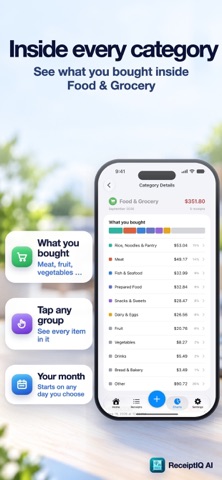
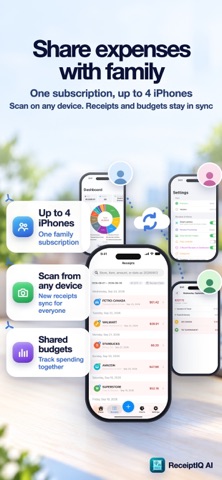
ReceiptIQ AI reads every line item on a receipt, not just the total — so you see what you actually bought, not only what you spent. On iPhone, iPad and Mac, with one purchase. PERFECT FOR • Freelancers and landlords who need itemized receipts at tax time • Families sharing one budget across up to four devices • Anyone tracking expenses who wants the items, not just a number Point the camera at a receipt and let go. It waits until the paper is flat and in focus, then takes the shot itself. Seconds later the shop, the date, the tax and each individual item are filed and categorised. WHAT IT CAPTURES • Paper receipts, with the camera on iPhone or iPad. • E-receipts and screenshots. Share an Amazon order, an Uber receipt or an emailed invoice into the app from the share sheet. • Email receipts. Turn on your personal forwarding address and forward order confirmations to it; you review each one before it is saved. Your mailbox is never connected. • On the Mac: photos, PDF files and receipts dragged onto the window. • Bank and credit-card statements (Beta). Import the PDF from your bank, or a photo, and every row becomes its own transaction, with a review list before anything is saved. Card and account numbers are masked on your device. WHAT MAKES IT DIFFERENT • Every line item, not just the total. Search "latte" or "USB-C" and find every purchase that contained one. • No double entries. Scan the same receipt twice and the app notices — same store, same day, same total. • Tax on its own. Sales tax, recycling fees and deposits go into a Tax category, so they stop inflating your grocery spending. • A camera that waits for you. Live edge detection and automatic capture — no tapping, no blurry retakes. • Receipts in any currency. A receipt printed in yen, euros or Taiwan dollars is recognised and converted at that day's rate, with the printed amount kept alongside it. • Tested on real paper. Every release is checked against hundreds of real receipts from Japan, Taiwan, Hong Kong, Malaysia, the Netherlands, Canada and the US before it ships. • iPhone, iPad and Mac. One subscription with your Apple ID works on all three. • Family Sharing for up to four devices. Devices share receipts directly when they are near each other — no accounts, no sign-up, nothing stored on a server. EVERYTHING ELSE • Budgets with live progress • Charts and a calendar view, by day, month or category • Income and recurring bills tracked beside your expenses • Audit-ready PDF reports: a summary, per-category totals and every receipt with its scan • CSV export, filtered by category and date range • Apple Watch app: this period's spending at a glance • 16 languages: English, Spanish, French, German, Italian, Portuguese, Polish, Dutch, Swedish, Danish, Norwegian, Finnish, Turkish, Korean, Japanese, Traditional Chinese • Face ID lock • Voice entry in your language — say "coffee five dollars at Starbucks" • Manual entry works offline • No account required. Install it and start. PRIVACY Your receipts and photos are stored only on your own devices. To read a receipt, the photo and its text are sent to our AI service and deleted as soon as they are read; nothing is kept on our servers. We do not sell data, we never connect to your bank or your mailbox, and there is no account to create. PRICING Your first 30 receipts read by AI are free; entries you type in yourself never count. Then choose monthly or yearly. One subscription covers iPhone, iPad and Mac and up to four family devices. If you only ever want to type entries in by hand, ReceiptIQ Lite is a one-time purchase. ReceiptIQ Lite never scans receipts. License Agreement https://www.apple.com/legal/internet-services/itunes/dev/stdeula/
What's new · 2.5.3
• Mac: drag receipt photos or PDFs onto the window, open them from Finder with ReceiptIQ AI, or choose “From Files”. Exports now ask where to save. • Mac and iPad: picking a section in the sidebar always shows that page, Settings use switches, and the overview shows category names in full. • Charts: a clear start screen before your first receipt, and the month range always shows the whole month. • Clearer free plan: 30 scanned receipts are free — typing an expense in is always free. • Better wording in all 16 languages, and many fixes.
Details