

JSON Viewer, Editor & Format
MEHMET CANKER (TR) · Education
Independent analytics for this App Store listing. AppTracker is not affiliated with MEHMET CANKER (TR).
Chart standing · US
What changed · US
Listing changes AppTracker has observed for this app in this storefront — new versions, price moves, rating shifts, and store copy.
What's new: • Attach screenshots when you contact us, so we can help faster. • Find our answers under Profile → My Requests — you'll get a notification when we reply. • Design refinements, bug fixes and performance improvements.
In-app purchases · US
What this app sells inside itself, grouped by kind and priced for this storefront.
Screenshots


About
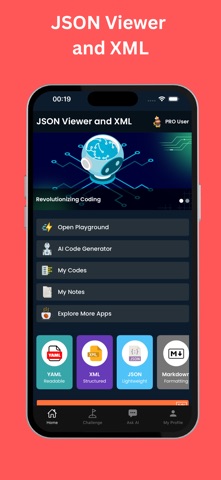
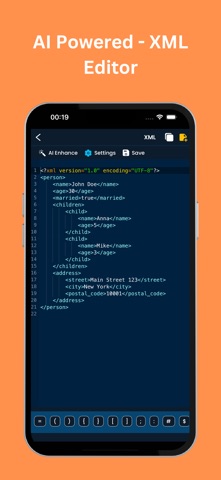
JSON Viewer & JSON/XML Editor is the ultimate mobile tool for developers, analysts, testers, and tech enthusiasts who work with structured data. Whether you're reading API responses, editing configuration files, or formatting complex nested objects, this app provides a powerful and user-friendly experience to view, edit, validate, format, and transform both JSON and XML files directly from your mobile device. Working with JSON or XML can often become tedious and error-prone, especially when you're on the go or away from your desktop. This app solves that by bringing all the essential tools into one mobile-first experience—with syntax-aware editing, automatic formatting, tree view navigation, and AI-powered utilities—all in your pocket. The app features a fast and intuitive JSON Viewer that lets you open any JSON data and see it rendered in a clean, collapsible tree structure. Easily navigate through nested objects and arrays, expand or collapse levels, and copy values or keys with a tap. The viewer supports large JSON files without lag and handles edge cases gracefully. The XML Editor and Viewer offers similar functionality for XML files. View the document structure in a hierarchical layout, inspect nodes and attributes, and edit values in-line. With auto-indentation and closing tag support, editing XML becomes smooth and less error-prone. Smart Editing Capabilities: Use the integrated code editor to write or modify JSON/XML content with syntax highlighting, bracket matching, line numbering, and error detection. The editor helps you avoid common mistakes by showing you exactly where an issue occurs, such as missing commas, mismatched brackets, or invalid nesting. Beautify and Minify in One Tap: Format your data instantly using the built-in beautifier for both JSON and XML. Whether your file is a single compressed line or poorly formatted, one tap will turn it into clean, human-readable code. You can also minify it for performance and storage purposes. AI Assistant for Data Help: Stuck on what to do with a raw JSON or XML structure? Just ask the AI! It can explain what a particular schema represents, suggest how to convert one structure to another, or even generate a sample JSON/XML based on your description like “Create a user profile with name, age, and address.” It’s like having a smart data assistant on demand. Validate and Fix Errors: Run schema validation on your files to detect syntax errors and structural issues. The app not only shows you where the problem lies but also suggests corrections when possible. Whether you're debugging a malformed API response or validating a config file before deployment, the app gives you confidence that your data is correct. Convert Between JSON and XML: Effortlessly convert JSON to XML and vice versa using the built-in converter. Preserve formatting, handle nested structures, and avoid manual rewriting. This feature is perfect for developers working across systems, formats, or platforms. Import and Export Easily: Load data from files, clipboard, URLs, or cloud storage. Export your edited files as JSON or XML, save them to your device, or share them instantly via email or messaging apps. Whether you're debugging mobile APIs or updating app configs, it's all done in a few taps. Offline Mode: All major functionalities work fully offline, so you're never dependent on an internet connection when editing or reviewing files. Dark Mode & Custom Themes: For late-night debugging or personal comfort, the app offers dark mode and custom syntax color themes to reduce eye strain and personalize your editing environment. History and Undo: Track your editing changes with full undo/redo support and access version history for your files. Accidentally made a mistake? Just roll back to a previous version or undo recent changes with ease. Term of Use https://www.apple.com/legal/internet-services/itunes/dev/stdeula/ Privacy Policy https://coddykit.com/terms/privacy-policy
What's new · 82.5.1
What's new: • Attach screenshots when you contact us, so we can help faster. • Find our answers under Profile → My Requests — you'll get a notification when we reply. • Design refinements, bug fixes and performance improvements.
Details