

UtilityControl
Ganna Chepenko · Utilities
Independent analytics for this App Store listing. AppTracker is not affiliated with Ganna Chepenko.
Chart standing · US
What changed · US
Listing changes AppTracker has observed for this app in this storefront — new versions, price moves, rating shifts, and store copy.
What's new in 4.1 • Delete your account and all its data right in the app (Settings → Delete Account) • See your plan and how much of each limit you have left • New yearly Premium plan that costs less than paying monthly • A clearer Premium screen, and a heads-up before you reach a limit • AI answers now show their formatting properly • A clear message when the AI assistant is briefly unavailable • Locations now show when they were created • Readings always show the date you recorded them • New passwords need at least 10 characters, for better security • Safer purchases and sign-in, clearer messages after too many attempts • Bug fixes and performance improvements
Screenshots



About
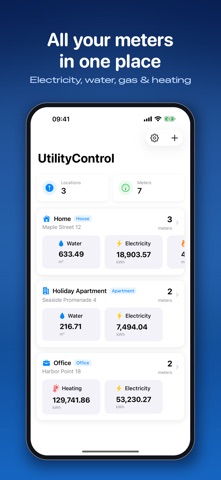
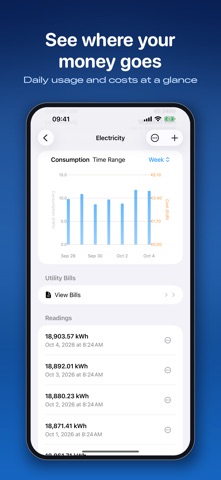
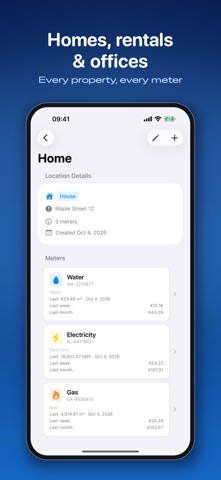
Track every utility meter – electricity, water, gas and heating – in one simple app. Log a reading in seconds, see your usage and costs in clear charts, and ask the AI assistant what is driving your bills. Made for homeowners, renters, landlords and property managers who want to understand their consumption and save money. LOG READINGS IN SECONDS • Add a meter reading with the date and time you took it • Electricity, water, gas, heating, cooling and custom meters • Any unit: kWh, m³, kW, BTU and more • Notes on every reading; edit or delete anytime SEE WHERE YOUR MONEY GOES • Interactive charts for 24 hours, a week, a month, 3 months or a year • Daily usage and trends reveal spikes and waste • Cost per unit in your currency, with weekly and monthly totals ASK THE AI ASSISTANT Ask in plain language and get answers from your own data: • "How much did I spend on electricity last week?" • "What was my last water reading?" • "What does one kWh cost me?" SCAN YOUR UTILITY BILLS Take a photo or pick a PDF. Dates, amounts and usage are read automatically and linked to your meters, so you can check each bill against your readings. ALL YOUR PROPERTIES IN ONE PLACE • Organize meters by house, apartment, office, warehouse and more • A dashboard with every location and meter at a glance • Your data syncs between iPhone, iPad and the web dashboard YOUR DATA, YOUR CONTROL • Sign in with Apple, Google or e-mail • Encrypted connections; we never sell your data • Delete your account and all its data at any time, right in the app PLANS UtilityControl is free to start. Your current plan and remaining limits are shown in the app. Premium removes the limits on locations, meters and readings – yearly or monthly, both with a 7-day free trial for new subscribers. Payment is charged to your Apple ID. The subscription renews automatically unless it is cancelled at least 24 hours before the end of the current period. Manage or cancel it in your App Store account settings. Privacy Policy: https://www.qlines.net/apps/utilitycontrol/privacy-policy Terms of Use: https://www.qlines.net/terms-of-service Web Dashboard: https://www.qlines.net/apps/utilitycontrol
What's new · 4.2
What's new in 4.1 • Delete your account and all its data right in the app (Settings → Delete Account) • See your plan and how much of each limit you have left • New yearly Premium plan that costs less than paying monthly • A clearer Premium screen, and a heads-up before you reach a limit • AI answers now show their formatting properly • A clear message when the AI assistant is briefly unavailable • Locations now show when they were created • Readings always show the date you recorded them • New passwords need at least 10 characters, for better security • Safer purchases and sign-in, clearer messages after too many attempts • Bug fixes and performance improvements
Details