

Times Tables: Math for Kids
Titans of Industry · Education
Independent analytics for this App Store listing. AppTracker is not affiliated with Titans of Industry.
Chart standing · US
What changed · US
Listing changes AppTracker has observed for this app in this storefront — new versions, price moves, rating shifts, and store copy.
Big news: you now practice the times tables with your own buddy! • Pick your buddy: eight 3D animals, and your buddy joins you everywhere. • Race in 3D: race the robot. The better you answer, the faster your kart goes. • New: Master Builder. Every right answer builds a piece of your castle. • Runner and Bubbles are now in 3D too, in your own world. • Now on Apple TV: practice on the big screen with the Siri Remote. • Fluffy is back, with a tip or a little encouragement every day. With Premium you also play in Candyville, Winterland, Desert and on the Moon.
Price & rating history · US
Reconstructed from the listing changes AppTracker has observed in this storefront. A field is charted once it has changed more than once, and each line starts at the value it moved from.
Average rating · ★ 4.32 now · 7 changes on record
Ratings breakdown · US
The star breakdown behind this app's rating in this storefront.
In-app purchases · US
What this app sells inside itself, grouped by kind and priced for this storefront.
Screenshots





About
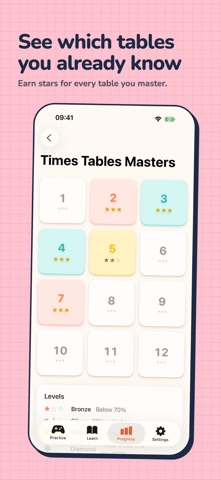
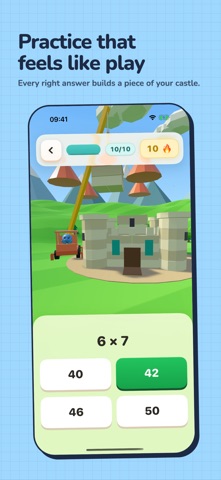
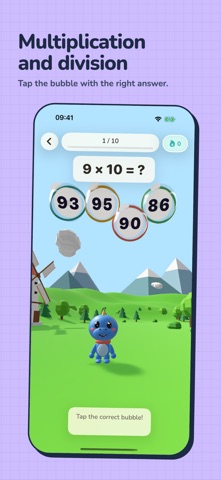
A multiplication app that kids in 3rd, 4th, and 5th grade actually keep coming back to. They practice with their own buddy, in six game modes, so it feels like playing instead of doing a worksheet. Built for homework time and the ten minutes before school. Covers the multiplication facts in the Common Core 3.OA standard, plus division, in tables from 1 to 12. Pick a few tables to focus on, or set up a longer mixed session. Tap the answer or type it. When one mode starts to feel routine, you switch. Made in Belgium by Titans of Industry, with help from primary-school teachers and the kids who actually use it. NEW IN 4.0 Your own buddy. Pick one of eight 3D animals. Your buddy races, runs, builds and pops bubbles with you. The games are 3D now. Race, Runner and Bubbles play out in a world of your own. And there's a new game, Master Builder: every right answer adds a piece to your castle. Apple TV. Practice on the big screen with the Siri Remote. Premium bought on iPhone or iPad works there too. GAME MODES Classic. A question, an answer, the next question. Good for building the basics. Against the clock. How many can you get in 60 seconds? For kids who focus better with a little pressure. Race. You and the robot, racing to the finish. Every right answer hits the gas. Runner. Run through the gate with the right answer on it. Bubbles. Tap the bubble with the right answer before it floats away. Master Builder. New in 4.0. Build your castle one sum at a time. QUESTION TYPES You can mix the question shapes in any session. Type the answer. Pick from multiple choice. Judge a true-or-false statement. Fill in the missing number. Match four pairs in one round. Variety keeps practice from sliding into autopilot. LEARN AND KEEP GOING Every table is explained: tap a sum and see the matching division. Earn stars for every table you master, keep a daily streak going, and get extra practice on the facts that are still tricky. Fluffy, the app's guide, drops by with a tip or a little encouragement every day. Siri Shortcuts work too, if your kid wants to say "start practice" and skip the menus. Home Screen and Lock Screen widgets show the current streak at a glance. FOR PARENTS The Parent Report shows what your child has actually been working on. Which tables they're confident with, which ones still trip them up, how their streak is going, how many minutes they've practiced this week. Kids see their stars and badges. Parents get the picture behind them. Tables 1 through 5 and the Green Hills world are free from day one. Premium opens tables 6 through 12 and four more worlds: Candyville, Winterland, Desert and the Moon. It's a one-time purchase. No subscriptions, no ads. You buy it once, your family has it on every device on your Apple ID. QUIET BITS Works without an internet connection once installed. No ads, anywhere. LEGAL Terms of use (EULA): https://www.apple.com/legal/internet-services/itunes/dev/stdeula/ Privacy policy: https://titansofindustry.be/privacy-table-champion/en
What's new · 4.0.0
Big news: you now practice the times tables with your own buddy! • Pick your buddy: eight 3D animals, and your buddy joins you everywhere. • Race in 3D: race the robot. The better you answer, the faster your kart goes. • New: Master Builder. Every right answer builds a piece of your castle. • Runner and Bubbles are now in 3D too, in your own world. • Now on Apple TV: practice on the big screen with the Siri Remote. • Fluffy is back, with a tip or a little encouragement every day. With Premium you also play in Candyville, Winterland, Desert and on the Moon.
Details