

ScubAI: Underwater Photo AI
KAMIL PAWEL BUDZYNSKI · Photo & Video
Independent analytics for this App Store listing. AppTracker is not affiliated with KAMIL PAWEL BUDZYNSKI.
Chart standing · US
What changed · US
Listing changes AppTracker has observed for this app in this storefront — new versions, price moves, rating shifts, and store copy.
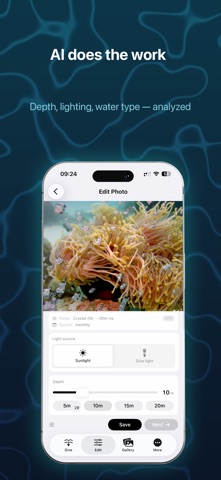
Night dives, done right — mark the dive as night and your photos develop themselves. NIGHT DIVES • New day/night switch on the pre-dive checklist. ScubAI preselects it from the sun's position at your location — even offline, even for a dusk dive that ends in the dark. • At night every photo is lit by your dive light, not the sun - so ScubAI applies dive-light physics directly. No depth needed. • Night photos develop automatically after the dive and arrive in Edit already corrected, marked with a night-dive tag. Fine-tune anytime. PRE-DIVE CHECKLIST • Redesigned start screen with a cleaner checklist. • New storage check - free space shown as room for ~X more photos. • Grant location access right from the checklist. • Warns when your iPhone runs hot before you seal the housing. EDIT SCREEN • See where every photo stands: orange dot = waiting for edit, blue dot = corrected and ready to export — with counts above the grid. • Simpler light choice: Sunlight or Dive light. • Dive-light photos no longer ask for depth. FIXES • Any volume button press now dismisses alerts • Fixed a crash during heavy editing. Pay once. No subscription. All processing stays on your iPhone.
In-app purchases · US
No in-app purchases.
Screenshots



Keywords this app targets
Search terms AppTracker associates with this app — estimates, not search volume. ❝ = in the app's title; a highlighted number is its current position for that term.
Similar apps
Competitors and close alternatives, as estimated by AppTracker.
 ReefLens: Reef & Scuba Camera
Mustafa Kulac
2 shared topics
ReefLens: Reef & Scuba Camera
Mustafa Kulac
2 shared topics
 Aquarium Camera
John Ostler
2 shared topics
Aquarium Camera
John Ostler
2 shared topics
 Mobile Darkroom: RAW Photo Lab
Bjoern Kindler
1 shared topic · 1 shared title word
Mobile Darkroom: RAW Photo Lab
Bjoern Kindler
1 shared topic · 1 shared title word
 DIVEROUT - Dive Computer
DIVEROUT Tech Co., Ltd.
DIVEROUT - Dive Computer
DIVEROUT Tech Co., Ltd.
 AI Reef Cam
Feraco media Inc.
1 shared title word
AI Reef Cam
Feraco media Inc.
1 shared title word
 Scuba Diving Computer Oceanic+
Huish Outdoors, LLC
Scuba Diving Computer Oceanic+
Huish Outdoors, LLC
 Pro Camera - Reeflex
Reeflex GmbH
1 shared topic
Pro Camera - Reeflex
Reeflex GmbH
1 shared topic
 ShalloWeDive
Andygile
ShalloWeDive
Andygile
About
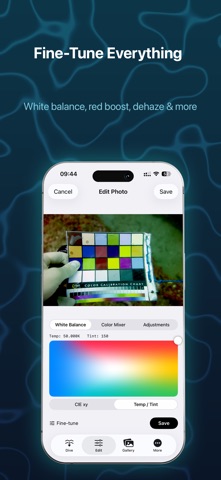
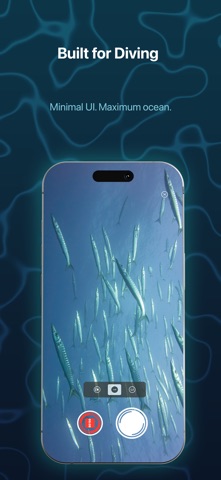
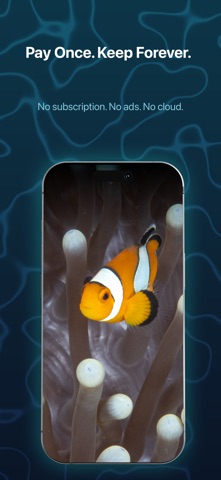
Underwater photos lose color as you descend. Red disappears by 5 meters, orange by 10, yellow by 20 — leaving everything blue-green. ScubAI analyzes each photo, estimates depth and lighting conditions, and restores color channel by channel. No strobes. No filters. No subscription. Just your iPhone in a housing. ONE-TAP COLOR CORRECTION ScubAI analyzes every photo automatically — histogram, color tint, flash detection, water type — and applies depth-scaled correction in one tap. Red boost, blue-green balance, dehaze, and white balance are all computed from the image, not a generic preset. Don't like the auto result? Fine-tune everything manually: • White balance — temperature and tint with 2D visual picker • Red boost — restore warm tones absorbed by water • Blue-green balance — adjust for tropical blue or temperate green water • Dehaze — cut through underwater haze and backscatter • Exposure, contrast, shadows, sharpness DIVE DATA FROM APPLE WATCH ULTRA Connect Apple Health and ScubAI reads depth, water temperature, and location straight from your Apple Watch Ultra dives: • Per-photo depth — each shot is matched to the exact moment in your dive, so the correction uses your real depth, not an estimate. Depth is the single biggest input to accurate underwater color. • Location for cameras without GPS — imported RAWs from dedicated cameras usually have no GPS tag. Your dive fills in the site automatically, unlocking water-aware correction. • Water temperature stamped into every photo, for your archive and dive log. • Read-only and private — ScubAI never writes to Apple Health, and nothing leaves your device. NIGHT DIVES On a night dive there is no sunlight — every photo is lit by your dive light. Flag the dive as night on the checklist and ScubAI handles the rest: • Night photos develop automatically and arrive in Edit already corrected • Dive-light physics needs no depth input • The checklist suggests day or night by itself, from the sun's position at your location — even offline BUILT FOR DIVING Underwater, you have gloves, a regulator, and a hundred things to think about. ScubAI strips the camera to what matters — no ISO dials, no menu trees, no tiny buttons you can't press with dive gloves. • Full-screen viewfinder — the ocean is the subject, not the UI • Volume button control — take photos and switch lenses without touching the screen. Works with any waterproof housing, no proprietary case required • Battery saver mode — dims screen and pauses preview for long dives • Pre-dive checklist — battery, GPS, housing status at a glance RAW WORKFLOW ON YOUR PHONE Capture RAW (DNG) and import RAW files from professional cameras: • Sony (ARW), Nikon (NEF), Canon (CR2, CR3), Fuji (RAF), Pentax (PEF), Panasonic (RW2) • Edit on your phone right after the dive — no laptop needed • Batch export to HEIC with all corrections applied • Manage storage — export compressed, keep or delete originals ORGANIZE BY DIVE • Automatic GPS tagging with reverse geocoding — see the dive site name, not just coordinates • Library grouped by date and location • Find that photo from last Tuesday in Komodo without scrolling through your camera roll PRIVACY All processing happens on your iPhone. No cloud upload. No account required. Your photos never leave your device. ONE-TIME PURCHASE Pay once, use forever. No subscription, no in-app purchases, no ads. Learn the science behind underwater color correction: https://scub.ai/docs
What's new · 2.4
Night dives, done right — mark the dive as night and your photos develop themselves. NIGHT DIVES • New day/night switch on the pre-dive checklist. ScubAI preselects it from the sun's position at your location — even offline, even for a dusk dive that ends in the dark. • At night every photo is lit by your dive light, not the sun - so ScubAI applies dive-light physics directly. No depth needed. • Night photos develop automatically after the dive and arrive in Edit already corrected, marked with a night-dive tag. Fine-tune anytime. PRE-DIVE CHECKLIST • Redesigned start screen with a cleaner checklist. • New storage check - free space shown as room for ~X more photos. • Grant location access right from the checklist. • Warns when your iPhone runs hot before you seal the housing. EDIT SCREEN • See where every photo stands: orange dot = waiting for edit, blue dot = corrected and ready to export — with counts above the grid. • Simpler light choice: Sunlight or Dive light. • Dive-light photos no longer ask for depth. FIXES • Any volume button press now dismisses alerts • Fixed a crash during heavy editing. Pay once. No subscription. All processing stays on your iPhone.
Details