

Furigana AI:OCR Study Japanese
Sho Fujimoto · Education
Independent analytics for this App Store listing. AppTracker is not affiliated with Sho Fujimoto.
Chart standing · US
What changed · US
Listing changes AppTracker has observed for this app in this storefront — new versions, price moves, rating shifts, and store copy.
Version 3.0 is our biggest update yet. Furigana AI is now a complete Japanese study app. ■ AI explanations Not just how to read it, but what it means. AI explains the text you scanned with the key points, the important words, and a translation. ■ "Books" — keep what you read Save furigana and explanations as pages and bind them into your own book. Flip through it in PDF like a textbook, as many times as you like. ■ "Problem Sets" — test yourself AI writes open-ended questions from the material you saved. Answer, turn the page, and the explanation is waiting. ■ Improved OCR More accurate recognition, especially on textbooks and printed handouts. ■ Redesigned interface A simpler, calmer screen built for studying. Thank you for using Furigana AI!
Screenshots



About
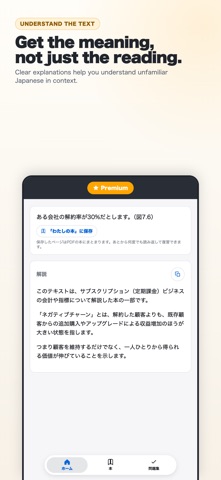
Perfect for Learning Japanese! Furigana AI Features ## Snap a Photo, Get Furigana Take a picture of any Japanese text: books, menus, documents, worksheets. AI adds furigana above the kanji, like "調(しら)べます". Pick a photo from your camera roll or shoot on the spot. Extracted text can be copied to the clipboard with one button. ## Understand It, Not Just Read It AI explains the text you scanned: the key points, the important words, and a translation in your own language. Reading is only half of it. Now you also know what the text actually says. ## Bind It Into a Book Save furigana pages and explanations into your own "book". Flip through it in PDF like a textbook and come back to it whenever you want. Jump straight to any page from the table of contents, and rename or remove pages as you go. ## Test Yourself With Problem Sets AI writes open-ended questions from the material you saved. Answer them, turn the page, and the explanation is waiting for you. ## Read Several Images at Once Analyze multiple images together. Ideal when you have a lot of text to get through. ## Voice Playback Learn through sound as well as text. Press play to hear how the Japanese is pronounced. Terms of Use: https://www.apple.com/legal/internet-services/itunes/dev/stdeula/ Privacy Policy: https://shofj.com/en/apps/furigana-ai/privacy-policy
What's new · 3.0.5
Version 3.0 is our biggest update yet. Furigana AI is now a complete Japanese study app. ■ AI explanations Not just how to read it, but what it means. AI explains the text you scanned with the key points, the important words, and a translation. ■ "Books" — keep what you read Save furigana and explanations as pages and bind them into your own book. Flip through it in PDF like a textbook, as many times as you like. ■ "Problem Sets" — test yourself AI writes open-ended questions from the material you saved. Answer, turn the page, and the explanation is waiting. ■ Improved OCR More accurate recognition, especially on textbooks and printed handouts. ■ Redesigned interface A simpler, calmer screen built for studying. Thank you for using Furigana AI!
Details