

Teleprompter & Captions-TeCap
Changsha Duyou Network Technology Co., Ltd · Utilities
Independent analytics for this App Store listing. AppTracker is not affiliated with Changsha Duyou Network Technology Co., Ltd.
Chart standing · US
What changed · US
Listing changes AppTracker has observed for this app in this storefront — new versions, price moves, rating shifts, and store copy.
Teleprompter & Captions-TeCap Version 1.2.4 What's New: - Fixed known bugs to improve the overall app experience. Thank you for choosing Teleprompter & Captions-TeCap! Your support helps us continue making the app better for your video creation and presentation needs. If you enjoy using our app, please consider leaving us a five-star review. Your feedback inspires us to keep enhancing your experience.
Price & rating history · US
Reconstructed from the listing changes AppTracker has observed in this storefront. A field is charted once it has changed more than once, and each line starts at the value it moved from.
Average rating · ★ 4.75 now · 4 changes on record
Ratings breakdown · US
The star breakdown behind this app's rating in this storefront.
Screenshots


About
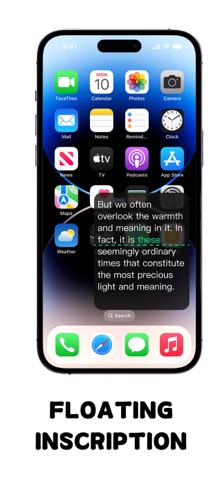
TeCap redefines your presentations, recordings, and livestreams by delivering perfectly synchronized, accurate scrolling captions. Whether you’re a content creator, speaker, educator, or livestream expert, TeCap lets you focus on your message — no more worrying about forgotten words or awkward pauses. Core Features: Smart Scroll Control • Customize scroll speed, font size, and color to match your personal reading style. • Enjoy gesture-based pause/resume control to seamlessly handle any unexpected interruptions during your session. Multi-Scene Adaptation • Mirror Mode: Enable natural eye contact with an optimized mirror view, ensuring your presence in front of the camera remains authentic and engaging. • Floating Window: Always have access to your prompts with a floating window that sits on top of any app, allowing you to multitask without missing a word. • Background Transparency: Adjust the transparency of the teleprompter overlay for easy integration of prompts and capture. Remote Control Support • Remotely control scroll speed, play/pause, and more from your mobile device, truly freeing your hands. • Perfect for team collaboration, allowing an assistant or partner to easily control the progress of the prompter and improve shooting efficiency. Ultimate User Experience • Experience a minimalist interface with a single click to import documents and activate the teleprompter. • Night mode reduces eye strain in low-light conditions, ensuring clarity and comfort throughout your presentation. • Multi-language support (over 20 languages, including Chinese and English) makes TeCap the perfect tool for a global audience. Applicable Scenarios • Short Video/Vlog Recording • Public Lectures and Meetings • Live Broadcasting • Online Course Teaching • News Broadcasting Download TeCap now and embark on a stress-free career journey! Privacy Agreement: https://sites.google.com/view/teleprompter-privacypolicy Terms: https://sites.google.com/view/teleprompter-gterms
What's new · 1.2.4
Teleprompter & Captions-TeCap Version 1.2.4 What's New: - Fixed known bugs to improve the overall app experience. Thank you for choosing Teleprompter & Captions-TeCap! Your support helps us continue making the app better for your video creation and presentation needs. If you enjoy using our app, please consider leaving us a five-star review. Your feedback inspires us to keep enhancing your experience.
Details