

BerryFilm - Korean Style Cam
Seungyun Kim · Photo & Video
Independent analytics for this App Store listing. AppTracker is not affiliated with Seungyun Kim.
Chart standing · US
What changed · US
Listing changes AppTracker has observed for this app in this storefront — new versions, price moves, rating shifts, and store copy.
Use BerryFilm right when you need it, wherever you are. - Select BerryFilm from the Share menu in the Photos app to open it directly. - Apply BerryFilm filters right from the editing screen in the built-in Photos app. - Press the camera button on the side of your iPhone to launch BerryFilm quickly.
Price & rating history · US
Reconstructed from the listing changes AppTracker has observed in this storefront. A field is charted once it has changed more than once, and each line starts at the value it moved from.
Average rating · ★ 4.90 now · 4 changes on record
Ratings breakdown · US
The star breakdown behind this app's rating in this storefront.
In-app purchases · US
No in-app purchases.
Screenshots



Keywords this app targets
Search terms AppTracker associates with this app — estimates, not search volume. ❝ = in the app's title; a highlighted number is its current position for that term.
Similar apps
Competitors and close alternatives, as estimated by AppTracker.
 MellowFilter Photo Filters
ChanGyu Kang
2 shared topics
MellowFilter Photo Filters
ChanGyu Kang
2 shared topics
 filmhwa - @hwa.min's filter
ARTTIC CO., LTD.
3 shared topics
filmhwa - @hwa.min's filter
ARTTIC CO., LTD.
3 shared topics
 CherryFilm Korean selfie cam
京 唐
1 shared topic · 2 shared title words
CherryFilm Korean selfie cam
京 唐
1 shared topic · 2 shared title words
 Heedam Filter
Seongmin Lee
2 shared topics
Heedam Filter
Seongmin Lee
2 shared topics
 Filmlike Camera
Hyun-il Kim
1 shared topic
Filmlike Camera
Hyun-il Kim
1 shared topic
 Negative - Film Look Filter.
스몰캐머러
1 shared topic
Negative - Film Look Filter.
스몰캐머러
1 shared topic
 Colourtone: Photo Editor
CEE ENTERPRISES PTY LTD
1 shared topic
Colourtone: Photo Editor
CEE ENTERPRISES PTY LTD
1 shared topic
 Foodie - Filter & Film Camera
SNOW Corporation
1 shared topic
Foodie - Filter & Film Camera
SNOW Corporation
1 shared topic
About
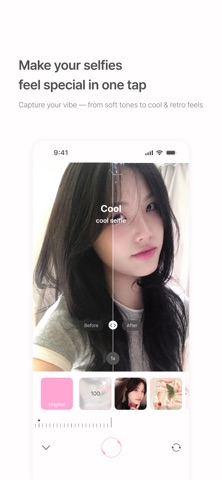
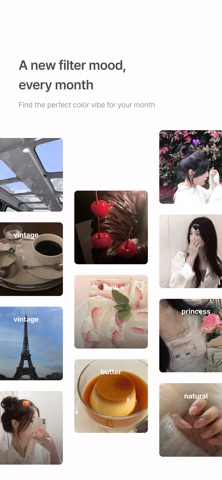
Hi, I’m Berry, a filter creator from South Korea. Some of you may know me from Instagram as @berryveryloveyou. Many of the filters I once shared on social media are now gone— but I wanted to preserve the soft tones I’ve created over the past 5 years. That’s why I built this space: BerryFilm. New filters will be added regularly. Natural skin tone effects and soft light features are also in the works. Please enjoy the filters I’ve poured my heart into. -- Features - Soft and subtle Korean-style filters From airy milk tones to cool, warm, and vintage moods— you’ll find filters that bring out your natural atmosphere. - Photos and videos in your favorite tone Transform your gallery into a soft, aesthetic feed with gentle color correction and minimalist touch. - Simple, quiet, and easy to use Apply filters with one tap, save favorites, and shoot with a silent shutter—anytime, anywhere. - New filters every month Always something new, designed to match the season or your mood. - Built with feedback from real users We’re constantly improving the app through your suggestions. -- Recommended For - Fans of Berry’s Instagram filters - Anyone looking for soft, natural Korean-style filters - Users who love subtle selfies without heavy edits - Those who enjoy discovering new filters each month -- Included Filters Featuring over 40 carefully designed filters like milk, iPhone 7, butter, cool, warm, and blossom — with more coming soon. -- Contact & Sharing Tag @seesun.app on Instagram to share your photos. For questions or feedback, feel free to DM or email us. Email: seesunapp@gmail.com Instagram: @berryfilm.app
What's new · 1.3.40
Use BerryFilm right when you need it, wherever you are. - Select BerryFilm from the Share menu in the Photos app to open it directly. - Apply BerryFilm filters right from the editing screen in the built-in Photos app. - Press the camera button on the side of your iPhone to launch BerryFilm quickly.
Details