

Video Converter to MP3,MP4,Any
TROSTUN LTD · Utilities
Independent analytics for this App Store listing. AppTracker is not affiliated with TROSTUN LTD.
Chart standing · US
What changed · US
Listing changes AppTracker has observed for this app in this storefront — new versions, price moves, rating shifts, and store copy.
Price & rating history · US
Reconstructed from the listing changes AppTracker has observed in this storefront. A field is charted once it has changed more than once, and each line starts at the value it moved from.
Average rating · ★ 4.07 now · 4 changes on record
Ratings breakdown · US
The star breakdown behind this app's rating in this storefront.
In-app purchases · US
What this app sells inside itself, grouped by kind and priced for this storefront.
Screenshots



About
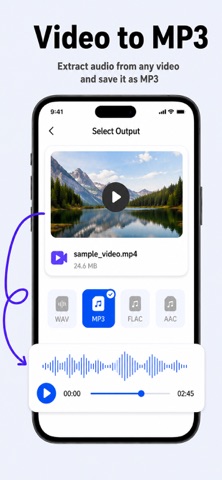
Instantly convert your videos to different formats with our Video Converter! Whether you need to convert videos to share them in a specific format, save space on your iPhone, or simply want to change the file type to make it more accessible, you can trust our app with this job. How to Convert Videos? You don’t need to have any technical skills or expertise to manage the conversion process. Just follow these simple steps: - Select your input file from your device or cloud storage. - Choose your output format (MP4, MP3, AVI, M4A, etc.). - Hit the conversion button (this is all that you need to do!) - Save or share your converted files to your favorite apps, or use the file browser to view previous conversions. Input Formats Accepted by Video Converter MOV, MP4, WEBM, M4A, AVI, TS, MTF, GIF, WMV, MP3, MKV, MPG, 3GP (more coming in future updates) Supported Output Formats You can get your videos converted in the following formats: MP4 MP3 WEBM GIF WMV MOV 3G2 FLAC FLV M4A MKV WAV MPG You can choose any of these formats and leave the rest to our video converter. Features of Our Video Converter iOS App Check out the features that make our app distinctive from many others. Quick Conversions The video converter app takes 15 to 20 seconds to complete the conversion process. Cloud/Local Support Users can convert files using our secure cloud server or do local conversions for instant results (no internet is required for some formats). Airdrop Support You can Airdrop your converted files to other iOS or Mac devices in mere seconds. Convenient Sharing You can easily share your converted files directly with other apps or save them to your device with a single click. Build-In Browser You can easily access your converted files or manage the previous versions from the in-app file browser. High-Quality Output You would always get high-quality video conversions without any compromise on resolution or clarity. Terms: https://www.trostun.com/terms-and-conditions/ Privacy Policy: https://www.trostun.com/privacy-policy/
What's new · 1.1.4
We’ve made important updates to improve performance, stability, and the overall conversion experience. • Hot fixes and stability improvements • Audio conversion quality enhanced • Faster video and audio processing speeds • Improved compatibility with more file formats • General performance upgrades and bug fixes Thanks for using Video Converter! Your feedback helps us keep improving. If you enjoy the app, please consider leaving a review.
Details