

Mobile Display – HDMI Monitor
Satoshi Sakuma · Utilities
Independent analytics for this App Store listing. AppTracker is not affiliated with Satoshi Sakuma.
Chart standing · US
Ratings breakdown · US
The star breakdown behind this app's rating in this storefront.
Screenshots



About
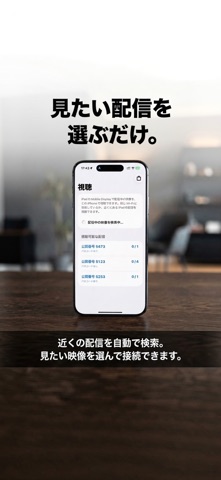
### Turn your iPad into a professional HDMI monitor—and bring the picture to iPhone. Mobile Display is a powerful monitor app that uses a UVC (USB Video Class) capture device to display video from devices such as Nintendo Switch, cameras, and PCs on your iPad in real time. With local streaming, you can also share the video displayed on your iPad and view it from another iPhone or iPad on the same Wi-Fi network or nearby. No complicated setup. Use the beautiful display of your iPad as a capable external monitor, and share the picture with other devices whenever you need it. --- 【Why choose Mobile Display】 ■ Simple plug-and-view setup Connect a UVC-compatible device to your iPad and start displaying HDMI video right away. No specialist knowledge is required. ■ Local streaming to iPhone and iPad Share the video displayed in Mobile Display on your iPad with nearby iPhone and iPad devices or devices on the same Wi-Fi network. This is local device-to-device streaming. It does not publish your video to the internet. ・View streamed video on iPhone / iPad ・Video Only / Video + Audio modes ・Passcode-protected connections ・Stream a standby image when external input is unavailable ・Portrait and landscape viewing ■ Intuitive gesture controls Move the display area with a swipe and zoom in or out with a pinch. Adjust the video layout as naturally as viewing a photo. ■ Advanced adjustments for real-world use Fine-tune the video for your setup. ・Scale / position adjustment ・Rotation / flip and mirror display ・Color filters / brightness / contrast / saturation ・Display mode switching: Low Latency / High Quality ■ Profiles and Lock Save your favorite adjustments as profiles and recall them with a tap. Lock controls to help prevent accidental changes during gaming, filming, or other work. ■ Convenient audio preview Monitor audio as well as video. Background audio playback lets you continue checking sound while using other tasks. --- 【Great for】 ・Gaming: Use Low Latency mode and turn your iPad into a game monitor. ・Camera monitoring: Check camera and camcorder footage on a larger display. ・Live production monitoring: Keep an eye on your program output in real time. ・Remote viewing nearby: Stream the iPad display locally and watch it from an iPhone or another iPad. ・Business and education: Use it with PC video output or document cameras. --- 【Supported devices】 ■ HDMI / UVC video display and local streaming Supported on USB-C iPad models including: ・iPad Pro 12.9-inch (3rd generation or later) ・iPad Pro 11-inch (1st generation or later) ・iPad Air (4th generation or later) ・iPad (10th generation or later) ・iPad mini (6th generation or later) ■ Local streaming viewing iPhone and iPad can view video being streamed from Mobile Display. HDMI / UVC capture input is used on iPad. --- 【How to use】 ■ Use as an HDMI monitor 1. Connect a UVC-compatible capture device to your iPad. 2. Connect the source device using an HDMI cable. 3. Launch Mobile Display to begin previewing the video. ■ View a local stream 1. Start local streaming from Mobile Display on the iPad. 2. Open the viewing screen in Mobile Display on an iPhone or another iPad. 3. Select a stream from the available streams and connect. If a passcode is enabled, enter the passcode displayed on the streaming iPad. --- 【About local streaming】 The free version allows up to 10 minutes of local streaming per day from an iPad. With the non-consumable purchase “Unlimited Local Streaming”: ・Remove the daily streaming time limit ・View simultaneously on up to 4 devices ・Remove in-app ads The existing Remove Ads purchase removes ads only. It does not remove the local streaming time limit or increase the number of simultaneous viewers. --- Turn your iPad into a powerful HDMI monitor. Then bring the picture to your iPhone or another iPad. Use video more freely with Mobile Display.
What's new · 2.0
Mobile Display v2.0 introduces Local Streaming. You can now view video displayed on your iPad from an iPhone or iPad on the same Wi-Fi network or nearby. ・View streamed video on iPhone / iPad ・Video Only and Video + Audio modes ・Passcode-protected connections ・Standby image streaming when external input is unavailable ・Switch video sources while streaming ・Portrait and landscape viewing ・Up to 10 minutes of local streaming per day for free With the new non-consumable purchase “Unlimited Local Streaming”: ・Remove the local streaming time limit ・View simultaneously on up to 4 devices ・Remove in-app ads This update also improves the streaming, viewing, and purchase screens, along with overall stability.
Details