

ImageFlux: Multiple Exposure
Ozgur Odabasi · Photo & Video
Independent analytics for this App Store listing. AppTracker is not affiliated with Ozgur Odabasi.
Chart standing · US
What changed · US
Listing changes AppTracker has observed for this app in this storefront — new versions, price moves, rating shifts, and store copy.
Share your blends as stories, jump in from your Home Screen, and shoot faster with Burst Mode. • New — Blend Story: turn any blend into a vertical story video for Instagram and TikTok. After you export, ImageFlux offers to build one for you. • New — Widgets: Recent Blends rotates on your Home Screen every 5, 10, or 30 minutes, and the Quick Actions widget puts Camera, Dual Shot, Shuffle, Photos, and Files one tap away. • New — Shortcuts, Spotlight & Control Center: start a blend or open the camera from anywhere. • Camera upgrades: Burst Mode shoots up to 30 frames so you can keep up to 10 of your best, ProRAW capture is faster, and Bluetooth shutter grips are supported. • Crop & Flip: crop, straighten, and flip any layer with draggable handles and aspect-ratio lock. Your crop is kept when you re-edit. • Built for iPhone Duo: the canvas adapts to the inner display, with the layers panel split right at the fold. • Polish: clean up temporary blends in Settings > Storage, plus fixes for deleted blends coming back after you enable iCloud sync (the Recent Blends widget now updates right away too), the Black & White sliders, Light theme text contrast, a layer vanishing when dragged to the bottom, and a black camera screen during iCloud sync. Thanks for creating with ImageFlux. Keep the blends coming!
Ratings breakdown · US
The star breakdown behind this app's rating in this storefront.
In-app purchases · US
What this app sells inside itself, grouped by kind and priced for this storefront.
Screenshots



About
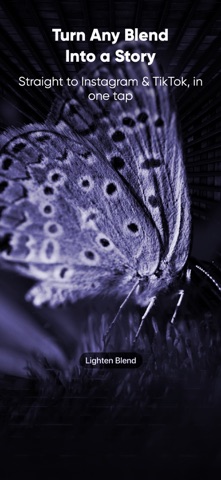
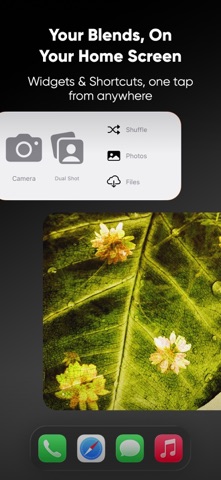
ImageFlux is the only iPhone app that blends Apple ProRAW photos in real time — up to 10 layers, 27+ blend modes, and full GPU-accelerated rendering. Create double exposures, layered composites, and film-style art that no filter can replicate. Now with Blend Story, Crop, and Home Screen widgets. Loved by photographers worldwide. --- Key Features Blend Story — Share as Video • Turn any blend into a vertical story video for Instagram and TikTok • After you export, ImageFlux offers to build one for you Dual Shot — Front & Back at Once • Capture both cameras at the same time and blend them into a single multiple exposure on the spot • Your blend is auto-created and saved straight to your Photo Library • Available on iPhone XS and later Apple ProRAW Capture & Blending • Shoot ProRAW directly in-app — no need to switch cameras • Blend ProRAW files with full dynamic range preserved • Compatible with iPhone 12 Pro and later Advanced RAW Blending • Layer up to 10 RAW photos with live control • Pinch, rotate, scale & move layers in real time • Adjust exposure per layer • Merge, reorder, hide, flip, or delete layers • Supports DNG, CR3, NEF, ARW, RAF & more Crop, Straighten & Flip • Crop any layer with draggable handles and aspect-ratio lock • Straighten with a ruler, and flip horizontally or vertically • Your crop is kept when you re-edit a saved blend 27+ Professional Blend Modes • Multiply, Screen, Overlay, Divide, Subtract, Hard Mix & more • Live preview — see results instantly as you create Blending Camera • Live multi-exposure capture with ghost overlay • Burst Mode: shoot up to 30 frames, then keep your best 10 • Shoot with Bluetooth shutter grips and remotes Non-Destructive Editing • Undo and redo any change, any time • Re-edit saved blends without losing the original layers Export Your Way • Single photo export with full resolution • JPG & TIFF — no compression, no quality loss • ZIP project export to back up or move full layered projects (Pro) • Share directly to Instagram, Threads, or any app Widgets, Shortcuts & Control Center • Recent Blends widget rotates through your work every 5, 10, or 30 minutes • Quick Actions widget: Camera, Dual Shot, Shuffle, Photos, and Files • Start a blend or open the camera from Siri Shortcuts, Spotlight, or Control Center Smart Project Management • Save, reopen, and re-edit blends anytime • Built-in gallery for quick browsing --- Plans & Pricing • Free — the complete toolset for your first blends, no account needed • Monthly — Full access, cancel anytime • Yearly — Full access at best value • Lifetime — Pay once, yours forever --- Who's it for? • Photographers who want RAW multi-exposures beyond the camera • Artists exploring textures, surreal blends, and layered storytelling • Creators who want bold, original content for social media • Hobbyists experimenting with double exposures for the first time --- Privacy Policy: https://voidstd.io/privacy Terms of Use: https://www.apple.com/legal/internet-services/itunes/dev/stdeula/
What's new · 2.6.0
Share your blends as stories, jump in from your Home Screen, and shoot faster with Burst Mode. • New — Blend Story: turn any blend into a vertical story video for Instagram and TikTok. After you export, ImageFlux offers to build one for you. • New — Widgets: Recent Blends rotates on your Home Screen every 5, 10, or 30 minutes, and the Quick Actions widget puts Camera, Dual Shot, Shuffle, Photos, and Files one tap away. • New — Shortcuts, Spotlight & Control Center: start a blend or open the camera from anywhere. • Camera upgrades: Burst Mode shoots up to 30 frames so you can keep up to 10 of your best, ProRAW capture is faster, and Bluetooth shutter grips are supported. • Crop & Flip: crop, straighten, and flip any layer with draggable handles and aspect-ratio lock. Your crop is kept when you re-edit. • Built for iPhone Duo: the canvas adapts to the inner display, with the layers panel split right at the fold. • Polish: clean up temporary blends in Settings > Storage, plus fixes for deleted blends coming back after you enable iCloud sync (the Recent Blends widget now updates right away too), the Black & White sliders, Light theme text contrast, a layer vanishing when dragged to the bottom, and a black camera screen during iCloud sync. Thanks for creating with ImageFlux. Keep the blends coming!
Details