

Wake Music Pro:Offline Music
Guangzhou Three Willows Network Technology Co., Ltd. · Music
Independent analytics for this App Store listing. AppTracker is not affiliated with Guangzhou Three Willows Network Technology Co., Ltd.
Chart standing · US
What changed · US
Listing changes AppTracker has observed for this app in this storefront — new versions, price moves, rating shifts, and store copy.
◆◆◆ Major Update 1. Added support for iOS 27.1 and iPhone Duo. 2. Added support for pCloud, Box, MEGA, Yandex Disk, SMB, FTP, 123 cloud drive and Guangya cloud drive. 3. New 10-band EQ to fine-tune your listening experience. 4. New audio spectrum analysis to explore the spectral characteristics of your audio. 5. Improved audio fingerprint recognition with a significantly higher song identification success rate. 6. Redesigned onboarding to help you discover the app's features. 7. Rebuilt the Navidrome module for a refreshed music server experience. 8. Updated our Privacy Policy and Terms of Use. 9. Fixed other known issues. If you run into any issues, please contact us at support@kakainc.com.
Screenshots




Keywords this app targets
Search terms AppTracker associates with this app — estimates, not search volume. ❝ = in the app's title; a highlighted number is its current position for that term.
Similar apps
Competitors and close alternatives, as estimated by AppTracker.


About
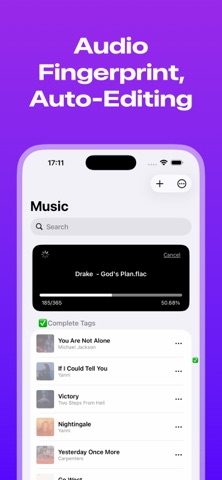
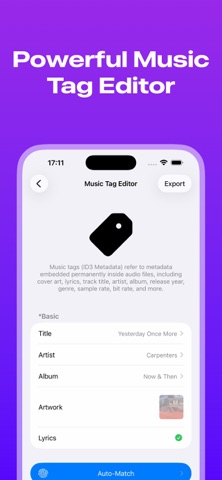
Your music. Your collection. More than playback. Wakemusic brings your local files, cloud drives, NAS and Navidrome library together. Play, explore and organize your music, from a favorite track to a carefully curated collection. ◆◆◆ Local music, ready when you are 1. Play MP3, FLAC, WAV, M4A, AAC, APE, AIFF, DSF, DFF and more, from everyday listening to lossless collections. 2. Import files and folders, transfer over Wi-Fi or extract audio from videos. 3. Browse by song, artist, album or genre. Make playlists and save favorites. 4. Download music for offline listening on your commute, on a trip or anywhere without a connection. ◆◆◆ Connect your collection 1. Access Google Drive, Dropbox, Box, pCloud, MEGA, Baidu Netdisk, Aliyun Drive, 115, 123 and Guangya cloud drives. 2. Connect to your NAS, computer or server via SMB, WebDAV or FTP. 3. Stream music or queue downloads to build your offline library. 4. Enable pre-downloading to keep completed downloads in your local music folder as you listen. ◆◆◆ Your personal music server 1. Explore Navidrome and compatible Subsonic services in a dedicated server mode. 2. Rediscover recent plays, favorites, playlists, random picks and recent additions. 3. Browse and search songs, artists and albums. View album details, artist biographies and similar artists when supplied by the server. 4. Download songs, then switch to classic mode to enjoy them offline. ◆◆◆ Give your music lasting value 1. Find song information with audio fingerprint recognition. 2. Edit titles, artists, albums, artwork and lyrics to keep your collection organized. 3. Embed metadata in supported audio files so your work stays with your music across devices and players. 4. Recognition results and writable tags depend on the song and file format. ◆◆◆ Shape the sound. See the details. 1. Adjust a 10-band EQ and preamp gain to suit your taste. 2. Try Bass Boost, Vocal, Rock, Jazz and other presets, or save your own settings. 3. Analyze local audio spectra and check format, file size, average bitrate and sample rate. 4. Save or share an analysis card. A spectrum helps reveal audio characteristics but cannot, on its own, prove a recording is truly lossless. ◆◆◆ Make listening your own 1. Choose vinyl, cassette and other player styles. 2. Enjoy artwork-inspired backgrounds, mini lyrics and audio information. 3. Use shuffle, sequential playback, repeat-one, queue management and a sleep timer. ◆◆◆ About Pro 1. Pro includes premium features with no additional subscription required. 2. Third-party membership and transfer fees are separate and subject to each provider's terms. ◆◆◆ Good to know Wakemusic is a player and library manager; it does not supply music. Use audio you have permission to access. Third-party access, memberships, transfer limits and features depend on each provider. Feedback: support@kakainc.com Privacy Policy: https://kakainc.com/en/wakemusic/legal/app-store/privacy/ Terms of Use: https://kakainc.com/en/wakemusic/legal/app-store/terms/
What's new · 3.6.0
◆◆◆ Major Update 1. Added support for iOS 27.1 and iPhone Duo. 2. Added support for pCloud, Box, MEGA, Yandex Disk, SMB, FTP, 123 cloud drive and Guangya cloud drive. 3. New 10-band EQ to fine-tune your listening experience. 4. New audio spectrum analysis to explore the spectral characteristics of your audio. 5. Improved audio fingerprint recognition with a significantly higher song identification success rate. 6. Redesigned onboarding to help you discover the app's features. 7. Rebuilt the Navidrome module for a refreshed music server experience. 8. Updated our Privacy Policy and Terms of Use. 9. Fixed other known issues. If you run into any issues, please contact us at support@kakainc.com.
Details