

Tidy Cam - Swipe Delete Photos
Charles Chiejina · Photo & Video
Independent analytics for this App Store listing. AppTracker is not affiliated with Charles Chiejina.
Chart standing · US
What changed · US
Listing changes AppTracker has observed for this app in this storefront — new versions, price moves, rating shifts, and store copy.
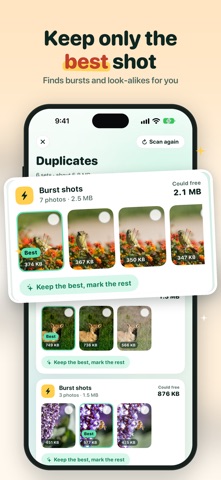
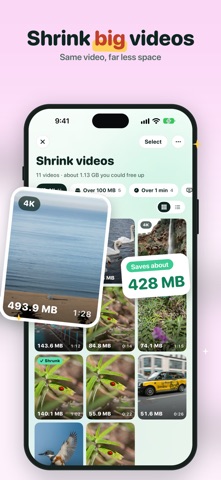
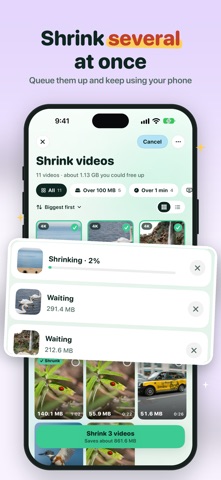
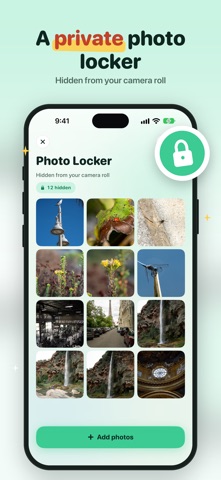
Tidy Cam has a whole new look, and it does a lot more. New • Shrink several videos at once. Pick them, tap Shrink and keep using your phone while they finish in the background. • After a shrink, choose what to keep: the smaller copy, both, or just the original. • Shrunk videos keep their date, location and albums, so they stay right where they were in your library. • Sort into your own albums while you swipe. One tap files a photo into Birds, Trips, anything you like. • Swiped photos fly into the bin or your keep pile, with little sounds and taps. Turn either off in Settings. • Search your photos in plain words, like "dog at the beach" or "receipts". It all runs on your iPhone. • Puzzle of the day widget: one of your older photos, scrambled, new every day. A new step-by-step guide shows how to add it. • Duplicates shows each burst with the best shot picked, and one button clears the rest. Improved • A brighter design across the whole app, and a new icon. • A new Shrink videos screen with filters, sorting and a tag on every video you've already shrunk. • Shrinking is faster and keeps going when you leave the app. • New Settings, Stats, Photo Locker and Saved for later screens. Fixed • Space freed during your first clean-up now counts in Stats. • A blank screen that could appear when opening a finished video. • Lots of smaller fixes.
In-app purchases · US
What this app sells inside itself, grouped by kind and priced for this storefront.
Screenshots



About
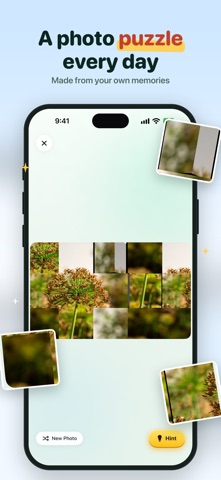
Clean up your camera roll, one swipe at a time. Keep what matters, delete what doesn't. Why you'll love it: • Simple swipe: right to keep, left to delete, up to save for later. • Sort as you go: one tap files a photo into your own albums. • Tidy now: pick up exactly where you left off with your newest photos. • Random Mix: shuffle your library for quick clean-ups. • Search: find any photo by describing it. • Photo Puzzle: solve a puzzle made from your own memories every day. Powerful tools: • Duplicates: finds bursts and look-alikes and keeps the best shot. • Shrink videos: make big videos much smaller, several at once, and keep their date and location. • Photo Locker: hide private photos behind Face ID or passcode. • Widgets: On This Day and Puzzle of the day on your Home Screen. • Stats and goals: see how much space you've saved. Your photos never leave your device. Privacy Policy: https://foggoapps.com/tidycam/privacy.html Terms of Use: https://foggoapps.com/tidycam/terms.html
What's new · 1.110
Tidy Cam has a whole new look, and it does a lot more. New • Shrink several videos at once. Pick them, tap Shrink and keep using your phone while they finish in the background. • After a shrink, choose what to keep: the smaller copy, both, or just the original. • Shrunk videos keep their date, location and albums, so they stay right where they were in your library. • Sort into your own albums while you swipe. One tap files a photo into Birds, Trips, anything you like. • Swiped photos fly into the bin or your keep pile, with little sounds and taps. Turn either off in Settings. • Search your photos in plain words, like "dog at the beach" or "receipts". It all runs on your iPhone. • Puzzle of the day widget: one of your older photos, scrambled, new every day. A new step-by-step guide shows how to add it. • Duplicates shows each burst with the best shot picked, and one button clears the rest. Improved • A brighter design across the whole app, and a new icon. • A new Shrink videos screen with filters, sorting and a tag on every video you've already shrunk. • Shrinking is faster and keeps going when you leave the app. • New Settings, Stats, Photo Locker and Saved for later screens. Fixed • Space freed during your first clean-up now counts in Stats. • A blank screen that could appear when opening a finished video. • Lots of smaller fixes.
Details