

Plander: Planner & Calendar
CHOI HYEONG SEOK · Productivity
Independent analytics for this App Store listing. AppTracker is not affiliated with CHOI HYEONG SEOK.
Chart standing · US
What changed · US
Listing changes AppTracker has observed for this app in this storefront — new versions, price moves, rating shifts, and store copy.
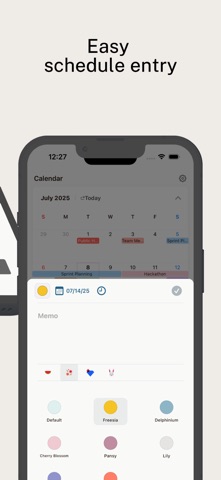
- Redesigned the Add Event screen: a simpler one-line date picker and a new Today button. - Pick an alarm right on the screen, and set alarms for all-day events too. - Color picker now uses washi-tape style stickers, with refined colors for each theme. - Clearer highlight for the selected day in week view. - Fixed overlapping holiday text and events hidden behind the bottom banner. - The Apple Calendar prompt no longer repeats, plus stability improvements for the latest iOS.
Ratings breakdown · US
The star breakdown behind this app's rating in this storefront.
In-app purchases · US
No in-app purchases.
Screenshots



About
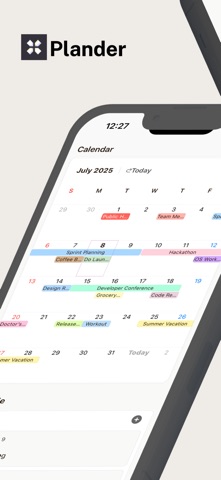
Plander is a task management app built for simplicity and minimal design. Add a task with a double-tap and swipe it away—just like moving sticky notes with your fingertips. Quickly view and organize your tasks for today and tomorrow at a glance :) ■ Key Features ∙ Color Customization: Assign custom tag colors by project or category ∙ Schedule Blocks: Display your day or multiple days in an intuitive timeline ∙ Push Notifications: Receive timely reminders so you never miss an important task ∙ iCloud Sync: Keep your schedule up to date across all your devices in real time ∙ Holiday Calendar: Integrate public holiday calendars in real time ■ Contact & Feedback ∙ plander.cs@gmail.com
What's new · 1.4.0
- Redesigned the Add Event screen: a simpler one-line date picker and a new Today button. - Pick an alarm right on the screen, and set alarms for all-day events too. - Color picker now uses washi-tape style stickers, with refined colors for each theme. - Clearer highlight for the selected day in week view. - Fixed overlapping holiday text and events hidden behind the bottom banner. - The Apple Calendar prompt no longer repeats, plus stability improvements for the latest iOS.
Details