

SideCam: Private Camera
jaesung Lee · Photo & Video
Independent analytics for this App Store listing. AppTracker is not affiliated with jaesung Lee.
Chart standing · US
What changed · US
Listing changes AppTracker has observed for this app in this storefront — new versions, price moves, rating shifts, and store copy.
Parking Space now shows how long you’ve been parked and lets you add a parking note at the bottom of the screen. The photo viewer displays the time elapsed since each photo was taken along with its capture date and time, while albums are now organized into sections by capture date.
Price & rating history · US
Reconstructed from the listing changes AppTracker has observed in this storefront. A field is charted once it has changed more than once, and each line starts at the value it moved from.
Average rating · ★ 0.00 now · 2 changes on record
In-app purchases · US
No in-app purchases.
Screenshots




About
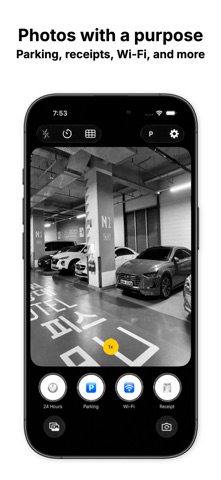
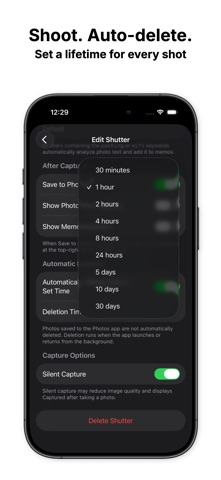
A private camera for photos that don’t need to stay in your main photo library. Do temporary reference photos such as parking spots, Wi-Fi passwords, receipts, and documents keep piling up in Photos? Pictures taken with SideCam are stored in its dedicated album by default. Save only the photos you need to your photo library or share them with others. Shutters made for you Create different shutters for different types of photos. • Save to Photos • Silent capture • Show photo after capture • Open the memo keyboard • Automatically delete photos after a set time SideCam includes Default, Business, 24 Hours, Parking, Wi-Fi, Document, and Receipt shutters. Customize their names, emojis, and capture options to fit your needs. Photos and notes together Add notes to each photo and keep important details close at hand. The Parking and Wi-Fi shutters can recognize text in photos and automatically organize useful details, such as parking locations and Wi-Fi information, into notes. Keep photos only as long as needed Set a retention period for each shutter and automatically delete photos after a chosen amount of time. Keep temporary photos only while they’re useful and spend less time cleaning up old images. Essential camera features • Flash • Camera grid • 3, 5, and 10-second timers • Front and rear camera switching • Camera zoom • Photo sharing and saving to Photos Quick access Add SideCam to your Lock Screen or Control Center to quickly open the app or camera. A Shortcuts automation guide is also included to help you launch SideCam when you need it. Keep your photo library clean. Keep useful photos and notes in SideCam.
What's new · 2.0
Parking Space now shows how long you’ve been parked and lets you add a parking note at the bottom of the screen. The photo viewer displays the time elapsed since each photo was taken along with its capture date and time, while albums are now organized into sections by capture date.
Details