

PaceTimer - onTime
阳 孙 · Productivity
Independent analytics for this App Store listing. AppTracker is not affiliated with 阳 孙.
Chart standing · US
What changed · US
Listing changes AppTracker has observed for this app in this storefront — new versions, price moves, rating shifts, and store copy.
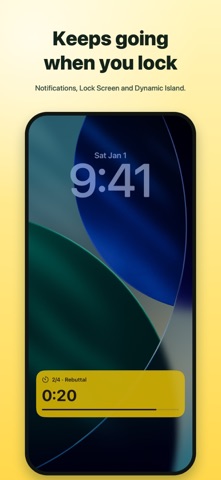
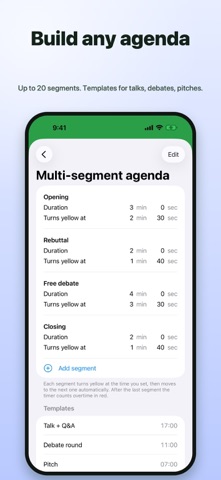
PaceTimer 2.0 is the biggest update yet. • Reminders now arrive even when the screen is locked or the app is in the background (fixes the iPhone-going-to-sleep reports) • Live Activity: see the countdown on the Lock Screen and in the Dynamic Island • Set times to the second, not just minutes • Overtime keeps counting in red (+MM:SS) • Screen stays awake while timing • Multi-segment agendas with templates for talks, debates and pitches (Pro) • Saved presets and full history with on-time stats (Pro) • Apple Watch timer rebuilt: accurate in the background, with notifications • Now in Japanese, Korean, German, French, Spanish and Traditional Chinese PaceTimer is now free to download. If you bought the paid version earlier, Pro is already unlocked for you. Thank you!
In-app purchases · US
No in-app purchases.
Screenshots


Keywords this app targets
Search terms AppTracker associates with this app — estimates, not search volume. ❝ = in the app's title; a highlighted number is its current position for that term.
Similar apps
Competitors and close alternatives, as estimated by AppTracker.
 TimePacer: Meeting Talk Timer
隆明 弥生
2 shared topics
TimePacer: Meeting Talk Timer
隆明 弥生
2 shared topics
 TalkPace: Speech & Pitch Timer
Gregory Baker
1 shared topic
TalkPace: Speech & Pitch Timer
Gregory Baker
1 shared topic
 Presentation Clock
Shawn Welch
2 shared topics
Presentation Clock
Shawn Welch
2 shared topics
 PaceCoach
COLIN PETER OLLIVER
PaceCoach
COLIN PETER OLLIVER
 Timer with Sections
Christian Fries
2 shared topics
Timer with Sections
Christian Fries
2 shared topics
 Podium Timer Pro
Don Miller
1 shared topic
Podium Timer Pro
Don Miller
1 shared topic
 P-Timer
Yoshiaki Onishi
1 shared topic
P-Timer
Yoshiaki Onishi
1 shared topic
 Timekept
Philip Belesky
Timekept
Philip Belesky
About
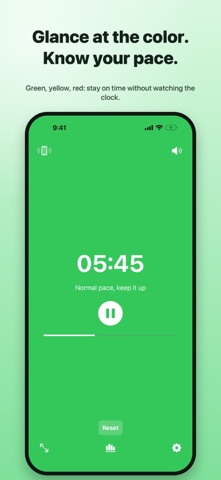
PaceTimer shows your pace as a color. Green means you're on track, yellow means start wrapping up, red means time's up. Glance at the screen, not the clock. BUILT FOR SPEAKING UNDER A TIME LIMIT Speeches, presentations, lectures, debates, interviews, meetings, pitch practice. FREE • Green → yellow → red background, with sound, vibration and flash at each change • Set total time and the yellow point to the second • Quick presets: 3, 5, 10, 15, 20, 30, 45, 60 minutes • Elapsed, remaining, or both on screen; overtime counts up in red • Full-screen mode: huge digits readable from the back row • Keeps alerting when the screen is locked (notifications) and shows a Live Activity on the Lock Screen and Dynamic Island • Screen stays on while the timer runs • Apple Watch app with haptic alerts PRO (one-time purchase, no subscription) • Multi-segment agenda: chain up to 20 segments, each with its own warning, with auto-advance. Templates for talk + Q&A, debate rounds and pitches • Saved presets: start your favorite setups in one tap • History and stats: on-time rate and how far you run over or under If you bought the earlier paid version of PaceTimer, Pro is unlocked for you automatically. Questions or ideas? Write to us from the App Store page. We read everything.
What's new · 2.0
PaceTimer 2.0 is the biggest update yet. • Reminders now arrive even when the screen is locked or the app is in the background (fixes the iPhone-going-to-sleep reports) • Live Activity: see the countdown on the Lock Screen and in the Dynamic Island • Set times to the second, not just minutes • Overtime keeps counting in red (+MM:SS) • Screen stays awake while timing • Multi-segment agendas with templates for talks, debates and pitches (Pro) • Saved presets and full history with on-time stats (Pro) • Apple Watch timer rebuilt: accurate in the background, with notifications • Now in Japanese, Korean, German, French, Spanish and Traditional Chinese PaceTimer is now free to download. If you bought the paid version earlier, Pro is already unlocked for you. Thank you!
Details