

SwiftServer - SSH Client
GitSwift LLC · Developer Tools
Independent analytics for this App Store listing. AppTracker is not affiliated with GitSwift LLC.
Chart standing · US
What changed · US
Listing changes AppTracker has observed for this app in this storefront — new versions, price moves, rating shifts, and store copy.
- Improved the terminal keyboard on iPhone and iPad - Added colorized Docker logs with level filtering, search, and follow - Fixed a number of bugs
Ratings breakdown · US
The star breakdown behind this app's rating in this storefront.
In-app purchases · US
What this app sells inside itself, grouped by kind and priced for this storefront.
Screenshots

Keywords this app targets
Search terms AppTracker associates with this app — estimates, not search volume. ❝ = in the app's title; a highlighted number is its current position for that term.
Similar apps
Competitors and close alternatives, as estimated by AppTracker.
 WebSSH - Sysadmin Toolbox
MENGUS ARNAUD
3 shared topics
WebSSH - Sysadmin Toolbox
MENGUS ARNAUD
3 shared topics
 ServerCat - SSH Terminal
Early Moon, LLC
1 shared topic · 1 shared title word
ServerCat - SSH Terminal
Early Moon, LLC
1 shared topic · 1 shared title word
 ShellBean - AI SSH Client
Beijing Rudian Technology Co., Ltd.
2 shared topics · 1 shared title word
ShellBean - AI SSH Client
Beijing Rudian Technology Co., Ltd.
2 shared topics · 1 shared title word
 Mobile SSH Terminal
Binaryscript Private Limited
2 shared topics · 1 shared title word
Mobile SSH Terminal
Binaryscript Private Limited
2 shared topics · 1 shared title word
 SSH Client - Terminal & Termux
Moon Technolabs Pvt Ltd
1 shared topic · 1 shared title word
SSH Client - Terminal & Termux
Moon Technolabs Pvt Ltd
1 shared topic · 1 shared title word
 GateShell
HEFTY INNOVATIONS
2 shared topics
GateShell
HEFTY INNOVATIONS
2 shared topics
 SSH, SFTP, databases: Boopbeep
Gabriel Lopez Santana
2 shared topics · 1 shared title word
SSH, SFTP, databases: Boopbeep
Gabriel Lopez Santana
2 shared topics · 1 shared title word
 SSH Terminal Pro
志鹏 潘
2 shared topics · 1 shared title word
SSH Terminal Pro
志鹏 潘
2 shared topics · 1 shared title word
About
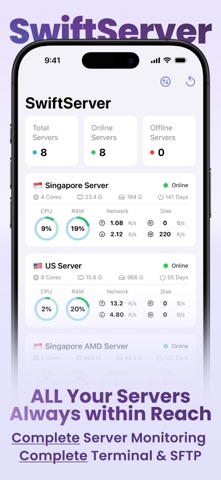
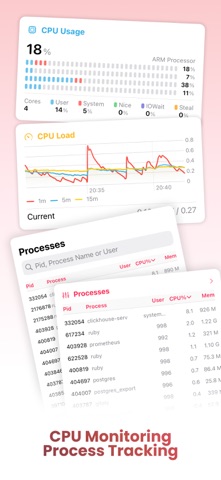
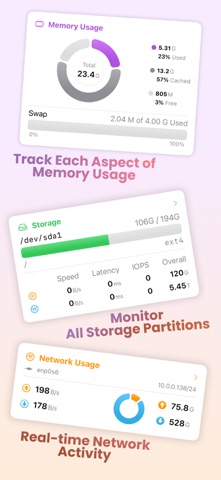
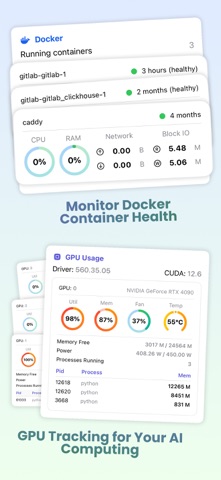
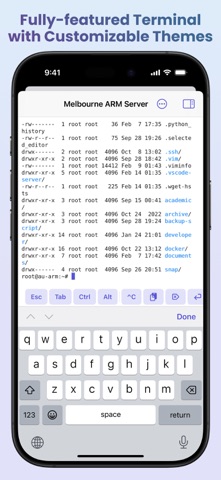
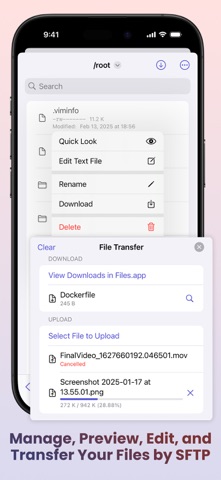
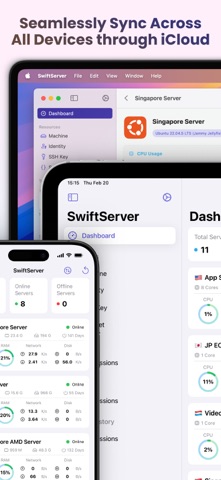
SwiftServer is an SSH client and server monitor for iPhone, iPad, and Mac. It is for developers, sysadmins, and homelab owners who run Linux, macOS, or Windows servers and want a terminal, live status, Docker, and SFTP in one app. Nothing is installed on the server. SwiftServer connects over the SSH access you already have. No agent, no daemon, no account. MONITORING - CPU per core, load averages, and temperature - Memory as used, cached, free, and swap - Live process table, sortable and searchable - Network speed and totals, with vnStat history by hour, day, month, and year - Storage per volume with disk I/O speed, latency, and IOPS - NVIDIA GPU: utilization, memory, fan, temperature, power, and compute processes - Public IP and location per server. Global View maps every server with live latency. - Linux, macOS, and Windows on one dashboard - Widgets, Live Activities, and the Dynamic Island TERMINAL - SSH and Mosh sessions. Mosh keeps the shell alive through network changes and sleep. - Keyboard bar with Esc, Tab, Ctrl, Alt, arrows, and ^C on iPhone and iPad. Hardware keyboards work too. - Snippets: save a command once, run it in any session, or across many machines with a result per machine - 518 color themes with separate light and dark picks, nine bundled monospace fonts, and custom font import - Mac: Local Shell opens a terminal on your own Mac in the same window DOCKER - Speaks the Docker Engine API over the SSH connection. No Docker port is exposed. - Overview: engine status, counts, reclaimable space, and live CPU and memory across containers - Containers: logs, processes, inspect. Create, start, stop, restart, pause, kill, remove. - Compose projects: up, down, start, stop, restart, pull, and logs - Images: pull with progress, remove, prune. Volumes and networks: inspect, remove, prune. Live event stream. SFTP - Browse, upload, download, rename, delete, and create files and folders - Copy files from one server to another without routing them through your device - Quick Look preview and a text editor with save NETWORKING - Port forwarding: local, remote, and dynamic SOCKS rules with auto start and a built-in browser on iPhone and iPad - Jump hosts: reach machines behind a bastion through one hop or a chain, each with its own credentials and host key check - Connection proxies: SOCKS5 and HTTP CONNECT profiles, per machine or per forwarding rule KEYS AND SECURITY - Password, SSH key, and keyboard-interactive login, including two-factor prompts - Generate Ed25519, ECDSA, or RSA keys on the device, or import existing keys - Host key fingerprint on first contact. A changed host key stops the connection. - Secrets stay in the device Keychain, behind Face ID, Touch ID, or passcode if you choose - Built on Traversio, our open-source SSH engine written in Swift ICLOUD SYNC AND PRIVACY - Machines, identities, keys, snippets, forwarding rules, proxy profiles, and trusted host keys sync through your own iCloud. Passwords and private keys go only through iCloud Keychain, end-to-end encrypted. - No accounts and no SwiftServer servers. What you save stays on your devices and in your iCloud. - The only outbound request is the IP lookup, sent from your server to ipinfo.io. The result is stored on your device only. FREE AND PREMIUM The core of SwiftServer is free: saved machines and keys, live server status, the full terminal with Mosh and snippets, SFTP, port forwarding, Docker browsing, widgets, and Global View. Premium adds unlimited monitored servers, iCloud sync, unlimited forwarding sessions, jump hosts, proxies, Docker management, terminal themes and fonts, SFTP preview and editing, and city, organization, and map pin for IP location. Premium is a monthly or yearly subscription, each with a free trial, or a one-time lifetime purchase. One purchase covers iPhone, iPad, and Mac. Support: support@gitswift.com Terms of Use: https://swiftserver.app/terms Privacy Policy: https://swiftserver.app/privacy
What's new · 2.2.1
- Improved the terminal keyboard on iPhone and iPad - Added colorized Docker logs with level filtering, search, and follow - Fixed a number of bugs
Details