

Split Buses
Dario Caric · Travel
Independent analytics for this App Store listing. AppTracker is not affiliated with Dario Caric.
Chart standing · US
What changed · US
Listing changes AppTracker has observed for this app in this storefront — new versions, price moves, rating shifts, and store copy.
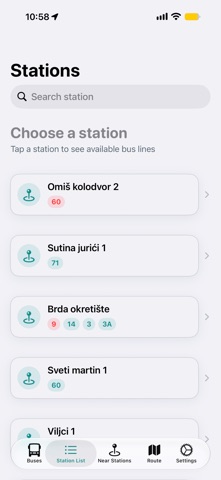
New small but useful feature. When you know bus line and you want to track when will that bus arrive on your station you just go to the station tab, find bus line, tap on the map button and you will see on the map bus location. Now just tap on the button to monitor bus while screen is locked and you will have information on the locked screen how many stations are left and time until bus arrival
Screenshots


About
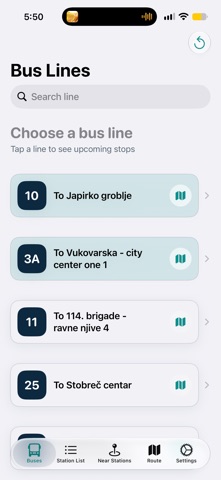
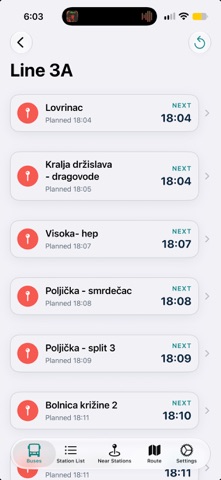
Split Buses – Real-Time Bus Tracking and More! Discover Split like never before with Split Buses, your ultimate guide to public transportation in the city. Designed for locals and visitors alike, this app ensures you stay informed and stress-free while navigating the city’s bus network. Key Features: • Real-Time Bus Tracking: Stay updated with accurate bus locations and estimated arrival times, recalculated for traffic conditions. • Enhanced Station Information: Corrected and verified station locations powered by user feedback and intelligent APIs. • Live Tracking Mode: Follow buses live as they approach your location or destination, ensuring you never miss your ride. • Tourist-Friendly: Explore Split’s public transit system with ease, whether you’re heading to a beach or historic sites. • Report Issues: Encounter wrong station data or other issues? Report them directly through the app for a better community experience. Why Split Buses? This app was born from a need for better transportation tools in Split. By combining accurate, real-time data with user-friendly features, SplitBus enhances your travel experience while making public transportation convenient and reliable.
What's new · 3.9
New small but useful feature. When you know bus line and you want to track when will that bus arrive on your station you just go to the station tab, find bus line, tap on the map button and you will see on the map bus location. Now just tap on the button to monitor bus while screen is locked and you will have information on the locked screen how many stations are left and time until bus arrival
Details