

ContactKeeper: Contacts
Martin Rost · Utilities
Independent analytics for this App Store listing. AppTracker is not affiliated with Martin Rost.
Chart standing · US
What changed · US
Listing changes AppTracker has observed for this app in this storefront — new versions, price moves, rating shifts, and store copy.
New in Version 2.3: MERGE CONTACTS INSTEAD OF CREATING DUPLICATES When importing, ContactKeeper now recognizes which contacts are already in your address book. Instead of creating duplicates, missing details — phone numbers, email addresses, postal addresses — are added to the existing contact. Your existing data stays untouched: nothing is overwritten, nothing is deleted. This matters most when restoring your own backup: your address book no longer doubles in size. NEW IMPORT PREVIEW Before importing, you see exactly what will happen — which contacts will be created, which ones already exist, and what will be added to them. You decide for each contact individually. VCARD IMPORT KEEPS MORE DATA Birthdays, websites, nicknames, social profiles, and contact photos are no longer lost when importing vCard files. Detecting contacts you already have is free. Merging them is part of Premium.
In-app purchases · US
What this app sells inside itself, grouped by kind and priced for this storefront.
Screenshots




Keywords this app targets
Search terms AppTracker associates with this app — estimates, not search volume. ❝ = in the app's title; a highlighted number is its current position for that term.
Similar apps
Competitors and close alternatives, as estimated by AppTracker.
 SA Contacts
ShenZhen SamApp Technology Development Co., Ltd
SA Contacts
ShenZhen SamApp Technology Development Co., Ltd
 My Contacts Editor +
SENSONET BILISIM TEKNOLOJILERI ELEKTRONIK YAZILIM SANAYI VE TICARET LTD STI
My Contacts Editor +
SENSONET BILISIM TEKNOLOJILERI ELEKTRONIK YAZILIM SANAYI VE TICARET LTD STI
 MCBackup Pro - Contacts Backup
Ravi Kotadiya
MCBackup Pro - Contacts Backup
Ravi Kotadiya
 Contact Cleaner & Merge
舜 陈
Contact Cleaner & Merge
舜 陈
 Contacts Backup- 3000
Simge Ceylan Akyuz
Contacts Backup- 3000
Simge Ceylan Akyuz
 Contaqs - The Contact Manager
entwicklungsschmiede UG (haftungsbeschraenkt) & Co. KG
Contaqs - The Contact Manager
entwicklungsschmiede UG (haftungsbeschraenkt) & Co. KG
 Minted: The Address Book
Minted, LLC
Minted: The Address Book
Minted, LLC
 ContactsPro HX
Demodit GmbH
ContactsPro HX
Demodit GmbH
About
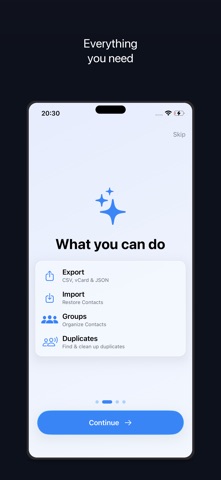
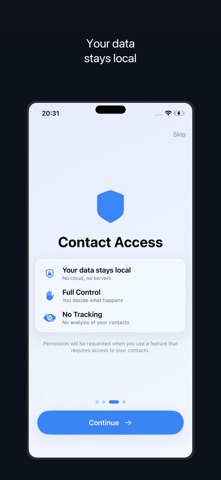
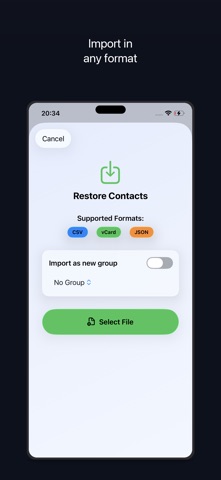
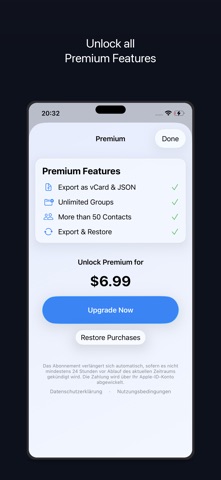
ContactKeeper - Your contacts, securely backed up. Take full control of your contacts with ContactKeeper. Back up, export, and restore your iPhone and iPad contacts - completely offline, no cloud, no servers. Your data never leaves your device. EXPORT & BACKUP Export contacts as CSV, vCard (.vcf), or JSON Select individual contacts or all at once Share via AirDrop, email, or save to iCloud Drive IMPORT & RESTORE Import contacts from CSV, vCard, or JSON files Preview before import - you decide which contacts to keep Detects existing contacts and merges them instead of creating duplicates Supports multiple encodings (UTF-8, Windows-1252, ISO-Latin1) GROUPS & ORGANIZATION Create and manage contact groups Organize contacts by category Export entire groups at once DUPLICATE DETECTION Find duplicate contacts automatically Smart scoring by name, phone & email Merge duplicates with one tap 100% PRIVACY All data stays local on your device No cloud uploads, no servers, no databases No tracking, no analysis of your contacts Privacy-friendly analytics via TelemetryDeck (no personal data) GET STARTED FOR FREE Single contact export for free Export up to 50 contacts as CSV CSV import included PREMIUM (One-time purchase - no subscription!) Export unlimited contacts All formats: CSV, vCard & JSON Manage & export groups Detect & merge duplicates Merge contacts during import For iPhone and iPad. Requires iOS 26 or later. Privacy: https://contactkeeper.de/en/privacy Support: https://contactkeeper.de/en/contact
What's new · 2.3
New in Version 2.3: MERGE CONTACTS INSTEAD OF CREATING DUPLICATES When importing, ContactKeeper now recognizes which contacts are already in your address book. Instead of creating duplicates, missing details — phone numbers, email addresses, postal addresses — are added to the existing contact. Your existing data stays untouched: nothing is overwritten, nothing is deleted. This matters most when restoring your own backup: your address book no longer doubles in size. NEW IMPORT PREVIEW Before importing, you see exactly what will happen — which contacts will be created, which ones already exist, and what will be added to them. You decide for each contact individually. VCARD IMPORT KEEPS MORE DATA Birthdays, websites, nicknames, social profiles, and contact photos are no longer lost when importing vCard files. Detecting contacts you already have is free. Merging them is part of Premium.
Details