

PhotoRiver
Naihe Hu · Photo & Video
Independent analytics for this App Store listing. AppTracker is not affiliated with Naihe Hu.
Chart standing · US
What changed · US
Listing changes AppTracker has observed for this app in this storefront — new versions, price moves, rating shifts, and store copy.
PhotoRiver 5.0 is here: • Daily Review: a quick daily pass through your photos. Keep, favorite, or delete each one in seconds • Monthly Recap: a look back at your month in photos, with highlights of what you captured • Language switching: change the app language right in Settings, no need to touch system settings • River menu refresh: the expanding menus now open from both sides, so every tool is easier to reach with one thumb • Smoother Cleanup Hub: the new daily and monthly entries sit right at the top All analysis happens on your device. Deleted photos go to Recently Deleted and can be recovered for 30 days.
In-app purchases · US
What this app sells inside itself, grouped by kind and priced for this storefront.
Screenshots






About
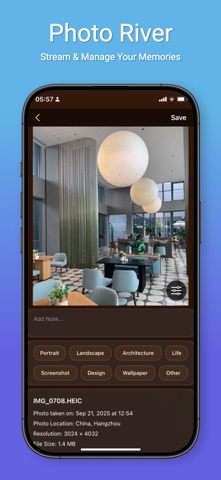
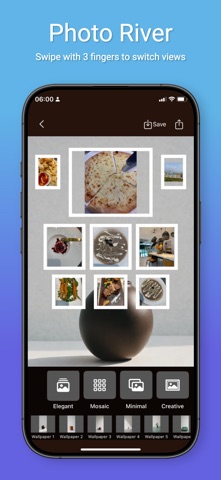
This app uses Apple's Standard End User License Agreement (EULA): https://www.apple.com/legal/internet-services/itunes/dev/stdeula/ PhotoRiver makes organizing your photo library as easy as browsing it. Swipe through your photos and videos full screen, and favorite, tag, or delete each one as you go. IMMERSIVE BROWSING • Swipe up and down, one photo per screen, with videos playing automatically • Favorite, tag, categorize, add notes, or add to albums and diaries right on the photo • Recommended, Memories, and To Organize filters • Switch between four views: River, Grid, Immersive, and Cards CLEANUP HUB • Duplicates and similar photos: compare in groups and keep the best one • Blurry photos: find the shots that didn't come out • Bursts and Live Photos: keep the best frame, clear the rest • Screenshot archiving: clear out screenshots you no longer need, in batches • Large files and video compression: see what's using your storage and compress videos in the app • Monthly review: a few minutes a month keeps your library tidy CAPTURE AND CREATE • Photo diary: combine photos with text, mood, and weather • Photo walls: templates and backgrounds for shareable collages • Albums: manage system and custom albums together • iCloud sync: favorites, tags, and diaries sync across your devices PRIVACY AND SAFETY • All photo analysis happens on your device and is never uploaded to our servers • Every deletion is confirmed first, and deleted photos stay in Recently Deleted for 30 days
What's new · 5.0
PhotoRiver 5.0 is here: • Daily Review: a quick daily pass through your photos. Keep, favorite, or delete each one in seconds • Monthly Recap: a look back at your month in photos, with highlights of what you captured • Language switching: change the app language right in Settings, no need to touch system settings • River menu refresh: the expanding menus now open from both sides, so every tool is easier to reach with one thumb • Smoother Cleanup Hub: the new daily and monthly entries sit right at the top All analysis happens on your device. Deleted photos go to Recently Deleted and can be recovered for 30 days.
Details