

MailCow
apply IT UG (haftungsbeschraenkt) · Utilities
Independent analytics for this App Store listing. AppTracker is not affiliated with apply IT UG (haftungsbeschraenkt).
Chart standing · US
What changed · US
Listing changes AppTracker has observed for this app in this storefront — new versions, price moves, rating shifts, and store copy.
New: temporary addresses. Create a throwaway address with an expiry date for any mailbox, from one day to permanent. Tap to copy, swipe to delete. New: Siri and Shortcuts. Say "Create a throwaway address with Moo Admin", or put the action on your lock screen or the Action button. The new address goes straight to your clipboard.
In-app purchases · US
What this app sells inside itself, grouped by kind and priced for this storefront.
Screenshots



About
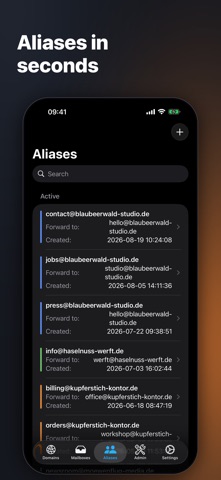
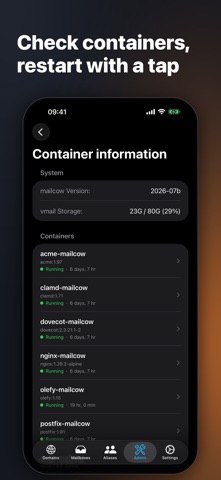
Moo Admin is your client for mailcow servers. Manage domains, mailboxes, and aliases on the go, and keep an eye on quarantine, mail queue, and logs – directly via your server's API, fast and without detours. FEATURES Create and edit domains, including limits and rate limits Create mailboxes, change passwords, adjust spam thresholds per mailbox Manage aliases and forwardings Temporary addresses per mailbox: a throwaway address expiring from one day to never, tap to copy Siri and Shortcuts: create a throwaway address by voice, from the lock screen or the Action button Domain colors for quick identification of mailboxes and aliases Fully localized in English and German MOO ADMIN PRO (one-time purchase, no subscription) Manage multiple servers Quarantine: view messages, release them, learn as ham or spam Fail2Ban: view and unban banned IPs, maintain allow and deny lists Sync jobs with last run and exit status View and control the mail queue Search server logs Container information: status, image, and uptime of all services – including restart PRIVACY The app communicates exclusively with your own server. No tracking, no cloud, no third parties. REQUIREMENTS You need your own mailcow server (mailcow: dockerized) and an admin API key. DISCLAIMER Moo Admin is an independent third-party client. mailcow is a registered trademark of The Infrastructure Company GmbH. This app is not affiliated with, endorsed by, or supported by the mailcow project or The Infrastructure Company GmbH. LEGAL Privacy policy: https://www.apply-it.de/de/datenschutzrichtlinie-moo-admin Terms of use (EULA): https://www.apple.com/legal/internet-services/itunes/dev/stdeula/
What's new · 1.4.0
New: temporary addresses. Create a throwaway address with an expiry date for any mailbox, from one day to permanent. Tap to copy, swipe to delete. New: Siri and Shortcuts. Say "Create a throwaway address with Moo Admin", or put the action on your lock screen or the Action button. The new address goes straight to your clipboard.
Details