

TempoFlow | Routine Builder
Electric Bloom LLC · Health & Fitness
Independent analytics for this App Store listing. AppTracker is not affiliated with Electric Bloom LLC.
Chart standing · US
What changed · US
Listing changes AppTracker has observed for this app in this storefront — new versions, price moves, rating shifts, and store copy.
Your TempoFlow, Your Colors: Choose preset or custom colors in Appearance, fine-tune light and dark styles separately, and preview your palette across the app. Keep Exercise Cues in View: Turn on Show Current Exercise Cue in workout settings to see each exercise's coaching cue above your notes while you train. Count Up Your Timed Exercises: Prefer elapsed time? Timed exercises can now start at 0:00 and count up on iPhone, iPad, and Apple Watch. Tap to Pause on Apple Watch: Tap the center of the workout timer to pause or resume without switching to the controls screen. Privacy & Permissions in One Place: Manage Apple Health and notification access, control optional usage analytics, and find privacy, legal, and data tools from your profile.
Price & rating history · US
Reconstructed from the listing changes AppTracker has observed in this storefront. A field is charted once it has changed more than once, and each line starts at the value it moved from.
Average rating · ★ 4.77 now · 12 changes on record
Ratings breakdown · US
The star breakdown behind this app's rating in this storefront.
In-app purchases · US
What this app sells inside itself, grouped by kind and priced for this storefront.
Screenshots




About
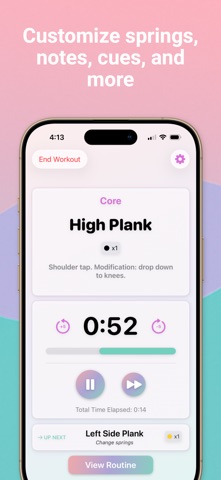
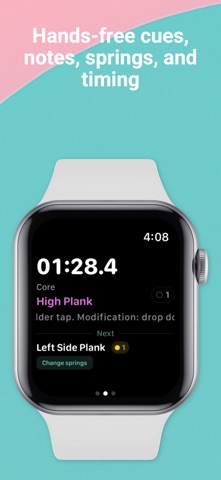
Stop juggling a stopwatch mid-class or forgetting your routines. TempoFlow is the Lagree timer and routine planner built for Lagree, Pilates, Solidcore, and HIIT instructors who demand precision every class. Whether you're cueing a packed Lagree class or coaching one-on-one, TempoFlow keeps your timing sharp and your routines organized, so you teach with confidence, not chaos. TempoFlow helps you: • Build and save custom Lagree routines with timed exercises, spring loads, and rest intervals • Manage your routine library - organize, duplicate, and edit routines in seconds • Run class timers hands-free from your Apple Watch • Plan your full class schedule with routine sequencing built in • Track every second with a clean, tap-to-run timer interface The Lagree timer and routine planner instructors trust. Terms of Use: https://www.apple.com/legal/internet-services/itunes/dev/stdeula/
What's new · 2.9.0
Your TempoFlow, Your Colors: Choose preset or custom colors in Appearance, fine-tune light and dark styles separately, and preview your palette across the app. Keep Exercise Cues in View: Turn on Show Current Exercise Cue in workout settings to see each exercise's coaching cue above your notes while you train. Count Up Your Timed Exercises: Prefer elapsed time? Timed exercises can now start at 0:00 and count up on iPhone, iPad, and Apple Watch. Tap to Pause on Apple Watch: Tap the center of the workout timer to pause or resume without switching to the controls screen. Privacy & Permissions in One Place: Manage Apple Health and notification access, control optional usage analytics, and find privacy, legal, and data tools from your profile.
Details