

Privacy AI: Powerful chatbot
AcmeUp Inc. · Productivity
Independent analytics for this App Store listing. AppTracker is not affiliated with AcmeUp Inc.
Chart standing · US
What changed · US
Listing changes AppTracker has observed for this app in this storefront — new versions, price moves, rating shifts, and store copy.
This update makes model downloads dependable: start one, close the app, and it is still there when you come back. IMPROVEMENTS - Downloads Survive Closing the App Model downloads now pick up where they left off after the app is closed. When you reopen it, the screen that started the download shows its progress and Cancel button again, and the model is set up as soon as the download finishes. - Resume After Swiping the App Away A model download stopped by swiping the app away in the app switcher now continues from where it stopped with one tap on Resume. The import button in My Models reads Resume Download with the model's name and opens the paused download. BUG FIXES - Download Live Activity Stays Visible The download progress on the Lock Screen and in the Dynamic Island now stays up after the app is reopened, instead of disappearing while the download keeps running. - Hugging Face Imports Finish Reliably A model downloaded from Hugging Face is now added to My Models even if the app was closed during the download. - Retrying Audio and Image Downloads Retrying an MLX audio or image model download no longer deletes a download that had already finished. - Partial Whisper Downloads A Whisper model that only partly downloaded no longer shows as Downloaded. It now offers to continue the download instead.
Price & rating history · US
Reconstructed from the listing changes AppTracker has observed in this storefront. A field is charted once it has changed more than once, and each line starts at the value it moved from.
Average rating · ★ 4.80 now · 5 changes on record
Ratings breakdown · US
The star breakdown behind this app's rating in this storefront.
In-app purchases · US
What this app sells inside itself, grouped by kind and priced for this storefront.
Screenshots





Keywords this app targets
Search terms AppTracker associates with this app — estimates, not search volume. ❝ = in the app's title; a highlighted number is its current position for that term.
Similar apps
Competitors and close alternatives, as estimated by AppTracker.
 3sparks Chat
3sparks labs llc
3sparks Chat
3sparks labs llc
 ChatBy AI Chat Bot and Creator
CreativAI s.r.l.
ChatBy AI Chat Bot and Creator
CreativAI s.r.l.
 Quillbot-AI Writing & Keyboard
QuillBot, a Learneo Inc. business
Quillbot-AI Writing & Keyboard
QuillBot, a Learneo Inc. business
 ChatGO - ChatBot AI
Wachanga LTD
ChatGO - ChatBot AI
Wachanga LTD
 Chat Smith: AI Chatbot & Agent
Chat Smith OpCo
Chat Smith: AI Chatbot & Agent
Chat Smith OpCo
 Grammarly: AI Keyboard & Voice
Superhuman Platform Inc
Grammarly: AI Keyboard & Voice
Superhuman Platform Inc
 TypeAI: AI Keyboard & Writer
DEEP FLOW SOFTWARE SERVICES - FZCO
TypeAI: AI Keyboard & Writer
DEEP FLOW SOFTWARE SERVICES - FZCO
 Chat AI 5: AI Agent & Video
Alzor Labs Company Limited
Chat AI 5: AI Agent & Video
Alzor Labs Company Limited
About
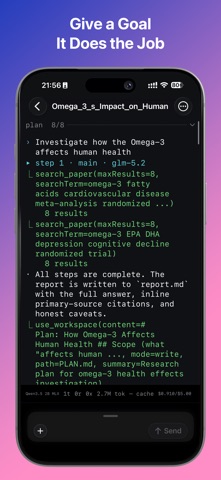
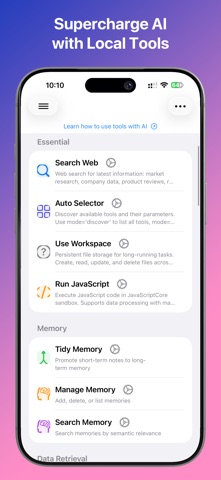
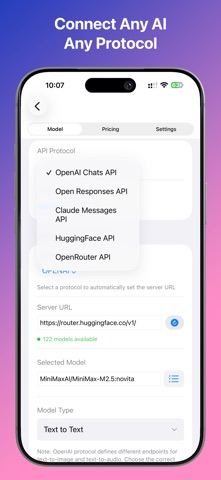
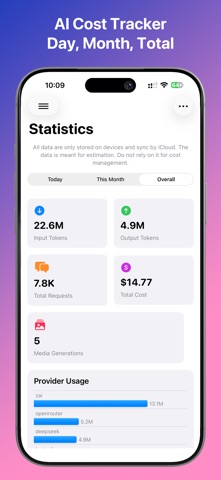
Privacy AI is both a chatbot and an agent, and both run on your device. Ask it a question, or give it a goal and it will plan, use tools, and come back with a report. Local models work fully offline, and nothing leaves your phone unless you connect a cloud provider yourself. Run Models Locally or in the Cloud - On-device GGUF and MLX models, with vision and tool-calling - New on iOS 27: Neural Engine models keep generating after you leave the app - Local Decisions: classify and rate text on device, no text generated - Apple Private Cloud Compute and the on-device Foundation Model, no account or API key - Apple models read attached pictures; models without vision get an on-device description - Connect to OpenAI, Claude, Gemini, DeepSeek, or any OpenAI-compatible server Agent - Give it a goal and it keeps working across as many turns as that takes - It plans first, calls tools, keeps its own folder of files, and delivers a written report - Suited to work that must be broken down: deep research, a multi-leg trip, comparing options - Teach it with Skills: folders of instructions and scripts it can call by name Chat - Set model tiers once (fast, capable, reasoning, local), then just type - Smart Chat routes each message by complexity and privacy, and keeps sensitive text local - Switch local and remote models mid-conversation, keeping context System Keyboard - Bring Privacy AI into any app: dictate by voice, or rewrite, translate and reshape text in place - Build named pipelines (Polish then Translate) or use presets like Proofread - Types in 11 languages with Pinyin, Japanese and Korean input Mini Apps - Doc Scanner: turn a PDF, photo or camera scan into clean Markdown, tables and equations intact - Email Assistant: triage any IMAP inbox on device, with a dated report you can undo - Knowledge Wiki: a cross-linked knowledge base from your documents, with cited answers - LLM Council: query several models in parallel and synthesize one answer - Custom assistants with instructions, an avatar, and a knowledge base Tools - 60+ built-in tools: web search, news, calendar, code execution and more - Full MCP support with a marketplace, Siri and Shortcuts Writing and Voice - Long-form writing assistant that drafts outlines and chapters - Text to Audio: turn a document into a single audio file using on-device voices - Real-time voice chat and live transcription Files and Content - Convert PDFs, Office files, EPUB, video and audio to Markdown, with OCR - Media Studio: generate images with your provider Accessibility - VoiceOver support, sound and haptic feedback, Verbose Announcements - View Assistant: point the camera and hear what is in front of you Free to Use. No Ads. Local model features are free, including the AI keyboard, knowledge wiki, writing assistant, custom assistants, 60+ tools, document reader, and image generation. Cloud API models and the MCP marketplace need a subscription. Privacy by Design Privacy AI runs on-device. No backend servers. No accounts. No data collection. Every API request is visible in the Protocol Inspector. Your models. Your device. Your data. Terms of Use: https://privacyai.acmeup.com/docs/policy/tos.html Privacy Policy: https://privacyai.acmeup.com/docs/policy/privacy.html
What's new · 3.2.1
This update makes model downloads dependable: start one, close the app, and it is still there when you come back. IMPROVEMENTS - Downloads Survive Closing the App Model downloads now pick up where they left off after the app is closed. When you reopen it, the screen that started the download shows its progress and Cancel button again, and the model is set up as soon as the download finishes. - Resume After Swiping the App Away A model download stopped by swiping the app away in the app switcher now continues from where it stopped with one tap on Resume. The import button in My Models reads Resume Download with the model's name and opens the paused download. BUG FIXES - Download Live Activity Stays Visible The download progress on the Lock Screen and in the Dynamic Island now stays up after the app is reopened, instead of disappearing while the download keeps running. - Hugging Face Imports Finish Reliably A model downloaded from Hugging Face is now added to My Models even if the app was closed during the download. - Retrying Audio and Image Downloads Retrying an MLX audio or image model download no longer deletes a download that had already finished. - Partial Whisper Downloads A Whisper model that only partly downloaded no longer shows as Downloaded. It now offers to continue the download instead.
Details