

GearsLib-Equipment Assistant
萌萌 刘 · Utilities
Independent analytics for this App Store listing. AppTracker is not affiliated with 萌萌 刘.
Chart standing · US
What changed · US
Listing changes AppTracker has observed for this app in this storefront — new versions, price moves, rating shifts, and store copy.
Added: duplicate gear with one tap to quickly create similar items Improved: plan sorting is now consistent between the list and carousel views Improved: the image mode in plan details uses an adaptive grid layout for a tidier display on all screen sizes Improved: clearer name input hints and smoother weight/name text entry Fixed: occasional errors in some scenarios for better stability
Screenshots




About
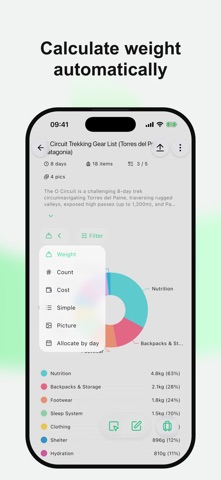
GearsLib — built for users who care about gear weight and need checklist verification. No sign-up required; jump in immediately. The free version already covers the core needs for packing, making every trip prep more precise. Whether you’re summiting, camping, or on a multi-day trek, GearsLib makes gear planning effortless. Key advantages at a glance: - Zero barrier: no account or login—open and use instantly. - Lightning-fast actions: add gear quickly, calculate weights by itinerary, and create custom gear stickers—efficient and time-saving. - Visual-first design: smooth category switching, dynamic weight charts, and per-day food planning for better packing decisions. - Clean, distraction-free UI: no ads, prioritizes gear/weight data, lightweight icons and sensible spacing, plus night mode for comfortable planning after dark. - Features within reach: list management and weight stats are front and center, common actions one tap away, and shareable long images or text. Supports iCloud backup/restore and imports from Excel, CSV, or ZIP to build lists quickly; export to Excel or ZIP (with icons) for backups—your data stays under your control. In short: whether mountaineering, camping, or multi-day hiking, GearsLib is a practical, worry-free gear planning companion — try it now.
What's new · 2.1.4
Added: duplicate gear with one tap to quickly create similar items Improved: plan sorting is now consistent between the list and carousel views Improved: the image mode in plan details uses an adaptive grid layout for a tidier display on all screen sizes Improved: clearer name input hints and smoother weight/name text entry Fixed: occasional errors in some scenarios for better stability
Details