
Chart standing · US
Ratings breakdown · US
The star breakdown behind this app's rating in this storefront.
Screenshots



About
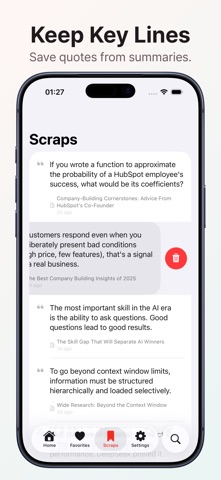
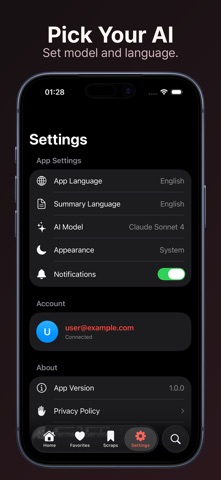
One tap from Share — Safari, YouTube, Messages, anywhere. Long articles, podcasts, and 1-hour talks become a concise summary + key points. Pick your AI: Claude, GPT, or Gemini. Save, scrap, and search every summary across iPhone, iPad, and the web. How it works 1. Find a long article, video, or thread anywhere on iOS 2. Tap Share → choose Harvest 3. Get a concise summary, key points, and a quick "is this worth reading?" verdict — in seconds What you can summarize • Long-form articles — Medium, Substack, news sites, blogs • YouTube videos — including 1-hour talks, lectures, and podcasts • Reddit threads, X/Twitter discussions, forum posts • Newsletters and email links • Korean, Japanese, English content (input in most languages) • Anything with a Share button on iOS Why people switch to Harvest • One tap from the Share Sheet — no copy-paste, no new tab • Pick your AI — Claude, GPT, and Gemini all available • Save what matters — favorite summaries and save key sentences as scraps • Find it again, fast — search across every summary you've ever made • Read across languages — English content, Korean summary (or vice versa) • Cross-device sync — iPhone, iPad, web. Your library follows you Perfect for • Research and study — get a quick read on a paper before committing • Daily news catch-up — scan the day's headlines as concise summaries • YouTube backlog — clear your "watch later" without watching every minute • Newsletter overload — quickly get the gist of every issue • Team links — know what someone shared before you click • Long Reddit/forum threads — see the gist before scrolling Privacy and trust • Summaries are generated by your selected AI provider (Claude, GPT, or Gemini). Source content is sent to that provider strictly to produce the summary. • Your library is private by default. Public sharing is opt-in, scoped to a single summary, and revocable. • For full details, see harvest.pub/privacy-policy. FAQ Q. Which sites are supported? A. Anywhere with an iOS Share button — Safari, YouTube, news apps, Reddit, Medium, Substack, Slack/Discord links, RSS readers, and more. Q. How long can a video be? A. Most 1–2 hour talks, podcasts, and lectures work fine. Q. Can I switch AI models per summary? A. Yes. Pick the default model in Settings; switch any time without losing your library. Q. What if a page is paywalled or login-required? A. Harvest summarizes whatever it can fetch from the shared URL. Pages behind a login may return a partial result; sharing the rendered article view from Reader Mode usually works. Q. What about my data? A. Summaries are generated by your selected AI provider. For details on what we collect and how it's used, see our privacy policy at harvest.pub/privacy-policy. Q. Do I need an account? A. Sign in once with Apple or Google to sync across devices. That's it. Sign in with Apple supported.
What's new · 2.11.2
Harvest now supports Japanese, alongside stability improvements and bug fixes.
Details