

Room Screen: Clock & Weather
enoiu · Utilities
Independent analytics for this App Store listing. AppTracker is not affiliated with enoiu.
Chart standing · US
What changed · US
Listing changes AppTracker has observed for this app in this storefront — new versions, price moves, rating shifts, and store copy.
- You can now position the bar at the bottom. - Added an option to reverse the bar layout (swap positions of time/weather and icons). - Added an option to choose from 9 clock positions. - Added a feature to display the capture date of background photos and videos. - Background videos can now play to the end before switching (can be disabled in settings). - Improved performance when displaying backgrounds. - You can now set the time and date sizes for Sleep Mode separately from the standard clock.
Price & rating history · US
Reconstructed from the listing changes AppTracker has observed in this storefront. A field is charted once it has changed more than once, and each line starts at the value it moved from.
Average rating · ★ 4.46 now · 8 changes on record
Ratings breakdown · US
The star breakdown behind this app's rating in this storefront.
Screenshots



About
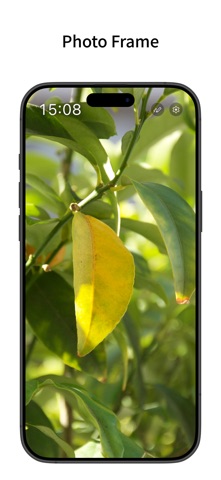
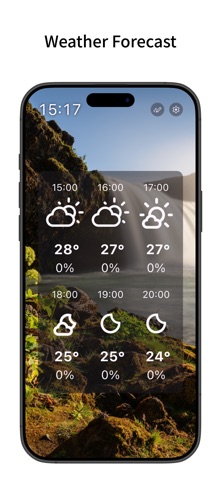
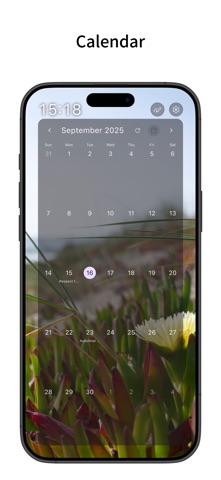
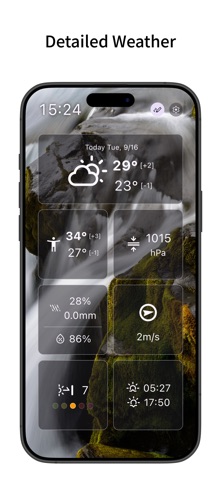
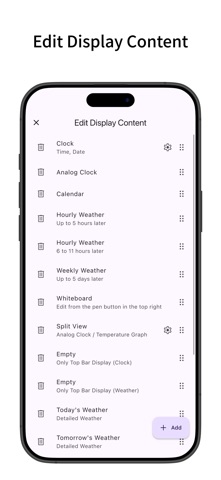
A simple clock app with a smart display feel. It also supports weather forecasts, calendars, and background images and videos. You can also use it as a digital photo frame. Simple Clock - Displays the time and date. - You can change the 12/24-hour display, seconds display, and text size from the settings. - Can display an analog clock. - Can display the time in the top bar. - Auto-scrolls like a smart display. - You can change the interval for automatic screen switching. - Supports changing screen transition animations and swiping up, down, left, and right to switch screens. Photo Frame - You can display images and videos saved on your device as the background. - You can select an album and display media from it randomly. - You can change the background display mode (fit whole, crop fill, etc.) and alignment position. - You can sync background media switching with screen switching. - You can change the automatic switching interval. - By displaying only the time or weather on the top bar, you can use it like a digital photo frame with images and videos as the main focus. Weather Forecast - Can display the current weather and temperature in the top bar. - Can display hourly and daily weather forecasts. - You can specify the forecast location by getting your current location or directly entering the latitude and longitude. - You can change the units for temperature, wind speed, and precipitation. - Weather forecast data is retrieved from Open-Meteo.com. Calendar - Can display a calendar. - Can display calendar events from your device. - You can select which device calendars to display events from. Whiteboard - You can draw on the whiteboard by pressing the pen button on the top bar. - Once you draw on the whiteboard, it will be displayed on the screen. - You can change color options and toggle pinch-to-zoom from the settings. - You can hide the pen button on the top bar by removing the whiteboard from the display content. Edit Display Content - You can add, remove, and reorder the content displayed on the screen from the settings. - Supports split view. You can select the content to display on the top, bottom, left, or right. Customization - Supports Dark Mode. - You can change the theme color. - You can change the text and icon colors. - You can toggle the display of shadows. - Features a simple design compliant with Material Design. Sleep Mode - A mode that displays only the time and date without updating the weather or displaying images. - By setting a schedule, you can automatically enter Sleep Mode during specified times. - The screen is black by default, but you can change it to a white screen by turning on "White screen in Sleep Mode". This is recommended when using the app as a room light. - The time and date sizes in this mode are linked to the clock settings. Pro Version - By purchasing the Pro version (in-app purchase), you can use all features, including removing ads, detailed weather displays, shorter weather update intervals (every 3 or 6 hours), screen transition animation changes, and video background settings. - The Pro version is a one-time purchase (not a subscription). - When you turn on Detailed Weather in the settings, you can display Today's Weather, Tomorrow's Weather, and various graphs in the display content. - For Today's Weather and Tomorrow's Weather, you can view the detailed weather for that day all at once. Tapping each item will show the graph for that day. - For detailed weather graphs (Temperature, Feels Like, Pressure, Precipitation, Humidity, Wind Speed, UV Index), you can view a detailed line graph that allows multi-day comparison. For Temperature, Feels Like, and Pressure graphs, the difference between the current value and the graph from 24 hours ago is displayed.
What's new · 4.1.1
- You can now position the bar at the bottom. - Added an option to reverse the bar layout (swap positions of time/weather and icons). - Added an option to choose from 9 clock positions. - Added a feature to display the capture date of background photos and videos. - Background videos can now play to the end before switching (can be disabled in settings). - Improved performance when displaying backgrounds. - You can now set the time and date sizes for Sleep Mode separately from the standard clock.
Details