

JPEGify: HEIC to JPG Converter
Polydez · Utilities
Independent analytics for this App Store listing. AppTracker is not affiliated with Polydez.
Chart standing · US
What changed · US
Listing changes AppTracker has observed for this app in this storefront — new versions, price moves, rating shifts, and store copy.
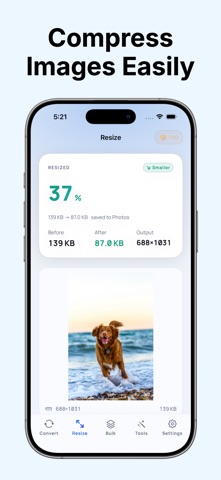
This version of JPEGify includes the following changes: - New interface: We've updated the user interface for a modern aesthetic. - Improved Export View: We've added a smooth progress bar to show when exporting. - Show size after compress/resize: JPEGify now shows the size after compressing/converting. - New App Icon! We hope you enjoy this new update!
In-app purchases · US
What this app sells inside itself, grouped by kind and priced for this storefront.
Screenshots




About
JPEGify makes it simple to convert HEIC, JPG, JPEG, and PNG images on your iPhone. Convert photos for sharing, uploading, printing, or saving space. Resize images, reduce file size, rename batches, add watermarks, and remove metadata—all in one fast image utility. HEIC TO JPG CONVERTER Turn HEIC photos into widely compatible JPG files in a few taps. Export images that are easier to share with websites, apps, clients, family, and friends. CONVERT IMAGE FORMATS Convert between popular image formats including: • HEIC to JPG • HEIC to PNG • PNG to JPG • JPG and JPEG conversions RESIZE IMAGES WITH CONTROL Change photo dimensions and resolution for social media, websites, email attachments, forms, listings, or print. • Resize by width and height • Scale images up or down • Keep proportions when needed • Export images at the dimensions you choose COMPRESS PHOTOS AND REDUCE FILE SIZE Make images smaller without unnecessary hassle. • Reduce photo file size • Adjust image quality • Prepare photos for email, messaging, uploads, and sharing • Save storage space on your device BATCH IMAGE CONVERTER Process multiple photos in one workflow. • Convert multiple HEIC, JPG, JPEG, or PNG images • Resize photos in bulk • Compress batches of images • Export multiple converted files quickly BATCH RENAME PHOTOS Organise image files more easily with bulk renaming tools. Rename multiple files in one action for cleaner folders and easier sharing. ADD WATERMARKS Protect your work or add your branding before sharing images. • Add custom text watermarks • Apply watermarks to multiple photos • Prepare images for business, listings, portfolios, or social media REMOVE PHOTO METADATA Remove image metadata before sharing photos when you want more control over privacy. JPEGify is built for quick, reliable image conversion and simple photo workflows. Download JPEGify and convert, resize, compress, organise, and protect your images in one place. - Terms of Service & Privacy Policy: https://www.polydez.com/jpegify - EULA: https://www.apple.com/legal/internet-services/itunes/dev/stdeula/
What's new · 2.4.6
This version of JPEGify includes the following changes: - New interface: We've updated the user interface for a modern aesthetic. - Improved Export View: We've added a smooth progress bar to show when exporting. - Show size after compress/resize: JPEGify now shows the size after compressing/converting. - New App Icon! We hope you enjoy this new update!
Details